Disappearing Safari Tabs on iPhone or iPad? How to Find Them - MacRumorsOpen MenuShow RoundupsShow Forums menuVisit ForumsOpen Sidebar
Skip to Content

Disappearing Safari Tabs on iPhone or iPad? How to Find Them

by

Every so often, a seemingly small bug in Apple's operating systems survives the company's annual OS launches and continues to cause users huge frustration from one software update to the next.
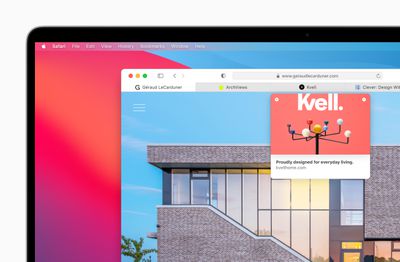
apple macos bigsur safari improvedtabs 06222020
The phenomenon of disappearing tabs in Safari is one such problem -– reports of multiple Safari tabs vanishing without a trace go back to at least iOS 13 and the issue still to this day blights the browser experience for some.

While there isn't an accepted solution to the problem of disappearing tabs, there are cases where it might seem that your tabs are gone, when in fact they are just hidden from view. Here are some ways that you may be able to get them back or stop them from disappearing in the first place.

Reveal Hidden Tabs

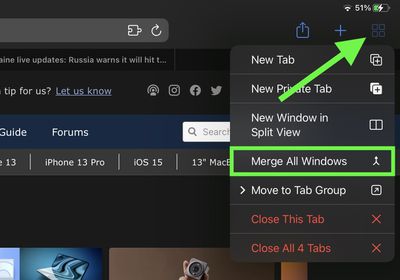
On iPadOS, for example, if you press and hold the Show Tab Overview button (four squares in a quadrant) in the top-right corner of the Safari window, this will reveal a dropdown menu that includes an option to Merge All Windows.
safari
Select this option, and all of your open tabs should appear in the current window, potentially including some that were not visible in the Tab Overview screen. Why this happens isn't entirely clear, but it may have something to do with the way iPadOS manages Safari windows that have been opened in Split View mode.

Reveal the Shelf

Another action worth trying on iPadOS is pressing and holding the Safari icon in the Dock or on the Home Screen and selecting Show All Windows from the popup menu that appears.

shelf
This will reveal any open windows in a shelf directly above the Dock, allowing you to switch between them and potentially reveal any tabs that had gotten lost.

Recently Closed Tabs

If you have an inkling that some of the tabs you're missing have been inadvertently closed, you can always use the Recently Closed Tabs option to re-open them. All you have to do is open up the tab view in Safari and long press on the "+" icon to get a look at all of the tabs that you've recently closed.


Even if you're aware of the gesture, it's worth a reminder that this feature exists in case someone gets ahold of your phone and checks your browser. Even if you've closed out a tab, it's still going to be visible in Safari, unless you were using a private browser window or have cleared your browsing history.

Turn Off Auto-Close Tabs

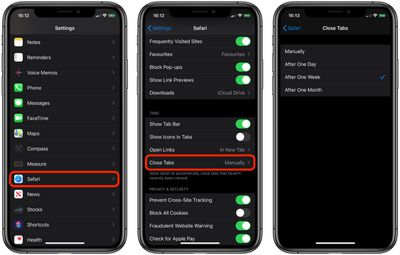
If you still haven't been able to find some of your tabs, make sure that Safari isn't closing them after a certain duration on your behalf: Open Settings, tap through to Safari -> Close Tabs and ensure that Manually is selected.
safari tabs

Bookmark All Open Tabs

If the above suggestions haven't worked for you, there is a workaround: Consider bookmarking your open tabs after each browsing session. This might sound like more hassle than it's worth, but since iOS 13 Apple has included a one-tap option to just that.
safari tabs
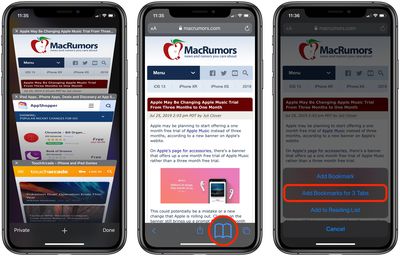
If you're on iPhone, make sure you have a few tabs open in Safari that you want to reference at a later time. Now, select one of those tabs, and in the main browsing window, long press the Bookmark icon (it looks like an open book).

A popup menu will appear at the on the screen from which you can select Add Bookmarks for X Tabs, the X being the number of tabs open.

Once you've tapped this option, you'll be asked to save the tabs in a new bookmarks folder (remember to give it a recognizable name). Alternately, you can choose a location from the existing folder list in which to save the tabs.
safari
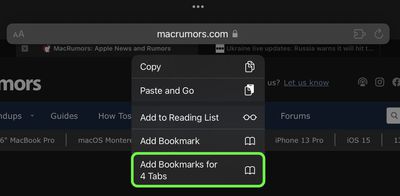
If you're on iPad, make sure you have a few tabs open in Safari, then simply press and hold on the address bar and select Add Bookmarks for X Tabs.

To access your bookmarks in Safari at any time, simply tap the Bookmarks icon in the main browsing interface or the sidebar to reveal all of your saved favorites and folders. Press and hold on the folder of bookmarks and select Open in New Tabs, or alternatively, Open in Tab Group if you want them grouped.


Tag: Safari

Popular Stories

Switch to Safari

Apple Explains Why Chrome Users Should 'Switch to Safari'

Tuesday October 13, 2026 5:29 am PDT by
Apple has launched a new "Switch to Safari" marketing campaign that encourages Chrome users to switch to Safari as their web browser of choice on the Mac. "Safari is a more powerful and private browser than Chrome," says Apple. Apple has a new "Switch to Safari" page on its website that outlines more than 10 reasons that Chrome users should switch to Safari, including faster performance...

safari iphone duo webkit

Apple Wants to Fix Safari's Cramped Layout on iPhone Duo

Saturday October 24, 2026 9:58 pm PDT by
Apple is considering changes to Safari on the iPhone Duo that would give websites access to more of the outer display, although the company has yet to settle on an approach. The challenge is allowing pages to occupy the area beneath Safari's side-mounted controls without making parts of a website inaccessible. In an Friday, October 23 WebKit post, Apple's Jen Simmons explained that an...
Switch to Safari

Apple Addresses Web Security Threat, Working on macOS Update With Additional Fix

Sunday October 25, 2026 4:07 pm PDT by
Earlier this month, a security researcher discovered that private cryptographic keys associated with eight of Indian company eMudhra's intermediate certificate authority (CA) certificates were weak. The compromised keys could have allowed attackers to impersonate legitimate websites, potentially putting users' sensitive information at risk. However, there is currently no evidence that the keys...
Latest Stories
Siri AI Rumored to Become 'More Like an Agent' as Early as Next Year
6 hours ago
Apple Taking New Approach to Developing iOS 28 and macOS 28
8 hours ago
Early Apple Black Friday Deals on Apple Watch, MacBook Air, and More
1 day ago
'Backglow' Lets You Customize New MacBook Pro's Glowing Apple Logo
1 day ago
Top Stories: Apple Product Launches, iOS 27.3 Beta, and More
1 day ago
More Fun iPhone Duo Apps: 30 New Picks to Try
2 days ago
Hands-On With Apple's New OLED Touchscreen MacBook Pro
2 days ago
Apple Store With All-New Design Opening Soon in Southern California
2 days ago
Control the Glowing Apple Logo on Your New MacBook Pro
2 days ago
Apple Shares New 'Apple Card: Apply and Use in Minutes' Ad
2 days ago
Apple Says More Than 100,000 Apps Optimized for iPhone Duo, Here's What's Still Missing
2 days ago
Early Black Friday Deals Kickoff With Steep Discounts on Apple Watch Ultras and More
2 days ago
The MacRumors Show: iOS 27.3 Looks Like a Huge Update
2 days ago
Best Buy's Black Friday Event Begins With Sitewide Savings on Apple, TVs, More
2 days ago
Apple Releasing Yet Another Two New Products Next Week
2 days ago
MacBook Air Drops to Lowest Price in Months With Amazon's $250 Discount
2 days ago
Apple Rumored to Drop the iPhone's Action Button Next Year
2 days ago
Apple's Extended Return Policy Now in Effect for 2026 Holiday Season
2 days ago
Apple Music Classical Updated With New Icon and Refreshed Design
2 days ago
OLED iPad Mini, M6 iMac, and New MacBook Pros Available From Today
3 days ago
Apple Surveys iPhone Duo Buyers About Crease and Camera
3 days ago
Apple's First Touchscreen Mac is Now Arriving to Customers
3 days ago
Claude Gets Personal Finance Feature With Bank Account Linking
3 days ago
Apple Arcade Adds Crossy Road Rush and NBA 2K27
3 days ago
Apple's New HomeView Smart Home Hub: Here's How Much RAM It Has
3 days ago
iPad Mini vs. iPad Air Buyer's Guide: Now Just $50 Apart
3 days ago
First iOS 27.3 and macOS Golden Gate 27.3 Public Betas Now Available
3 days ago
Apple Announces a New Mac Sales Record
3 days ago
Paid $200 for Logic Pro? Apple Says You Won't Get This New Feature
3 days ago
Instagram's Edits Video Editor is Now Available on Mac
3 days ago








































