


How to Flag Emails Using Different Colors on iPhone and iPad - MacRumorsOpen MenuShow RoundupsShow Forums menuVisit ForumsOpen Sidebar
Skip to Content

How to Flag Emails Using Different Colors on iPhone and iPad

by

ios 11 mail icon pn e1543485132148In iOS 13 and iPadOS 13, Apple's Mail app retains the swipe gestures of previous iOS versions that help you reduce the amount of time you spend managing messages in your inbox.

The basic inbox gestures still involve swiping right or left on an email to reveal tappable actions that you can perform instantly, without having to call up additional menus.

One of the default options that appear is the Flag action, which you might use to categorize a message that requests information needed by a certain date, for example.

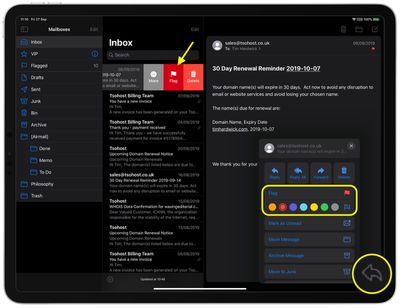
Using only the swipe gesture, you'd be forgiven for thinking that the Mail app provides only one color to use when flagging emails, but iOS 13 actually introduces support for multicolor flags – it's just hidden away in the menu that appears when you hit the Reply button.
mail
Tap the Flag button there, and you'll reveal a submenu that allows you to choose one of seven colors, including the option to remove a flag. Note that whichever color you select here subsequently becomes the default color when you tap the Flag action or the More -> Mark... option via the inbox swipe gesture.

Did you know that you can customize the actions that appear when you use the Mail app's inbox gestures? Click here to learn how.


Related Forum: iOS 13

Top Rated Comments

adrianlondon Avatar
91 months ago
"it's just hidden away in the menu that appears when you hit the Reply button."

Who thought of that? iOS 13 developer meeting:

"Oh, let's move most of the options, including move and archive, behind an arrow that makes people think they're going to reply to an email."

"Shall we also remove loads of icons from the bottom so that it's just wasted space?"

"Sure! hahaha"

"OK, I'll get right on it after I've messed up notifications, gMail access, and actually displaying mails in the combined inbox".
Score: 21 Votes (Like | Disagree)
itsmilo Avatar
91 months ago
remember when Apple just worked? Now we got options being „hidden“ behind the most unintuitive areas.

Two more things come to mind: the AA icon in Safari hiding everything from desktop view to content blockers. Maybe it’s just me but that icon implies font sizes to me.

also really hidden is the drawing tool on images. Literally no one I know even knows about it existence.

Of course the iPad gestures over the years take the cake

Attachment Image

Attachment Image
Score: 11 Votes (Like | Disagree)
91 months ago

"it's just hidden away in the menu that appears when you hit the Reply button."

"Oh, let's move most of the options, including move and archive, behind an arrow that makes people think they're going to reply to an email."

"Shall we also remove loads of icons from the bottom so that it's just wasted space?"

This is probably the most annoying thing about iOS 13 for me. Why hide commonly used actions inside a menu (that doesn’t even look like it could be used for such actions “reply”) when there’s plenty of space for an archive or move command? So incredibly dumb. I just can’t understand how this is their solution.
Score: 5 Votes (Like | Disagree)
twistedpixel8 Avatar
91 months ago
For once, the crappy news outlets are spot on: iOS 13 is a complete mess. If I could go back to 12, I’d do it in a heartbeat.
Score: 5 Votes (Like | Disagree)
91 months ago
I make heavy use of flags, so this was nice to see coming to iOS. Nice that coloured flags sync everywhere.

Just unfortunate the design decision to bury it under the reply arrow.
Score: 4 Votes (Like | Disagree)
gim Avatar
91 months ago
The Mail App on iOS 13 is a buggy mess. Since the update it’s constantly showing me unread E-Mails (red badge over the icon) even though there are none. Will have to make the switch to outlook I guess.
Score: 4 Votes (Like | Disagree)

Popular Stories

iOS 27 Next to iPhone

Here's When iOS 27 Rolls Out Today in Every Time Zone [Update: It's Out]

Sunday September 13, 2026 3:00 am PDT by
Update 10:04 a.m.: iOS 27 is rolling out now, though it may take a bit for all users to see it, so keep checking! Apple is about to release iOS 27, which will finally deliver more advanced Siri AI capabilities as well as a variety of other refinements, improvements, and new features to iPhones. It's Apple's biggest software update of the year, and Apple announced at Wednesday's iPhone event...
iOS 27 Icon iPhone

iOS 27 Available Now With These 8 New Features

Monday September 14, 2026 9:00 am PDT by
Update — 10 a.m. Pacific Time: Apple has released iOS 27. During its iPhone 18 Pro and iPhone Duo event last week, Apple announced that iOS 27 will be released widely on Monday, September 14. iOS 27 should be available around 10 a.m. Pacific Time / 1 p.m. Eastern Time today via the Settings app, under General → Software Update. Below, we have highlighted eight new features and...
Apple iCloud Plus expansion hero

iCloud+ Now Includes Apple TV, Apple Arcade, and Curated Apple Music Stations in Over 100 Countries

Tuesday September 15, 2026 1:43 am PDT by
Apple today announced a new subscription initiative that turns paid iCloud+ subscriptions into a broader services bundle in more than 100 countries. In select countries, Apple says every paid iCloud+ plan, including the cheapest 50GB tier, now includes Apple TV and Apple Arcade "at no additional cost," while family sharing extends the storage, TV and Arcade access to up to five people....













