

How to Force-Quit Misbehaving Apple Watch Apps - MacRumorsOpen MenuShow RoundupsShow Forums menuVisit ForumsOpen Sidebar
Skip to Content

How to Force-Quit Misbehaving Apple Watch Apps

by

Apple Watch apps rarely misbehave, but if one becomes non-responsive or fails to refresh data, sometimes force-quitting the app and relaunching it can solve the issue.
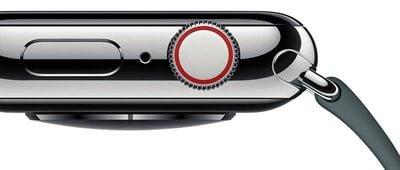
applewatchseries4digitalcrowndesign
Fortunately, it's a simple procedure. The following steps show you how it's done on Apple Watch models running watchOS 4 or later.

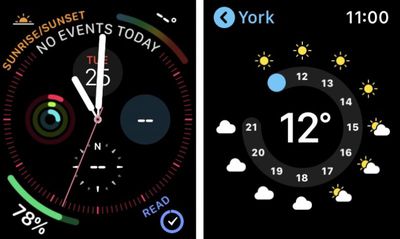
  1. Open the misbehaving app on your Apple Watch, either by tapping its complication or selecting it from the honeycomb-style app menu/list view, so that it takes over the display.
    force quit apple watch apps01

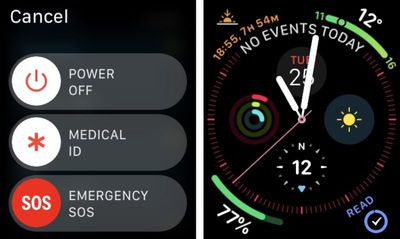
  2. Now, press and hold the Side button.
  3. Release the Side button once the power down menu appears.
    force quit apple watch apps02

  4. Next, press and hold the Digital Crown. You can release it once the app is whisked away from view and you're returned to the watch face.
And that's all there is to it. The next time you launch the app in question, it will load up as if for the first time, and hopefully play nice again.

If the problem you're having still persists, try restarting your Apple Watch from the power down screen, or consider re-installing the related app on your iPhone.

Related Roundup: Apple Watch 11
Buyer's Guide: Apple Watch (Caution)

Top Rated Comments

AZMecha Avatar
100 months ago
S4 using the new info graph face.

Has anyone noticed that the date & weather are not updating??
Score: 7 Votes (Like | Disagree)
skywalkerr69 Avatar
100 months ago
“Apple Watch apps rarely misbehave” hahahahahahahaha I cried reading this.
Score: 5 Votes (Like | Disagree)
OUsooner08 Avatar
100 months ago
Actually you hit the side button and then swipe left and hit the X.
No that removes the app from your dock.
Score: 3 Votes (Like | Disagree)
NufSaid Avatar
100 months ago
Actually you hit the side button and then swipe left and hit the X.
Score: 3 Votes (Like | Disagree)
bingeciren Avatar
100 months ago
I’ve been trying to find a solution for the non responding / slow responding Workout program for a while. Apparently it is a well known widespread problem and no known real cure for it. Apple recommend to reboot the watch, unpair and re-pair it again but the problem comes back after a while.

This info to kick out a misbehaving program from the memory was the remedy I was looking for. It actually works like a charm. I keep the Workout in the Dock but delete it from the memory once I’m done with it. Next time I need to run the Workout, I launch it from the Dock. It spins its icon briefly and loads it. Once it’s loaded no lag, no freeze no misbehaving, it just works immediately. Problem solved.
Score: 1 Votes (Like | Disagree)
100 months ago
“Misbehaving”?! Might as well have said “Naughty” hahah.
2nd defintion at https://www.merriam-webster.com/dictionary/misbehave
Score: 1 Votes (Like | Disagree)

Popular Stories

youtube iphone apple watch health ad 2026

New Apple Ad Sells the iPhone and Apple Watch Health Pairing

Thursday April 23, 2026 11:18 am PDT by
Apple has published a new ad to appeal to customers in the market for an iPhone and Apple Watch pairing, highlighting the insights it can offer for your health. Titled simply "Health with iPhone + Apple Watch," the half-minute ad focuses on a woman waiting in line at a cafe who begins receiving unsolicited health and fitness advice from other people in the queue, as well as local residents,...
watchos 26 gradient light

This New Apple Watch Face Is Coming in watchOS 26.5

Friday April 24, 2026 5:51 am PDT by
iOS 26.5 and watchOS 26.5 will have a new Pride Luminance wallpaper and Apple Watch face when the updates are released in the coming weeks, according to Bloomberg's Mark Gurman. In a brief tweet, Gurman revealed that Pride Luminance will "Celebrate the vibrancy and individuality of the LGBTQ+ community and customize your watch face with colors from Pride flags." iOS 26.5 has been in...
modular ultra training load

watchOS 27 to Offer New Watch Faces, Including 'Modular Ultra' Variant

Monday May 4, 2026 5:58 am PDT by
For watchOS 27, Apple is testing new Apple Watch faces, and one of them is a simpler version of an existing Apple Watch Ultra watch face that could be coming to standard Series models. Writing in his latest Power On newsletter, Bloomberg's Mark Gurman reports that Apple is testing multiple new faces for watchOS 27, code-named "Orchid." One of them is said to be a "simplified take" on the...















