

If you have an Apple Account (formerly Apple ID), Apple allows you to request a downloadable copy of the data associated with it. This article outlines the steps you need to take to request a copy of your data from Apple.

As part of putting you in control of your data and privacy, Apple gives you the ability to request a copy of data associated with your Apple Account. This can include your sign-in records, data that you store in iCloud, app usage information, purchase and app usage history, marketing and support history, and more. If you live in the EU or the UK, you can also request App Store information, and app installation and push notification history.
The data Apple can provide you with comes in its original format or in industry-standard formats that are easy to open and read. Photos, videos, and documents are provided in their original formats. Contacts, calendars, bookmarks, and mail are provided in formats such as .vcf, .ics, .html, and .eml. App usage information is provided as spreadsheets or files in .json, .csv, or .pdf formats.
Apple promises to fulfill all data requests within seven days. Bear in mind that the size of the data download depends on the items that you choose to include (iCloud photo libraries can be several gigabytes, for example), but Apple will divide it into multiple files to make the download more manageable.
For users in the European Union or United Kingdom, you can schedule a one-time or recurring download (either daily for 30 days or weekly for 180 days) for certain data, including App Store information and your app install and push notification activity.
How to Get a Copy of Your Apple Account Data
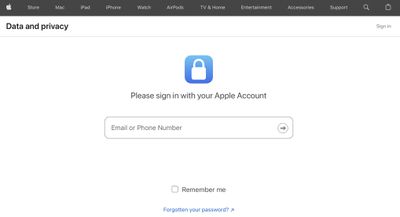
- Sign in to your Apple Account on Apple's Data and Privacy page.

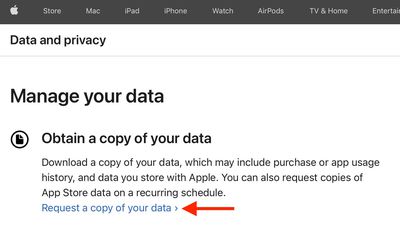
- Select "Request a copy of your data."
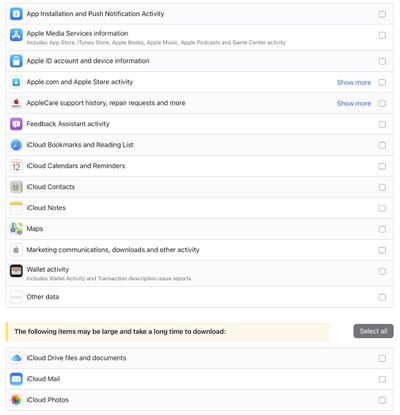
- On the following page, select the data you'd like to download by checking the related boxes. If you don't see this option, it means that this feature is not available in your country or region.
- Select Continue.
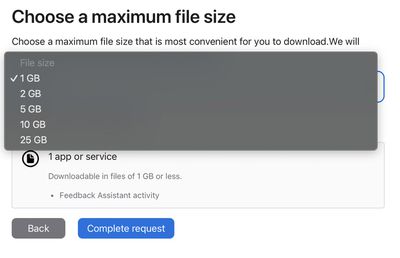
- Choose a maximum file size for your download (Apple divides the data into files of this or smaller), then click Complete request.
When the data is ready, Apple posts it to your Data and Privacy page and notifies you that it's available, after which you have 14 days to download your data. If you don't download it within the 14-day time frame, Apple will remove it from your Data and Privacy page, and you will have to request it again.















