

How to Get Audible Alerts From Apple Watch About Your Workout Progress - MacRumorsOpen MenuShow RoundupsShow Forums menuVisit ForumsOpen Sidebar
Skip to Content

How to Get Audible Alerts From Apple Watch About Your Workout Progress

by

In watchOS 8 and iOS 15, Apple has added a new option that lets you receive audible announcements on your workout progress. This article explains what they do and shows you how to enable them.
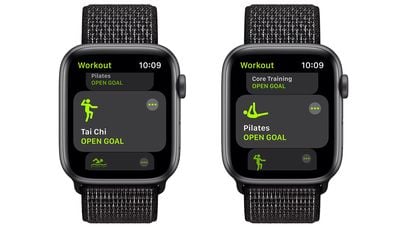
watchos 8 workout app
Progress alerts are nothing new in third-party workout apps. Most people who have used one will be familiar with the idea: Your workout is in progress, and at some point the app tells you via spoken audio when you've finished another kilometer or that you've reached the halfway point of your workout goal.

Previously, Apple's stock Workout app was limited to giving you these progress alerts via a haptic buzz and an onscreen alert, but now you can get these checkpoints spoken to you out loud as well. Not only that, you can also get audible alerts when you close your Activity Rings during a workout, too.

All you need to do is enable the Voice Feedback option in watchOS 8 and make sure you're wearing AirPods or other wireless headphones. To turn on progress voice feedback on your Apple Watch, follow these steps.

  1. On your Apple Watch, open the Settings app.
  2. Scroll to the bottom and tap Workout. siri workout voice feedback watchos 8
  3. Toggle the switch next to Voice Feedback so it's in the green ON position.
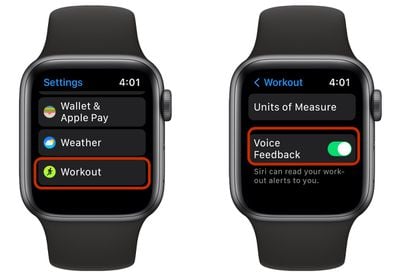
Note that you can find the same Voice Feedback toggle in the Watch app on your iPhone, under the Workout section. Note that watchOS 8 requires iOS 15, which is currently in public beta as of writing and will be released in fall 2021.


Related Forum: iOS 15

Popular Stories

macOS 27 on MacBook Pro

Apple Says macOS 27 Won't Be Compatible With These Macs

Wednesday June 3, 2026 8:29 am PDT by
During WWDC 2025, Apple revealed that macOS 26 Tahoe would be the final major macOS version for Intel-based Macs. macOS 27 will be compatible with Apple silicon Macs only, meaning that you will need a Mac with an M-series chip or a MacBook Neo with an A18 Pro chip in order to install the software update. Apple will unveil macOS 27 during its WWDC 2026 keynote this Monday, June 8, and the...
MacBook Neo on Yellow Feature

MacBook Neo is So Popular That Apple Reportedly Doubled Production

Wednesday June 3, 2026 9:24 am PDT by
On an earnings call in late April, Apple's CEO Tim Cook said that customer response to the MacBook Neo was "off the charts," and the popularity of the laptop has reportedly led the company to significantly boost production. Apple supply chain analyst Ming-Chi Kuo this week said he believes that MacBook Neo shipments to Apple were doubled from an initial target of 5 million units to 10...
iphone 18 pro blue%402x

iPhone 18 Pro: Dark Cherry, Light Blue, and Dark Gray Chassis Leaked [Update]

Thursday June 4, 2026 5:18 am PDT by
Update: Since publication, new information has come to light suggesting the images have been AI-manipulated and are not in fact iPhone 18 Pro chassis parts. The original article follows. The color options Apple is reportedly planning for the upcoming iPhone 18 Pro and ‌iPhone 18 Pro‌ Max have appeared online today in the form of images of chassis parts of unknown authenticity....















