

 In iOS 13 and iPadOS, the Find My app replaces the Find My Friends and the Find My iPhone apps of old and brings their features together in a unified interface that allows you to find whatever it is you need.
For example, like Find My Friends, the Find My app lets friends share their location with you and vice versa. If your friend allows it, it also lets you receive notifications whenever they leave or arrive at a location.
Getting location updates can be particularly useful if you're trying to coordinate a meet-up, or if you'd just like to know when your other half is returning home from work so that you can start preparing dinner. Keep reading to learn how to enable the feature in the Find My app.
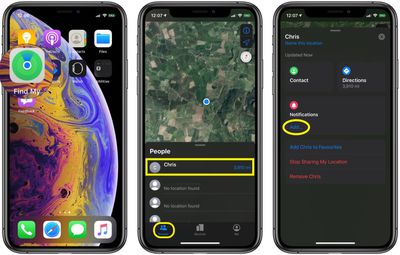
- Launch the Find My app on your iPhone or iPad.
- Select the People tab.
- Tap the friend that you want to receive location updates from.

- Drag the person's card up over the map to reveal all the options.
- Tap Add... under Notifications.
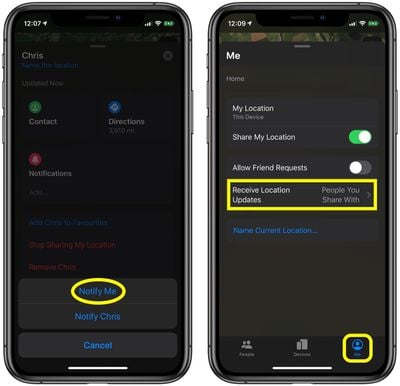
- Select Notify Me in the pop-up menu.
If you ever want to turn off location updates from a friend, simply return to the Notifications section of the person's card and you'll see an option to disable them.
Note that you can choose to receive location updates from everyone in your friends list, or only from people with whom you share your own location.
To choose between these two options, switch to the Me tab, drag the Me card up over the map to reveal all your options, then tap Receive Location Updates and select either People You Share With or Everyone.



















