iOS 15: How to Get Notified If You Leave Your AirPods Pro Behind - MacRumorsOpen MenuShow RoundupsShow Forums menuVisit ForumsOpen Sidebar
Skip to Content

iOS 15: How to Get Notified If You Leave Your AirPods Pro Behind

by

In iOS 15, Apple added separation alerts to the Find My app, which let you know when you leave an AirTag or other Apple device behind. Thanks to an October 2021 firmware update, AirPods Pro now also support separation alerts. This article explains more about how they work and how you can set them up.
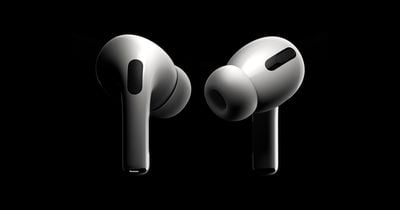
airpods pro black background
Called "Notify When Left Behind," the ‌‌Find My‌‌ separation alerts in iOS 15 let you know every time you are separated from your item at an unknown location, which can be helpful for items you take with you while traveling or visiting public locations. Like AirPods Pro, for example.

The feature automatically sets your home as a Trusted Location (somewhere where you leave your AirPods Pro frequently and don't want to be notified every time), so you need to add your home address to your contact card in the Contacts app before enabling it.

To use separation alerts with AirPods Pro, first you'll need to make sure your ‌AirPods Pro‌ have been updated with the latest firmware. Here's how.

How to Update Your AirPods Pro Firmware

You can do this by inserting them in the AirPods Pro charging case and connecting the case to a power source using the included Lightning to USB cable. Then move the iPhone or iPad that the AirPods have been paired with, near to the charging case, and make sure the iOS device has an internet connection.

After a short while, any available software updates should be automatically downloaded and installed. If you're having trouble updating your ‌AirPods‌, make sure the charging case is fully charged. You can also try resetting the ‌AirPods‌. You need AirPods firmware 4A400 or later, and can check your firmware version by following these steps:

  • Connect your ‌‌AirPods‌‌ or ‌‌AirPods Pro‌‌ to your iOS device.
  • Open the Settings app.
  • Tap General.
  • Tap About.
  • Tap ‌‌‌‌‌AirPods‌‌‌‌‌.
  • Look at the number next to "Firmware Version."

How to Enable Separation Alerts for AirPods Pro

The following steps run through the process of setting up separation alerts in ‌iOS 15 for AirPods Pro with updated firmware.

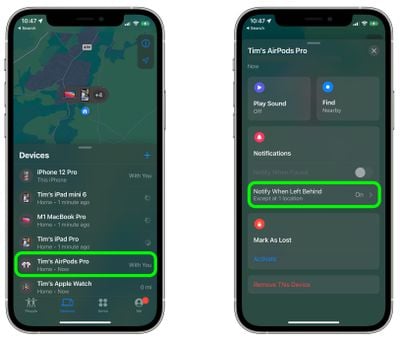
  1. Launch the Find My app on your iPhone or ‌iPad‌.
  2. Select the Devices, and tap the AirPods Pro in the list that you want to set up the alerts for.
  3. Tap Notify When Left Behind.
    find my

  4. Toggle on the switch for Notify When Left Behind.
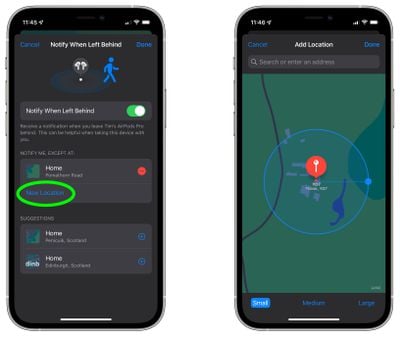
  5. Under "Notify Me, Except At," tap New Location to set a Trusted Location where you don't want to receive alerts.
  6. In the "Add Location" map screen, search or enter an address in the input field. You can define the radius of the ringed geofence for your trusted location by dragging the blue dot or using the Small, Medium, or Large options at the bottom. Tap Done when you're finished.
  7. If there are no more location exceptions you want to add, tap Done.
    find my

Now the next time you leave your AirPods Pro behind in a public place, you'll receive an alert informing you shortly after, giving you a chance to retrieve them before you travel any further.

Of course, these alerts depend on you not leaving your iPhone behind (there's currently no equivalent separation alert available on Apple Watch for this scenario), so that's the device you won't want to forget, wherever it is you go.
Related Roundup: AirPods Pro 3
Buyer's Guide: AirPods Pro (Neutral)
Related Forums: AirPods, iOS 15

Top Rated Comments

66 months ago
I have the proper firmware but it says this feature is not supported...Any clue?


Attachment Image

Attachment Image
Score: 32 Votes (Like | Disagree)
FasterQuieter Avatar
66 months ago
Yesterday, after arriving home from the movie theater, my watch informed me my AirPods Pro were missing. I had a minor heart attack before reaching into my pocket and finding them safe and sound. Looking forward to many more mini-frights like this in the future.

Score: 8 Votes (Like | Disagree)
66 months ago
This feature does not work correctly or I don't understand how it works. Three times, and as recently as this morning, I got a notificaton that I left the APPs behind at home or in my office. However, the entire time they were in my pocket in the car. I'm not sure what is wrong but it's clearly not working correctly.
Score: 7 Votes (Like | Disagree)
GubbyMan Avatar
66 months ago

I am in the same situation.
My device is an iPhone SE (2016) with iOS 15.0.1.
Same, I’m on an iPhone X. It says it’s not supported.
Score: 4 Votes (Like | Disagree)
Siannath Avatar
66 months ago

I have the proper firmware but it says this feature is not supported...Any clue?


I am in the same situation.
My device is an iPhone SE (2016) with iOS 15.0.1.
Score: 4 Votes (Like | Disagree)
66 months ago
I think this article is causing confusion, since it appears that not all devices that run iOS 15 are compatible with this feature. I've seen mixed results with iPhone 12 models mentioned in the comments, and I'd assume iPhone 13 models are compatible, but what about iPhone 11 and older iOS 15 devices?

Can the author update this article with which iPhones are compatible?
Score: 3 Votes (Like | Disagree)

Popular Stories

airpods pro 2 hearing aids

AirPods Pro Hearing Aid Feature Launching in These Canadian Provinces

Monday October 26, 2026 9:25 am PDT by
iOS 27.2 and iPadOS 27.2 enable Apple's clinical-grade Hearing Aid feature on the AirPods Pro 2 and AirPods Pro 3 in five Canadian provinces: Alberta, British Columbia, New Brunswick, Prince Edward Island, and Saskatchewan. The feature is still not available in any other provinces, but Ontario is reportedly set to hold a meeting to change a law that will pave the way for it to launch there,...
ios 27 2 apple tv remote

Older Siri Remotes Now Show Up in Find My With iOS 27.2

Monday October 26, 2026 5:13 pm PDT by
With iOS 27.2 and tvOS 27.2, second- and third-generation Siri Remotes can be tracked using the Find My app. There has been an option to locate a lost Siri Remote with an iPhone since iOS 17, but remotes did not previously show up in the Find My app. Locating a remote had to be done with the Apple TV Remote widget in the Control Center, which made the option hard to find. Supported Siri...
apple pro tell logo

Apple Launching Five New Products Today

Thursday November 5, 2026 12:59 am PST by
Apple is launching five new products on Friday, November 6, following pre-orders that opened last week, including its first touchscreen MacBook Pro models. The following new products will be available from today: iPad mini with OLED display and A20 Pro chip iMac with M6 chip 14-inch MacBook Pro with M6 chip 14-inch MacBook Pro with OLED touchscreen 16-inch MacBook Pro with OLED...
Latest Stories
Siri AI Rumored to Become 'More Like an Agent' as Early as Next Year
5 hours ago
Apple Taking New Approach to Developing iOS 28 and macOS 28
6 hours ago
Early Apple Black Friday Deals on Apple Watch, MacBook Air, and More
1 day ago
'Backglow' Lets You Customize New MacBook Pro's Glowing Apple Logo
1 day ago
Top Stories: Apple Product Launches, iOS 27.3 Beta, and More
1 day ago
More Fun iPhone Duo Apps: 30 New Picks to Try
2 days ago
Hands-On With Apple's New OLED Touchscreen MacBook Pro
2 days ago
Apple Store With All-New Design Opening Soon in Southern California
2 days ago
Control the Glowing Apple Logo on Your New MacBook Pro
2 days ago
Apple Shares New 'Apple Card: Apply and Use in Minutes' Ad
2 days ago
Apple Says More Than 100,000 Apps Optimized for iPhone Duo, Here's What's Still Missing
2 days ago
Early Black Friday Deals Kickoff With Steep Discounts on Apple Watch Ultras and More
2 days ago
The MacRumors Show: iOS 27.3 Looks Like a Huge Update
2 days ago
Best Buy's Black Friday Event Begins With Sitewide Savings on Apple, TVs, More
2 days ago
Apple Releasing Yet Another Two New Products Next Week
2 days ago
MacBook Air Drops to Lowest Price in Months With Amazon's $250 Discount
2 days ago
Apple Rumored to Drop the iPhone's Action Button Next Year
2 days ago
Apple's Extended Return Policy Now in Effect for 2026 Holiday Season
2 days ago
Apple Music Classical Updated With New Icon and Refreshed Design
2 days ago
OLED iPad Mini, M6 iMac, and New MacBook Pros Available From Today
2 days ago
Apple Surveys iPhone Duo Buyers About Crease and Camera
3 days ago
Apple's First Touchscreen Mac is Now Arriving to Customers
3 days ago
Claude Gets Personal Finance Feature With Bank Account Linking
3 days ago
Apple Arcade Adds Crossy Road Rush and NBA 2K27
3 days ago
Apple's New HomeView Smart Home Hub: Here's How Much RAM It Has
3 days ago
iPad Mini vs. iPad Air Buyer's Guide: Now Just $50 Apart
3 days ago
First iOS 27.3 and macOS Golden Gate 27.3 Public Betas Now Available
3 days ago
Apple Announces a New Mac Sales Record
3 days ago
Paid $200 for Logic Pro? Apple Says You Won't Get This New Feature
3 days ago
Instagram's Edits Video Editor is Now Available on Mac
3 days ago