How to Get the Old Apple Mail Back - MacRumorsOpen MenuShow RoundupsShow Forums menuVisit ForumsOpen Sidebar
Skip to Content

How to Get the Old Apple Mail Back

by

With recent software updates, Apple has made some major changes to the way its stock Mail app looks and works on iPhone, iPad, and Mac. Keen to roll back these changes and revert to how Apple Mail functioned before the updates? Keep reading to learn how it's done.
General macOS Mail Feature
When Apple released iOS 18.1, it added a priority messages feature to the Mail app for devices with Apple Intelligence. Then in iOS 18.2, it brought us new Categories that automatically sort your emails into four distinct sections: Primary, Transactions, Updates, and Promotions. The change also added contact photos and business logos for conversations in your inbox.

With the release of iOS 18.4, iPadOS 18.4, and macOS Sequoia 15.4, Apple has now fully rolled out these changes across iPhone, iPad, and Mac. Fortunately, if you don't like the new Mail interface, Apple has also included ways for users to bring back the old functionality. Let's break it down.

How to Disable Mail Categories

The new Categories view, while helpful for some, might not suit your email management style. For example, it has attracted criticism for introducing complexity where many users value simplicity and predictability. One major issue is the disconnect between how Mail now organizes email and how long-time users are accustomed to processing their messages via a chronological inbox view.

Categories don't physically move emails out of the inbox, but they impose a new visual and functional structure that can feel unintuitive and inconsistent, especially when emails appear in multiple places at once.

The relationship between Primary and Priority messages adds further confusion, with overlapping but not identical functionality, and badges that only reflect a subset of new mail. And for users who silo accounts across apps or depend on a feed-like view of their inbox, this layered system can feel like a solution in search of a problem – more disruptive than helpful, and out of sync with how many people actually manage their email.

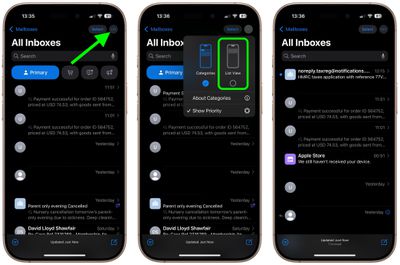
On iPhone and iPad, you can swipe left across the categories to switch to an "All Mail" view (the same option can be found on Mac to the right of the new category buttons). But if you want to remove the categories completely, follow these steps:

  1. Open the Mail app on your iPhone or iPad.
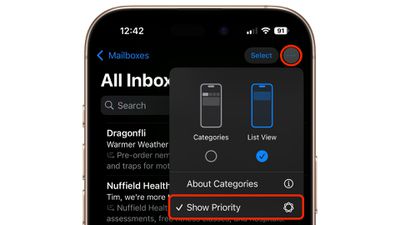
  2. Tap the More button (three dots) in the upper right corner of your inbox.
  3. On iPhone/iPad, select List View from the pop-up menu.
mail

The More menu also has an "About Categories" section where you can see how your messages have been categorized over the course of the last week, but there is no option to tell the Mail app if you believe an email has been put into the wrong category.

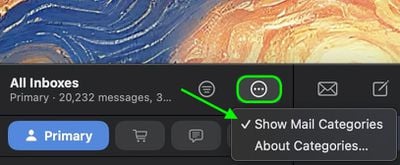
On Mac, there is a More button (three dots) at the top of the inbox view. Click this, and you will see an option to uncheck Show Mail Categories.
mail

You can also find the same option in the Mail menu bar (View ➝ Show Mail Categories).

Once you switch to List View, your inbox will return to showing all emails in chronological order, just as it did before. The change takes effect immediately. While categorization is not perfect, it's likely something that Apple will improve over time. You can always switch back to Categories view using the same menu if you want to try it again later.

How to Get Rid of Contact Photos in Mail
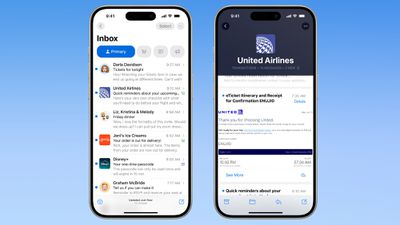
ios 18 mail app
Contact photos have been added to the Mail app in an effort to make it easier to identify the senders of all the emails you receive. However, if Apple can't recognize a business, or a contact doesn't have an associated photo, it can end up making your inbox look a bit of a mess.

Fortunately, you can easily turn off the little pictures completely by following these steps:

  1. Open the Settings app on your iPhone or iPad.
  2. Swipe to the bottom of the menu and tap Apps.
  3. Search for or scroll to Mail in the list of apps.
  4. Under "Message List," toggle off the switch next to Show Contact Photos.
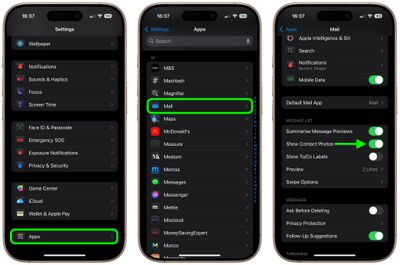
settings

That's all you need to do on iPhone and iPad. To reinstate the contact pictures, simply turn on the same option in Settings. In iOS 18.5, currently in beta, Apple will add a more convenient option to disable contact photos right from the Mail app.

If you want to be rid of Mail contact photos on Mac, simply click Mail ➝ View in the menu bar, and uncheck the Contact Photos option in the dropdown menu.
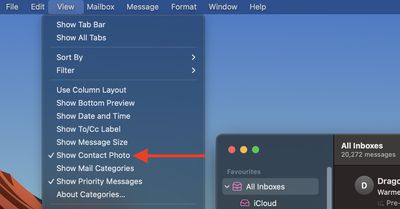
mail

How to Disable Priority Messages

Devices that have Apple Intelligence support will show priority emails in the Primary inbox. This idea behind the feature is that it lets you see what's most important first. However, the underlying AI is not fully fleshed out, and there may be times when Mail flags junk mail – or worst case, even phishing scams – as a priority message.

To avoid such scenarios, you can turn off the Priority in the following way:

  1. On iPhone/iPad, tap the More button (three dots) in the upper right corner of your inbox.
  2. Uncheck Show Priority.

mail

On Mac, simply click Mail ➝ View in the menu bar, and uncheck the Priority Messages option in the dropdown menu.
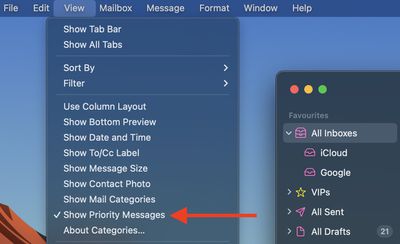
mail

Note that this option won't appear on devices without Apple Intelligence support.

Summing Up

As Apple continues to refine the Mail experience across its platforms, it's clear the company is laying the groundwork for a more intelligent and organized inbox. But with such sweeping changes, user preferences can easily be overlooked. Thankfully, Apple has provided ways to disable or revert many of the new features, offering a degree of customization that hasn't always been guaranteed in past updates.

While the current implementation may not suit everyone – and in some situations can leave users completely confused – there's hope that Apple will listen to feedback and make the system smarter, more flexible, and less intrusive in future updates.


Top Rated Comments

21 months ago
It's really telling that with all of Apple's "amazing" new features lately, all most of us want to do is go back to how it was. Apple seems to be going backwards with software.
Score: 24 Votes (Like | Disagree)
21 months ago

why would u do that. the old email sucks.
Because the new design sucks more.
Score: 20 Votes (Like | Disagree)
21 months ago
What a mess of poorly thought out junk that just adds unecessary complexity and half-baked AI garbage. I can tell ehich emails are important without any help, I have the ability to read a few words.
Score: 11 Votes (Like | Disagree)
g-7 Avatar
21 months ago
Or just live in Poland. Mail categories not available, priority notifications not available, summaries not available, Apple Intelligence not available, Siri not available, Scribble not available, iPhone mirroring not available, etc… We always get a pretty vanilla experience, no need to turn anything off :)
Score: 10 Votes (Like | Disagree)
TechWhisperer Avatar
21 months ago
Fire Federighi already! The guy’s becoming a total joke. Apple’s software is buggy as hell these days but he’s too busy doing his little song and dance to fix anything. Remember when Apple stuff actually used to wow us? Bring back the golden age of Apple, please!
Score: 6 Votes (Like | Disagree)
dannyyankou Avatar
21 months ago
I like some of the changes in concept, but some things need fine-tuning.
Score: 5 Votes (Like | Disagree)

Popular Stories

duo aquarium

More Fun iPhone Duo Apps: 30 New Picks to Try

Friday November 6, 2026 3:27 pm PST by
When the iPhone Duo launched, we shared a list of some of the fun apps developers created for the new form factor. Two weeks out, developers are continuing to come up with fresh ideas, so we thought we'd share some of our favorites. Games Marbles Unhinged ($2.99) - Marbles Unhinged is a marble maze designed for the Duo. When you fold it, the floor turns into a ramp. If you stand the top...

apple pro tell logo

Apple Launching Five New Products Today

Thursday November 5, 2026 12:59 am PST by
Apple is launching five new products on Friday, November 6, following pre-orders that opened last week, including its first touchscreen MacBook Pro models. The following new products will be available from today: iPad mini with OLED display and A20 Pro chip iMac with M6 chip 14-inch MacBook Pro with M6 chip 14-inch MacBook Pro with OLED touchscreen 16-inch MacBook Pro with OLED...
iOS 28 AI

Apple Taking New Approach to Developing iOS 28 and macOS 28

Sunday November 8, 2026 7:42 am PST by
Apple has made a change to its development process for iOS 28, macOS 28, and corresponding software updates, according to Bloomberg's Mark Gurman. In his Power On newsletter today, he said Apple separates development of each year's new operating systems into three major stages. Typically, he said each stage consists of four weeks of coding followed by a four-week "convergence" period where...

Latest Stories
Apple Store Subscription Sign-Up Controversy Exposed
6 hours ago
Siri AI Rumored to Become 'More Like an Agent' as Early as Next Year
16 hours ago
Apple Taking New Approach to Developing iOS 28 and macOS 28
18 hours ago
Early Apple Black Friday Deals on Apple Watch, MacBook Air, and More
2 days ago
'Backglow' Lets You Customize New MacBook Pro's Glowing Apple Logo
2 days ago
Top Stories: Apple Product Launches, iOS 27.3 Beta, and More
2 days ago
More Fun iPhone Duo Apps: 30 New Picks to Try
2 days ago
Hands-On With Apple's New OLED Touchscreen MacBook Pro
3 days ago
Apple Store With All-New Design Opening Soon in Southern California
3 days ago
Control the Glowing Apple Logo on Your New MacBook Pro
3 days ago
Apple Shares New 'Apple Card: Apply and Use in Minutes' Ad
3 days ago
Apple Says More Than 100,000 Apps Optimized for iPhone Duo, Here's What's Still Missing
3 days ago
Early Black Friday Deals Kickoff With Steep Discounts on Apple Watch Ultras and More
3 days ago
The MacRumors Show: iOS 27.3 Looks Like a Huge Update
3 days ago
Best Buy's Black Friday Event Begins With Sitewide Savings on Apple, TVs, More
3 days ago
Apple Releasing Yet Another Two New Products Next Week
3 days ago
MacBook Air Drops to Lowest Price in Months With Amazon's $250 Discount
3 days ago
Apple Rumored to Drop the iPhone's Action Button Next Year
3 days ago
Apple's Extended Return Policy Now in Effect for 2026 Holiday Season
3 days ago
Apple Music Classical Updated With New Icon and Refreshed Design
3 days ago
OLED iPad Mini, M6 iMac, and New MacBook Pros Available From Today
3 days ago
Apple Surveys iPhone Duo Buyers About Crease and Camera
3 days ago
Apple's First Touchscreen Mac is Now Arriving to Customers
3 days ago
Claude Gets Personal Finance Feature With Bank Account Linking
3 days ago
Apple Arcade Adds Crossy Road Rush and NBA 2K27
3 days ago
Apple's New HomeView Smart Home Hub: Here's How Much RAM It Has
4 days ago
iPad Mini vs. iPad Air Buyer's Guide: Now Just $50 Apart


4 days ago
First iOS 27.3 and macOS Golden Gate 27.3 Public Betas Now Available
4 days ago
Apple Announces a New Mac Sales Record
4 days ago
Paid $200 for Logic Pro? Apple Says You Won't Get This New Feature
4 days ago