iOS 17: How to Get Siri to Read Web Articles to You - MacRumorsOpen MenuShow RoundupsShow Forums menuVisit ForumsOpen Sidebar
Skip to Content

iOS 17: How to Get Siri to Read Web Articles to You

by

In iOS 17 and iPadOS 17, Apple has added a new Siri ability that means you can get the virtual assistant to read web articles aloud to you just like an audiobook, even if your device is locked. Keep reading to learn how it's done on iPhone and iPad.
iOS 17 Siri Feature
If you tend to be put off by the thought of reading long-form articles on the web on a small screen, we have good news for you. In iOS 17, Siri can read them out loud for you, meaning all you have to do is listen.

How It Works

There are a few things to keep in mind when you want Siri to read web content out loud for you. First, you need to be using Apple's Safari when browsing webpages, otherwise it won't work. As it stands, Siri won't respond to read requests in third-party browsers.

Second, the webpage you want read to you needs to be compatible with Reader View. Almost all news articles on modern websites are compatible with Safari's Reader View, which strips away images, ads, and any other extraneous webpage content, leaving you looking at a clean page of legible text.
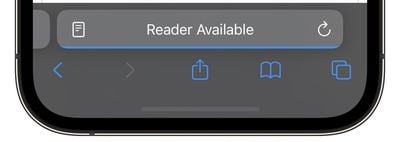
reader available
You can tell which pages support Reader View by looking for the words "Reader Available" and the document icon that briefly appears in the address bar when a webpage is loading. If you tap the aA icon that eventually replaces it, the Show Reader option will also be available (i.e. not grayed out) to indicate compatibility.

The last thing to be aware of is that if the article you want read to you is just one of many articles in a feed, such as on the MacRumors.com front page, you need to tap through to the individual article in question. Then you can do one of two things.

Method 1:

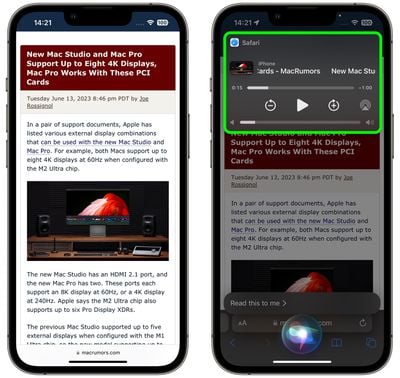
One way to get Siri to read the selected article to you is to hold your iPhone's side button (or top button on iPad) which will activate Siri. Then say "Read this to me." Alternatively, simply say "Siri, read this to me," hands-free. (In iOS 17, you don't even have to prefix a command with "Hey" to invoke Siri any more.)
siri
Siri will then begin reading the article to you out loud, and a media player panel will appear in the upper section of the screen, allowing you to rewind, fast-forward, adjust the volume, and even AirPlay the spoken audio to another device.

Method 2:

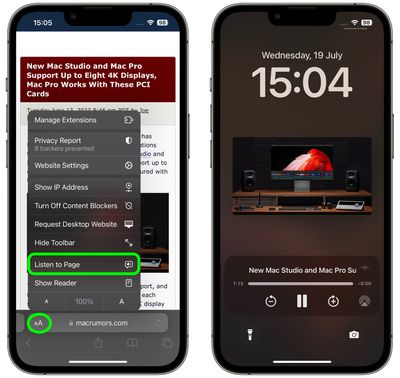
Another way to get Siri talking is to tap the Aa icon in the address bar, then choose the Listen to Page option in the pop-up menu. Siri will immediately begin reading the page to you.
safari
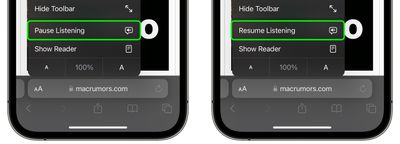
The only difference with this method is that, unless you lock your device while Siri is reading, you won't see a media control panel on the screen. If the article is still open in Safari, you can stop Siri reading it by tapping the Pause Listening option that replaces the "Listen to Page" option in the Aa pop-up menu.
listen to page safari
If you pause Siri, it will be replaced by a Resume Listening option, and the option will remain even if you navigate away from the page and return to it later.

So there you have it. With iOS 17, now almost any article on the web can be read to you via Siri while you're doing something else, even if your iPhone is locked and tucked away in your purse or pocket.


Related Forums: iOS 17, iPadOS 17

Top Rated Comments

macsplusmacs Avatar
43 months ago

Just curious -- what use case do people find for this? I would vastly prefer to read an article in 5-10 minutes instead of spending 30 minutes listening to it being read (especially by an AI voice). I guess this is useful for driving?

For me, background listing while I work of articles that I would like to read, but are not super essential or detailed so to save time I might as well listen to them.

For more important pages or stories I will definitely read them though.
Score: 4 Votes (Like | Disagree)
macsplusmacs Avatar
43 months ago
Going to use this a LOT!
Score: 4 Votes (Like | Disagree)
43 months ago
Funny: If the content isn’t in your Siri language, this feature isn’t available.

If you translate the page, it becomes available, but Siri will still read the original (with an accent) instead of the translation.
Score: 3 Votes (Like | Disagree)
klasma Avatar
43 months ago

Very cool! I’ve been waiting a long time for this feature. Previously, I’ve had to laboriously select text from a page to have it read. This will be very nice.
You could already (since iOS 12 I believe) use the Speak Screen two-finger swipe down to have a complete web page be read in Safari (https://support.apple.com/en-us/guide/iphone/iph96b214f0/).

Speak Screen works regardless of Reader mode support, and you even get controls to skip paragraphs forth and back, and (limited) control over reading speed. It also continues speaking when the iPhone is turned off.

So I’m not sure why Apple is now introducing a separate feature with different trade-offs, instead of integrating/expanding the existing one.
Score: 3 Votes (Like | Disagree)
Lcgiv Avatar
43 months ago
Probably not something I will use unless something happens to my vision, but definitely a useful feature for many
Score: 3 Votes (Like | Disagree)
mrr Avatar
43 months ago
Very cool! I’ve been waiting a long time for this feature. Previously, I’ve had to laboriously select text from a page to have it read. This will be very nice.
Score: 3 Votes (Like | Disagree)

Popular Stories

iOS 28 AI

Apple Taking New Approach to Developing iOS 28 and macOS 28

Sunday November 8, 2026 7:42 am PST by
Apple has made a change to its development process for iOS 28, macOS 28, and corresponding software updates, according to Bloomberg's Mark Gurman. In his Power On newsletter today, he said Apple separates development of each year's new operating systems into three major stages. Typically, he said each stage consists of four weeks of coding followed by a four-week "convergence" period where...
apple pro tell logo

Apple Launching Two More New Products This Friday

Monday November 9, 2026 4:22 am PST by
The Apple launches keep coming! The company is set to release two new products on Friday, November 13: the all-new Apple HomeView and the fourth-generation Apple TV 4K, both of which have been available to pre-order since mid-October. Apple HomeView: Apple's new smart home display, powered by Apple Intelligence with Siri AI, for entertainment and managing the home. Available in tabletop and...
duo aquarium

More Fun iPhone Duo Apps: 30 New Picks to Try

Friday November 6, 2026 3:27 pm PST by
When the iPhone Duo launched, we shared a list of some of the fun apps developers created for the new form factor. Two weeks out, developers are continuing to come up with fresh ideas, so we thought we'd share some of our favorites. Games Marbles Unhinged ($2.99) - Marbles Unhinged is a marble maze designed for the Duo. When you fold it, the floor turns into a ramp. If you stand the top...
Latest Stories
Here's What Apple Fixed in iOS 27.2.1 and macOS 27.2.1
7 hours ago
Webex Gets iPhone Duo Support
8 hours ago
Meta's Muse AI Agent Comes to Apple Watch
9 hours ago
Anker Launches Eufy Security Cam With Auto-Tracking Light
9 hours ago
macOS 27.2.1 Fixes eMudhra Certificate Flaw in Command-Line Tools
10 hours ago
Anthropic Launches Claude Fable 5.2 and Mythos 5.2
11 hours ago
Apple Releases macOS Golden Gate 27.2.1
12 hours ago
Apple Releases iOS 27.2.1 With Bug Fixes
12 hours ago
Apple Releases watchOS 27.2.1 and visionOS 27.2.1 With Security Fixes
12 hours ago
Apple Watch Ultra 4 Gets $99 Amazon Discounts, Starting at $699.99
12 hours ago
Apple Pay Ad Features Martial Arts Convenience Store Food Fight
13 hours ago
Apple Continues to Say Some AI Features Will Have Fees for Extra Usage
13 hours ago
Apple Announces Türkiye Expansion Plans as Tim Cook Visits
14 hours ago
Singapore Saved Apple $2.7 Billion in Taxes This Year
14 hours ago
Apple Music's 2026 Artist of the Year is Olivia Dean
14 hours ago
This Could Be Your Last Chance to Pre-Order the HomeView at a Discount
15 hours ago
Some HomePod Mini 2 Buyers Returning Units Over Mac Speaker Issues
15 hours ago
MacBook Pro With PROLED XDR Display: Details You Might Have Missed
15 hours ago
Satechi Offers MacRumors Readers 30% Off Select Accessories in Early Black Friday Sale
15 hours ago
Leaker Envisions a Shorter iPhone With a New iOS Layout
16 hours ago
Apple to Give You More Control Over When Your Mac Passwords Lock
17 hours ago
Siri Is Getting a Better Memory
17 hours ago
iPhone 18e Could Feature Bigger Display and Battery
18 hours ago
Apple's Siri Boss May Leave - Here's Who Could Take Over
18 hours ago
Apple Launching Two More New Products This Friday
18 hours ago
Apple Store Subscription Sign-Up Controversy Exposed
1 day ago
Siri AI Rumored to Become 'More Like an Agent' as Early as Next Year
2 days ago
Apple Taking New Approach to Developing iOS 28 and macOS 28
2 days ago
Early Apple Black Friday Deals on Apple Watch, MacBook Air, and More
2 days ago
'Backglow' Lets You Customize New MacBook Pro's Glowing Apple Logo
2 days ago