

 Apple officially releases iOS 11 on Tuesday, September 19, and a host of new iPhone and iPad features are coming with it, such as a revamped Control Center, a new Files app, Drag and Drop gestures, and several other updated design elements.
This article covers some of the things you can do to prepare your devices for Apple's latest mobile operating system, including storage maintenance tips, backup advice, and a few other useful tidbits to consider before upgrading. First though, it's worth finding out if your mobile devices are compatible with iOS 11.
iOS 11 Compatibility Check
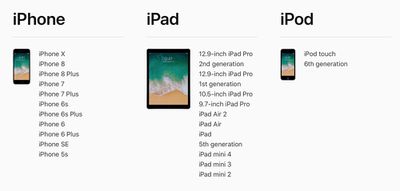
If you own an iPhone 5s or later, or an iPad Air or later, your device will run the latest operating system. Still unsure? Here's Apple's official compatibility list for iOS 11.
- iPhones: iPhone X, iPhone 8, iPhone 8 Plus, iPhone 7, iPhone 7 Plus, iPhone 6, iPhone 6 Plus, iPhone 6s, iPhone 6s Plus, iPhone 5s, iPhone SE.
- iPads: 12.9-inch iPad Pro (1st and 2nd generations), 10.5-inch iPad Pro, 9.7-inch iPad Pro, iPad Air 2, iPad Air 1, iPad 5th generation (2017 model), iPad mini 4, iPad mini 3, and iPad mini 2.
- iPods: iPod touch 6th generation.
Reclaim Device Storage Space
iOS 11 includes new features to help you free up space on your iOS device, such as personalized recommendations about actions you can take to increase the available storage. But before you can benefit from those, you'll want to make sure your device has adequate space to download and install the new operating system.
With that in mind, it's worth reconsidering what apps you currently have installed on your devices and whether you really need them. Swipe through your home screen and check inside your folders to root out any long-forgotten apps (including legacy 32-bit apps that won't work on iOS 11) that are taking up precious storage space.
You can delete apps by holding a finger on them and tapping the X that appears at the corner of their icon. Alternatively, go to Settings -> General -> Storage & iCloud Usage -> Manage Storage, tap any apps you don't use, and select Delete App. Be ruthless – you can always re-install removed apps at a later date if you change your mind.
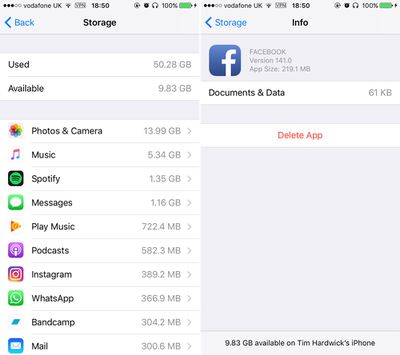
Check on the size of any social media apps you have installed, such as Facebook and Snapchat. These apps can often balloon in size after long periods of activity because of media caching and the like, so you might want to delete and then re-install them to start afresh.
If you're a WhatsApp user, open the app, go to Settings -> Data and Storage Usage -> Storage Usage, take a look at how many megabytes your chat history is consuming, and take appropriate action using the "Manage" option. You might be surprised at the savings this simple step can make.
If you use iCloud Photo Library, it's also worth checking that it's set up to use as little local storage on your device as possible. Tap through to Settings -> Photos and Camera, and make sure the option "Optimize iPhone Storage" is ticked. Lastly, open the App Store app and install any updates that are available to ensure maximum compatibility with iOS 11.
Create an Archived iTunes Backup
It's best practice to have an iTunes backup of your device stored on your computer in case something goes awry, or the worst happens and installation of iOS 11 fails. If you need to downgrade shortly after installing a new iOS update, making an archived iTunes backup beforehand is necessary.
An archived iTunes backup saves the current state of your iOS device and prevents it from being accidentally overwritten by subsequent backups. Here's how to do it on a Mac. (Note that if you're a Windows user, the iTunes procedure varies slightly and you will need to rename your iTunes backup folder or move it to another location to prevent it from being overwritten).
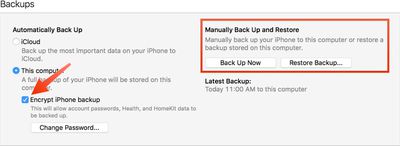
- Connect your iPhone or iPad to a Mac with the latest version of iTunes installed (click iTunes -> Check For Updates from the menu bar to make sure) and click on the device's icon in iTunes' interface.
- Under backups, select "This computer", choose "Encrypt iPhone backup" and then set a password. An encrypted backup retains all your account passwords as well as your Health and HomeKit data, whereas a non-encrypted backup doesn't.
- Click "Back Up Now" and wait for the backup process to finish. It should take between 5 to 15 minutes to complete depending on how much data is stored on your device.
Archive the Backup
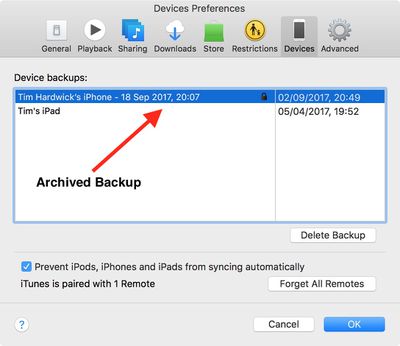
- To archive the backup, select "Preferences" from the iTunes menu and click on the "Devices" tab. Right-click the new backup and choose the "Archive" option.
- After the archival process is complete, a backup is labeled with the date and the time that it was archived.
Archived backups can be viewed at any time in iTunes' Preferences section. You can also delete an archived backup from here – simply select the backup in question and click the "Delete Backup" button.
Installing iOS 11
When iOS 11 becomes available (likely around 10 AM PST/1 PM EST on Tuesday, going on past releases) it will be delivered to your device either via iTunes when you plug it into your computer, or as an over-the-air update. Make sure your device is fully charged before you start the process over Wi-Fi, as it may take some time to complete.















































Top Rated Comments
Wait at least 2 weeks after it becomes available to let the smoke settle before (maybe) installing it. Apple does not have a perfect track record of rolling out brick free OSes.
To answer a previous poster's question, iOS 10.x is compatible with an iPhone 5. On iOS 11 the iPhone 5 got dropped because it's deemed too slow to run it. IOS 11 is a more demanding OS because it does more. Older phones (ip6) will feel it.
[LIST=1]
* Check to see if there are any mission critical 32-bit apps. Launch the Settings app | About | Applications. If any are important, find a 64-bit replacement or wait for vendor to update the app.
* Free up space if needed as recommended in this article.
* Manually backup in iTunes as recommended in this article.
* Make sure you know the iCloud password, especially when you are upgrading someone else's device.
* Set aside 30-60 minutes for the update to complete.
After updating:
[LIST=1]
* Launch the Phone app | Voicemails. If the list of voice mail is empty, restart the phone.
* Launch the Settings app | Camera | Formats. Select High Efficiency to use HEVC (video) and HEIF (photos) format, which will cut storage space by about half.
* Launch the Settings app | Photos | Transfer to Mac or PC. Use Automatic if use apps that do not support new file formats, Keep Originals otherwise (or if you primarily use Photos app and intend to upgrade to macOS High Sierra next Monday).
* If you have family, consider upgrading to 200MB ($2.99/month) or 2TB ($9.99/month) iCloud plan and turn on iCloud Family Sharing. Launch the Settings app | top banner | iCloud | Manage Storage | Family Usage.
[LIST=1]
* You will lose older messages in Messages app. Once Message in the iCloud arrives later this fall (iOS 11.1?), this will be a thing of the past.
* You will lose most of the voicemails in Phone app.
* You will need to reinstall apps, and place them where you want them.
* Some apps and games do not store settings and data in the cloud. For games, this may mean losing all the progress.
* All the customizations in Settings app need to be redone.
You seem to think that because you and a few other people you know HAVE seen lag, that everyone has it or is blind not to see it.
On the other hand, maybe there is something different from the phones that have it to the ones that do not - even something that is not obvious to you.
Clearly some people are not seeing the lag you do. This isn't because "TehY R Stoopid and blind" as you seem to want to assume. You can walk through troubleshooting.
Which iphone is showing the issue? Size? Network?
Do you have any phones NOT showing the issue?
How to recreate the lag?
Is it every time or just the first time (or every time after the first?
Does your phone have any other issues (dropped in molten lava, but just the once?)
You're using a beta OS, so beta - not just blamestorming.