How to Group Mac App Icons More Prominently in Your Dock - MacRumorsOpen MenuShow RoundupsShow Forums menuVisit ForumsOpen Sidebar
Skip to Content

How to Group Mac App Icons More Prominently in Your Dock

by

In macOS, the Dock provides convenient one-click access to your most frequently used Mac applications. The simplest way to organize docked apps is to click and drag them into your preferred place, but here we're going to show you a lesser-known trick for arranging docked items more clearly.
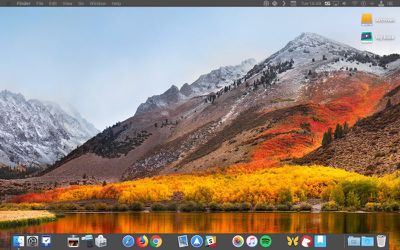
using spaces to arrange dock apps
To relate certain types of apps and add an extra visual clue to their location in the Dock, try inserting some spaces. Using this method, you could separate out other apps from, say, conversion tools that you frequently drag and drop files onto. Keep reading to learn how it's done.

How to Insert Spaces into the macOS Dock

  1. Launch the Terminal app found in Applications/Utilities. (To quickly open the Utilities folder in Finder, select Go -> Utilities from the menu bar, or use the key shortcut Shift-Command-U.)

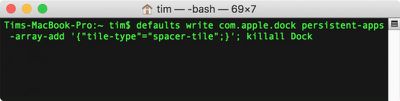
  2. At the Terminal prompt, type the following command and press Enter: defaults write com.apple.dock persistent-apps -array-add '{"tile-type"="spacer-tile";}'; killall Dock
    macos terminal dock spaces

  3. Your Dock will reboot with a single space added to it. Click and drag the space to your desired location, just like a regular app icon.
    Screen Shot

  4. Repeat the Terminal command above to insert additional spaces and arrange them in your Dock to suit.

macos dock spacers
To remove a space from your Dock simply right-click (or Ctrl-click) it and select Remove from Dock. Alternatively, click and drag the space out of the Dock then let go of the mouse button to delete it.


Top Rated Comments

107 months ago
To insert a small spacer, you specify "tile-type"="small-spacer-tile" (found on Ask Different ('https://apple.stackexchange.com/a/273540/654')).

An example with both widths:


To add them to the documents side instead of the apps side, use the key persistent-others instead of persistent-apps (found on Lifewire ('https://www.lifewire.com/add-custom-and-standard-doc-spacers-to-mac-2260861')).

Attachment Image
Score: 25 Votes (Like | Disagree)
keysofanxiety Avatar
107 months ago
Great tip, didn’t know this. Big fan of these articles too. Thanks!
Score: 8 Votes (Like | Disagree)
opeter Avatar
107 months ago
My problem with these separators is, that they take to much space (like a whole width of an icon).
Score: 6 Votes (Like | Disagree)
trollied Avatar
107 months ago
Dynamic spacer:

defaults write com.apple.dock persistent-apps -array-add '{"tile-type"="flex-spacer-tile";}'
Score: 5 Votes (Like | Disagree)
RightMACatU Avatar
107 months ago
Too bad I can't do this with my office cube neighbor :D
Score: 4 Votes (Like | Disagree)
107 months ago
I like this. Is there a way to group the icons together in a Stack, like the folders can do?
It's not as fancy, but I put aliases to grouped applications in a folder, then put those folders in the dock.
Score: 3 Votes (Like | Disagree)

Popular Stories

Aston Martin CarPlay Ultra Screen

Apple Says CarPlay Ultra is Coming to These Vehicle Brands

Thursday May 21, 2026 11:53 am PDT by
Last year, Apple launched CarPlay Ultra, the long-awaited next-generation version of its CarPlay software system for vehicles. Nearly a year later, CarPlay Ultra is still limited to Aston Martin's latest luxury vehicles, but that should change fairly soon. In May 2025, Apple said many other vehicle brands planned to offer CarPlay Ultra, including Hyundai, Kia, and Genesis. CarPlay Ultra...
iphone 18 pro blue%402x

iPhone 18 Pro: Dark Cherry, Light Blue, and Dark Gray Chassis Leaked [Update]

Thursday June 4, 2026 5:18 am PDT by
Update: Since publication, new information has come to light suggesting the images have been AI-manipulated and are not in fact iPhone 18 Pro chassis parts. The original article follows. The color options Apple is reportedly planning for the upcoming iPhone 18 Pro and ‌iPhone 18 Pro‌ Max have appeared online today in the form of images of chassis parts of unknown authenticity....
iOS 27 All the New App Features

iOS 27: All the Rumored App Features

Wednesday June 3, 2026 3:48 pm PDT by
Siri is getting a major overhaul in iOS 27, but Apple also has some big updates planned for apps like Camera, Photos, and Wallet. There are multiple new AI features in the works, plus some non-AI upgrades. Camera Apple is moving Visual Intelligence from the Camera Control button to the Camera app in iOS 27, according to Bloomberg. There will be a Siri mode that will be available alongside...