Apple's new iPhone 18 Pro and iPhone 18 Pro Max models come in the same sizes as 2026's equivalents. What's common among these new models is that they come with an all-screen design, Dynamic Island, an Action button, and Camera Control.

As such, the method of hard resetting or force restarting hasn't changed from the previous series. Still, if you're upgrading from a device with a Home button, keep reading to learn how to hard reset or force reset your iPhone 18 Pro, as the process can come in handy if your device bugs out or stops responding for any reason.
How to Hard Reset iPhone 18 Pro Models
- Quickly press and release the Volume Up button.

- Quickly press and release the Volume Down button.
- Press and hold the Side button until the Apple logo appears, then release the Side button.
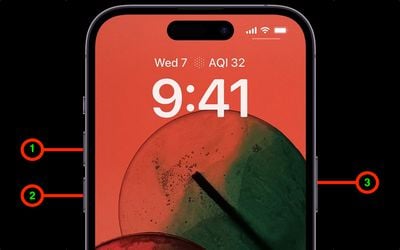
During this process, you will see a slider to power off the iPhone. You're going to want to ignore it and continue holding down the Side button until the screen goes black. At that point, the Apple logo will pop up, and after the restart is complete, the screen will activate once again.
Using the force restart process prevents you from having to shut the iPhone down entirely, which takes a few more steps and takes longer to boot up again.
If you do want to shut the iPhone down, you can do so by going to the General section of the Settings app, scrolling down to the bottom, and choosing the Shut Down option.