

How to Hide Default Apps on iOS 9 Using Limited Trick - MacRumorsOpen MenuShow RoundupsShow Forums menuVisit ForumsOpen Sidebar
Skip to Content

How to Hide Default Apps on iOS 9 Using Limited Trick

by

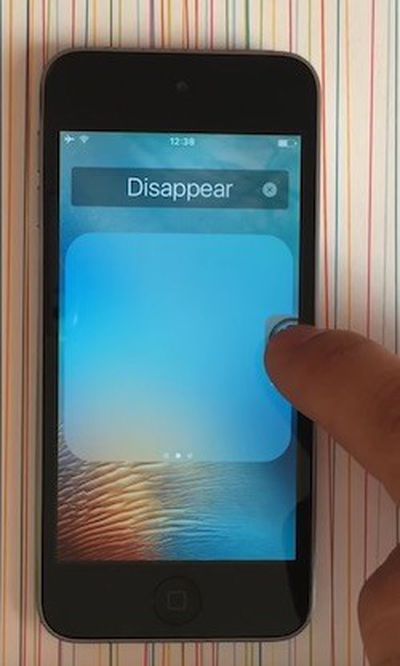
How-to-Hide-App-Icons-iOS-9While Tim Cook has promised Apple will "figure out a way" for iPhone and iPad users to remove certain default apps, a new limited trick allows for stock icons to be temporarily hidden on devices running iOS 9.0 to iOS 9.2 without jailbreaking.

YouTube channel videosdebarraquito shared a video of his trick over the weekend, and we have confirmed the method works as shown. Follow these step-by-step instructions and watch the video below for a demonstration.

How to Hide App Icons on iOS 9

  1. Hold down on the app icon you want to hide until it starts to wiggle.

  2. Drag the app icon over any other app to create a folder.

  3. Take your finger off the icon once in the folder. Do not press the Home button.

  4. Drag the app icon to the second page of the folder. Take your finger off the icon.

  5. Drag the app icon to the third page of the folder and keep your finger on it.

  6. Drag the app icon to the edge of the folder and press the Home button simultaneously.

As long as the device remains powered on, including when the display is locked, the app icons removed with this trick will remain hidden.


Keep in mind that the hidden app icons will reappear when the iPhone and iPad is restarted, so this trick only serves as a temporarily solution.

As a boilerplate disclaimer, this is an unofficial trick and we cannot guarantee it will not cause any unforeseen problems on your iPhone or iPad.

(Thanks, Jose!)

Top Rated Comments

137 months ago
Why can't Apple just make a way to hide apps of the user's choice?

And why do I need an Apple Watch app when I don't have one? Can't the Apple Watch owners just go to the App Store and download the app? :/
Score: 14 Votes (Like | Disagree)
mdridwan47 Avatar
137 months ago
I don't want to just hide it. I want to remove it. And if necessary redownload it from the app store.
Score: 13 Votes (Like | Disagree)
BrodieApple Avatar
137 months ago
I can see why people want apps to be hidden, but I don't see whats so annoying about having it just on the last page of a folder. Or a seperate page on your home screen.
Score: 10 Votes (Like | Disagree)
137 months ago
Is Apple still selling phones with 16GB? Then yes, people will still be b*tching about 100MB.
It's clear from your other post that you don't have an iPhone, but let me put 16GB devices into perspective for you. 100MB is less than 1% of available storage on a 16GB iPhone. Besides, those people bought a 16GB device.

MacRumors content image

WTH??? Are you blind?

If something is there that you don’t like/need it’s not too much of a stretch that it be described as clutter.
Personally, I’ve never gone down the space used line. But waste is waste and at the premium Apple charge for space I’d rather it was used for something I actually want or that it be free space.
The default apps that I don’t want are crap, (to me), in fact they’re not even that good. At least with the 3rd party ones I can remove them.
Like I said, a simple 'hide' option would solve two of them but as it's not an option yet, just stick them in a folder and done. This really is a non-issue.

And in terms of "premium" Apple storage, 100MB is 20 cents.
Score: 6 Votes (Like | Disagree)
137 months ago
Lol, you iPhone users still can't do that :)

So a simple 'hide' option would solve two of them, so the third is storage space.

Are you really quibbling over 100MB?
Is Apple still selling phones with 16GB? Then yes, people will still be b*tching about 100MB.
Score: 6 Votes (Like | Disagree)
137 months ago
Hold on a sec, this is becoming one very slippery slope... One minute it's about clutter, the next it's about space used and now it's about advertising?

What exactly is your problem with default iOS apps? Make your mind up!
All of the above! :)
Score: 4 Votes (Like | Disagree)

Popular Stories

iCloud iPhone 17 Pro

iPhone Users Who Pay for iCloud Storage Get Two New Perks on iOS 27

Thursday July 2, 2026 6:10 am PDT by
If you pay for certain iCloud+ storage plans beyond the 5GB that Apple offers for free, you will receive two more perks on iOS 27 at no additional cost. A summary of the two new iCloud+ perks on iOS 27:Increased daily usage limits for some new Apple Intelligence features, including image generation in the revamped Image Playground app. HomeKit Secure Video cameras receive generated video...
iPhone 4 on Black Feature

Apple Facing One of Its Worst Leaks Since the iPhone 4

Thursday July 2, 2026 9:53 am PDT by
Apple supplier Tata Electronics recently suffered a cyberattack that resulted in thousands of confidential files being published on the dark web, and this reportedly included some photos and documents related to the upcoming iPhone 18 Pro. We have elected not to share any of the leaked photos in this story due to the illegal nature in which they were obtained, but they can easily be found...
American Express Gold Apple Pay Feature

American Express Announces New Apple Pay Feature

Tuesday June 30, 2026 10:27 am PDT by
American Express today announced that you can now redeem Membership Rewards points when checking out with Apple Pay on the web and in apps on the iPhone and iPad. When checking out with Apple Pay on iOS 18 or iPadOS 18 or later, tap on your eligible American Express card (Platinum, Gold, Green, and others) and select the Membership Rewards points option. You can use points to cover all or...














