How to Hide Like and View Counts on Instagram Posts - MacRumorsOpen MenuShow RoundupsShow Forums menuVisit ForumsOpen Sidebar
Skip to Content

How to Hide Like and View Counts on Instagram Posts

by

Instagram includes several options on the platform that allow users to hide the number of like and view counts on posts. This article explains where to find them and adjust them to your preferences.

Instagram Feature 2
The new options were originally introduced a few years ago to "depressurize people's experience" on the platform, the Meta-owned social media company said at the time.

Instagram said its testing had found that removing likes had little impact on users' behavior and wellbeing, despite use of the platform being linked to anxiety and poor mental health. The following steps outline where you can find the new options in the Instagram mobile app.

How to Hide Like and View Counts on New Posts

By enabling this feature, you will see the username of a follower who has liked your post, followed by "and others," instead of a number indicating the number of likes.

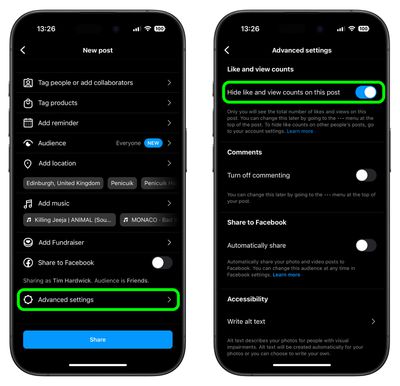
  1. Start a new Instagram post as usual until you get to the last menu before posting.
  2. Tap Advanced Settings at the bottom of the menu.
  3. Tap the switch next to Hide like and view counts on this post to toggle the option on and off.
instagram

Note that even if a user has Like Counts enabled, they will not be able to see the number of likes on accounts or posts that have hidden them.

How to Hide Like Counts on Your Existing Posts

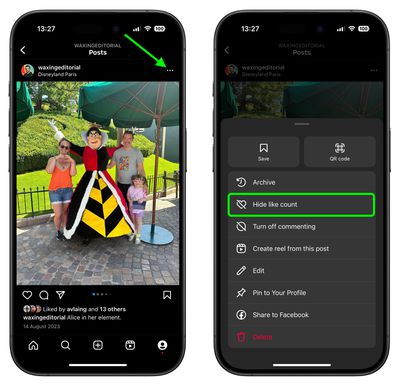
  1. Find one of your own shared posts.
  2. Tap the ellipsis icon (three dots) in the top-right corner of the post.
  3. Select Hide Like Count from the pop-up menu.
instagram

How to Hide Like and Share Counts on Other Users' Posts

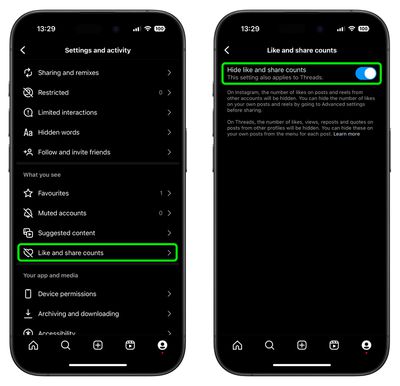
  1. Tap the Profile icon in the bottom-right corner of the Instagram interface, then tap the More (three-line) icon in the top-right corner.
  2. Scroll down to the "What you see" section, then tap Like and share counts.
  3. Tap the switch next to Hide like and share counts to toggle the option on or off.
instagram

Sometimes, for whatever reason, you might not want someone – or indeed anyone – to know when you were last active on Instagram. Fortunately, there is a way to hide your activity status in the app. Check our dedicated how-to article to learn how it's done.

Top Rated Comments

dannyyankou Avatar
71 months ago

The new options have been introduced to "depressurize people's experience" on the platform, the Facebook-owned social media company said.
A great way to do that is to deactivate your Instagram and Facebook account :)
Score: 30 Votes (Like | Disagree)
LiE_ Avatar
71 months ago
Step 1: long press app on Home Screen to enter jiggle mode.

Step 2: delete app

Now you have depressurised yourself from Instagram.

Score: 27 Votes (Like | Disagree)
Blackstick Avatar
71 months ago
I thought the entire point of Insta was the tiny dopamine hit from lots of people loving your dog or sunset photo with the perfect hashtags 🙄.
Score: 13 Votes (Like | Disagree)
71 months ago

A great way to do that is to deactivate your Instagram and Facebook account :)
A great decision for your mental health too I've found. At least for me it was.
Score: 8 Votes (Like | Disagree)
71 months ago
These are nice additions and options available. I’m sure most people will say to delete these apps, but the simple fact is that just isn’t going to happen for most and isn’t even solving anything really.

I don’t understand people’s unwillingness to learn and adapt to new things and the only “cure” is to delete and pretend it doesn’t exist at all. This applies to much more than just apps.
Score: 8 Votes (Like | Disagree)
GeoStructural Avatar
71 months ago

These are nice additions and options available. I’m sure most people will say to delete these apps, but the simple fact is that just isn’t going to happen for most and isn’t even solving anything really.

I don’t understand people’s unwillingness to learn and adapt to new things and the only “cure” is to delete and pretend it doesn’t exist at all. This applies to much more than just apps.
Man really good points. Many people will continue using social media, period. Some for business, quick news briefing and others for fun. And those are all valid choices.

And regarding the option I am glad it exists, it won’t have a personal impact on me but I have young people in my family that seem to be concerned about how much their content is liked or not, so I welcome it.
Score: 5 Votes (Like | Disagree)

Popular Stories

Instagram Feature 1

Instagram Launches Apple TV App With Reels and More

Saturday October 24, 2026 9:27 pm PDT by
Instagram is now available on the Apple TV, bringing Reels, longer videos, and live shows via the platform to Apple's streaming device for the first time. The Instagram app for Apple TV lets users watch content from their favorite creators, discover videos, and resume watching across devices. Instagram describes the app as a way to watch together with friends and family, extending its video...
instagram edits mac

Instagram's Edits Video Editor is Now Available on Mac

Thursday November 5, 2026 9:36 am PST by
Instagram today expanded its Edits video editing app to the Mac. Edits for Mac is intended for larger projects that benefit from a big screen and the control of a mouse and keyboard. The app includes Instagram's licensed and royalty-free audio libraries, sound and video effects, and unlimited automatic captions. Edits for Mac has a full multi-track timeline, keyframes for dynamic...
apple pro tell logo

Apple Launching Five New Products Today

Thursday November 5, 2026 12:59 am PST by
Apple is launching five new products on Friday, November 6, following pre-orders that opened last week, including its first touchscreen MacBook Pro models. The following new products will be available from today: iPad mini with OLED display and A20 Pro chip iMac with M6 chip 14-inch MacBook Pro with M6 chip 14-inch MacBook Pro with OLED touchscreen 16-inch MacBook Pro with OLED...
Latest Stories
Siri AI Rumored to Become 'More Like an Agent' as Early as Next Year
5 hours ago
Apple Taking New Approach to Developing iOS 28 and macOS 28
6 hours ago
Early Apple Black Friday Deals on Apple Watch, MacBook Air, and More
1 day ago
'Backglow' Lets You Customize New MacBook Pro's Glowing Apple Logo
1 day ago
Top Stories: Apple Product Launches, iOS 27.3 Beta, and More
1 day ago
More Fun iPhone Duo Apps: 30 New Picks to Try
2 days ago
Hands-On With Apple's New OLED Touchscreen MacBook Pro
2 days ago
Apple Store With All-New Design Opening Soon in Southern California
2 days ago
Control the Glowing Apple Logo on Your New MacBook Pro
2 days ago
Apple Shares New 'Apple Card: Apply and Use in Minutes' Ad
2 days ago
Apple Says More Than 100,000 Apps Optimized for iPhone Duo, Here's What's Still Missing
2 days ago
Early Black Friday Deals Kickoff With Steep Discounts on Apple Watch Ultras and More
2 days ago
The MacRumors Show: iOS 27.3 Looks Like a Huge Update
2 days ago
Best Buy's Black Friday Event Begins With Sitewide Savings on Apple, TVs, More
2 days ago
Apple Releasing Yet Another Two New Products Next Week
2 days ago
MacBook Air Drops to Lowest Price in Months With Amazon's $250 Discount
2 days ago
Apple Rumored to Drop the iPhone's Action Button Next Year
2 days ago
Apple's Extended Return Policy Now in Effect for 2026 Holiday Season
2 days ago
Apple Music Classical Updated With New Icon and Refreshed Design
2 days ago
OLED iPad Mini, M6 iMac, and New MacBook Pros Available From Today
2 days ago
Apple Surveys iPhone Duo Buyers About Crease and Camera
3 days ago
Apple's First Touchscreen Mac is Now Arriving to Customers
3 days ago
Claude Gets Personal Finance Feature With Bank Account Linking
3 days ago
Apple Arcade Adds Crossy Road Rush and NBA 2K27
3 days ago
Apple's New HomeView Smart Home Hub: Here's How Much RAM It Has
3 days ago
iPad Mini vs. iPad Air Buyer's Guide: Now Just $50 Apart
3 days ago
First iOS 27.3 and macOS Golden Gate 27.3 Public Betas Now Available
3 days ago
Apple Announces a New Mac Sales Record
3 days ago
Paid $200 for Logic Pro? Apple Says You Won't Get This New Feature
3 days ago
Instagram's Edits Video Editor is Now Available on Mac
3 days ago








































