How to Hide the MacBook Pro Notch - MacRumorsOpen MenuShow RoundupsShow Forums menuVisit ForumsOpen Sidebar
Skip to Content

How to Hide the MacBook Pro Notch

by

Apple's 2021 MacBook Pro models unexpectedly came with a display notch, or as Apple calls it, a camera housing, which sits dead center at the top of the screen. This article covers all the ways you can conceal the notch or at least make it play nice with your apps using software-based solutions.
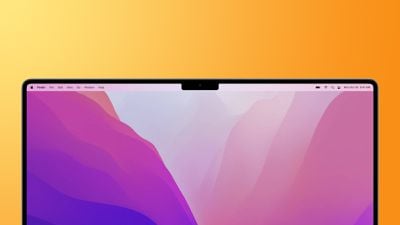
macbook pro 2021 notch feature
The inclusion of a notch on the redesigned 14-inch and 16-inch MacBook Pro allowed Apple to slim down the display bezels and move the menu bar up around the camera housing to leave more screen real estate below, but it was a controversial decision.

For some users, the appearance of the notch in the center of the menu bar is a blight on an otherwise fantastic screen. For others, its location actively interferes with app menu items. Either way many would rather not have it at all. Thankfully, there are ways to hide the notch to varying degrees or make it compatible with app menu bars.

Let's take a look at the available tricks below, starting with how to conceal the notch completely.

Hide the Notch With Fullscreen Mode

The easiest way to make the notch essentially invisible when you're using a specific app is to use it in fullscreen mode. If you click the green button in the row of traffic lights at the top-left corner of the app window, the app will expand to fill the screen. This automatically hides the contents of the menu bar by turning it black.
macos notch hides in full screen
You can hover over the menu bar with your mouse pointer to reveal the menu items, but the effect is such that you don't even see the notch is there in front of you for as long as you stay in fullscreen mode. To exit out of fullscreen, simply click the green traffic light button again.

Apps That Hide the Notch Completely

If you don't like the notch staring you in the face while you look at the display, there's an app for that. While the following third-party apps don't outright cancel the notch, they at least make its existence less obvious by forcing a black menu bar, similar to how macOS Monterey adds a black bezel to the top of the display when apps are in fullscreen mode, only by adapting your chosen wallpaper instead, like so.
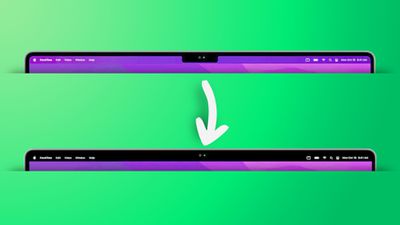
remove notch app feature2
Forehead (Free): Besides letting you switch between your default wallpaper and a black notchless one, Forehead includes options to round the corners of the screen, similar to the rounded top corners of the new MacBook Pros. The ability to simulate a notch on older Macs is coming in an update.

TopNotch (Free): Offers the same features as Forehead, and also supports Dynamic Wallpapers, works with multiple displays and spaces, and remains in the background and detects for wallpaper changes.

De-Notch-ifier ($9.95): Offers the same features as TopNotch, just in the form of a dropdown menu in the menu bar. De-Notch-ifier isn't a completely new app, rather it's a pre-configured version of Boring Old Menu Bar that gives you a boring old non-transparent menu bar on macOS Big Sur and later. If you buy one app, you get the other for free.

Scale App Menu Bars to Adjust to the Notch

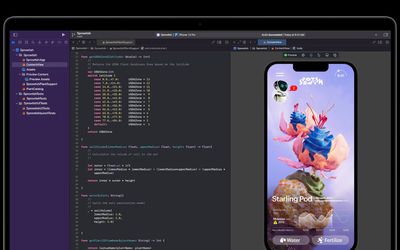
In some cases, older apps that make extensive use of menu bar items may have some of their content concealed beneath the camera housing, making for an unsightly appearance and difficulty accessing menu options. Going fullscreen or hiding the notch with a third-party app doesn't solve this issue, so what can be done to fix it?
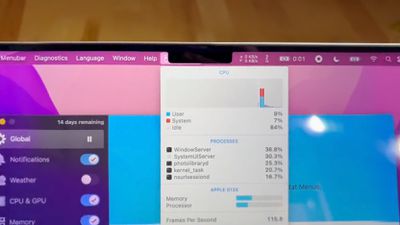
notch behavior feature
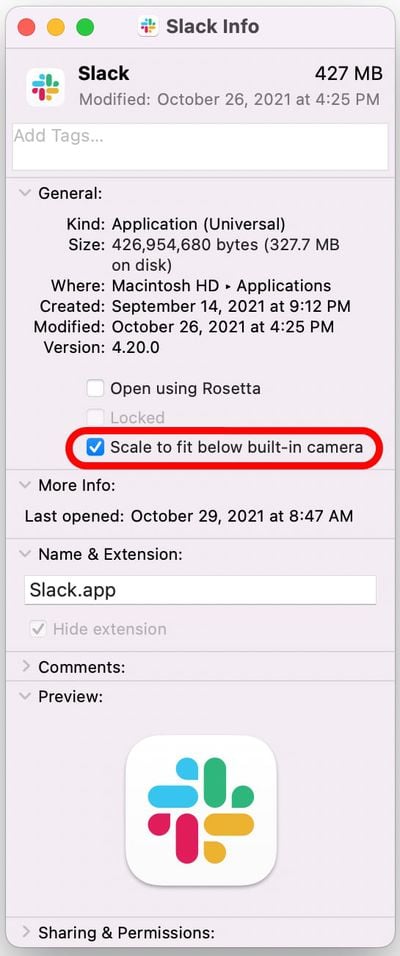
Fortunately, Apple was wise to the potential issue of having menus or menu items in the menu bar inadvertently being hidden behind the notch. In macOS Monterey, there is a compatibility setting called "Scale to fit below built-in camera," which adjusts an app's settings so that it either uses the whole display or uses only the area below the camera housing.

"Scale to fit" ensures the menu bar and app windows appear below the built-in camera on your Mac and are always visible. Moreover, if the app has menu bar items or windows that would appear behind the camera housing, all open apps or apps that share the same space appear below the camera until you quit the app using the scaled setting.

Here's how to turn it on for an individual Mac app.

  1. Close the app that you want to adjust for the notch.
  2. Launch Finder and select the Applications folder.
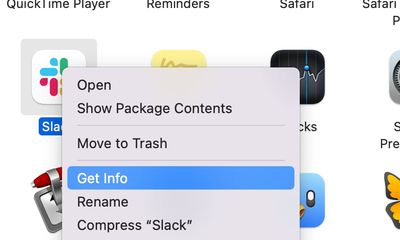
  3. Right-click (Ctrl-click) the icon for the app in question and choose Get Info.
    mac app notch get info

  4. Check the box next to Scale to fit below built-in camera.mac app scale below camera

Now restart the app, and as it launches you should see the screen automatically scale to fit its entire menu bar below the notch area, ensuring all of the app's menu bar items stay visible.


Related Forum: macOS Monterey

Popular Stories

apple pro tell logo

Apple Launching Five New Products Today

Thursday November 5, 2026 12:59 am PST by
Apple is launching five new products on Friday, November 6, following pre-orders that opened last week, including its first touchscreen MacBook Pro models. The following new products will be available from today: iPad mini with OLED display and A20 Pro chip iMac with M6 chip 14-inch MacBook Pro with M6 chip 14-inch MacBook Pro with OLED touchscreen 16-inch MacBook Pro with OLED...

duo aquarium

More Fun iPhone Duo Apps: 30 New Picks to Try

Friday November 6, 2026 3:27 pm PST by
When the iPhone Duo launched, we shared a list of some of the fun apps developers created for the new form factor. Two weeks out, developers are continuing to come up with fresh ideas, so we thought we'd share some of our favorites. Games Marbles Unhinged ($2.99) - Marbles Unhinged is a marble maze designed for the Duo. When you fold it, the floor turns into a ramp. If you stand the top...
silver iphone 18 pro

Apple Rumored to Drop the iPhone's Action Button Next Year

Friday November 6, 2026 6:07 am PST by
Apple plans to merge the iPhone's Action button with the Camera Control starting next year, according to the leaker known as "Instant Digital." In a new post on Weibo, the leaker claimed that a single press of the combined button would open the camera, while a long press would trigger the function assigned to the Action button. They explicitly clarified that the dedicated Action button would ...
Latest Stories
Apple Taking New Approach to Developing iOS 28 and macOS 28
27 minutes ago
Early Apple Black Friday Deals on Apple Watch, MacBook Air, and More
19 hours ago
'Backglow' Lets You Customize New MacBook Pro's Glowing Apple Logo
19 hours ago
Top Stories: Apple Product Launches, iOS 27.3 Beta, and More
1 day ago
More Fun iPhone Duo Apps: 30 New Picks to Try
2 days ago
Hands-On With Apple's New OLED Touchscreen MacBook Pro
2 days ago
Apple Store With All-New Design Opening Soon in Southern California
2 days ago
Control the Glowing Apple Logo on Your New MacBook Pro
2 days ago
Apple Shares New 'Apple Card: Apply and Use in Minutes' Ad
2 days ago
Apple Says More Than 100,000 Apps Optimized for iPhone Duo, Here's What's Still Missing
2 days ago
Early Black Friday Deals Kickoff With Steep Discounts on Apple Watch Ultras and More
2 days ago
The MacRumors Show: iOS 27.3 Looks Like a Huge Update
2 days ago
Best Buy's Black Friday Event Begins With Sitewide Savings on Apple, TVs, More
2 days ago
Apple Releasing Yet Another Two New Products Next Week
2 days ago
MacBook Air Drops to Lowest Price in Months With Amazon's $250 Discount
2 days ago
Apple Rumored to Drop the iPhone's Action Button Next Year
2 days ago
Apple's Extended Return Policy Now in Effect for 2026 Holiday Season
2 days ago
Apple Music Classical Updated With New Icon and Refreshed Design
2 days ago
OLED iPad Mini, M6 iMac, and New MacBook Pros Available From Today
2 days ago
Apple Surveys iPhone Duo Buyers About Crease and Camera
3 days ago
Apple's First Touchscreen Mac is Now Arriving to Customers
3 days ago
Claude Gets Personal Finance Feature With Bank Account Linking
3 days ago
Apple Arcade Adds Crossy Road Rush and NBA 2K27
3 days ago
Apple's New HomeView Smart Home Hub: Here's How Much RAM It Has
3 days ago
iPad Mini vs. iPad Air Buyer's Guide: Now Just $50 Apart
3 days ago
First iOS 27.3 and macOS Golden Gate 27.3 Public Betas Now Available
3 days ago
Apple Announces a New Mac Sales Record
3 days ago
Paid $200 for Logic Pro? Apple Says You Won't Get This New Feature
3 days ago
Instagram's Edits Video Editor is Now Available on Mac
3 days ago
Prevent Siri and Search From Accessing Specific iPhone Apps
3 days ago