

Hide iPhone Find My Location Without Raising Suspicion - MacRumorsOpen MenuShow RoundupsShow Forums menuVisit ForumsOpen Sidebar
Skip to Content

Hide iPhone Find My Location Without Raising Suspicion

by

Ever need a moment of privacy without raising suspicion? If you're secretly shopping for a holiday gift or planning a surprise party, you might want to temporarily obscure your actual location in Apple's Find My app on your iPhone without completely turning off location sharing.

FindMy Feature
Here's a clever trick that lets you keep sharing enabled while displaying a different location – all by using another Apple device you own.

To hide your actual location, you'll need to own an iPhone and an iPad, or two iPhones or two iPads (i.e. not a Mac) signed in to your Apple Account with Find My enabled. This method works by telling Find My to use a stationary device's location instead of your iPhone's.

Start by leaving the device you want to use as your displayed location (like an iPad) in a convincing spot – perhaps your home or office. Then, take your iPhone and follow these steps:

  1. Open the Find My app and tap the Me tab at the bottom of the screen.
  2. Scroll down to find "Use This iPhone as My Location" and make sure it's toggled off.
    find my

  3. Grab your other Apple device and open Find My.
  4. Tap the Me tab, then select "Use this [device] as My Location."
    find my

  5. Toggle on the switch next to Share My Location. Your shared location will now show where this device is stationed, not where you actually are with your iPhone.
  6. When you're ready to resume normal location sharing, simply return to your iPhone's Find My app and toggle "Use This iPhone as My Location" back on.
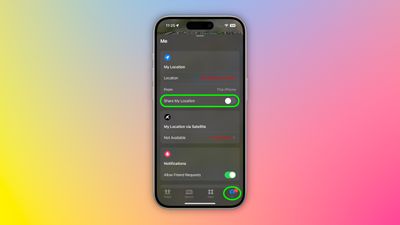
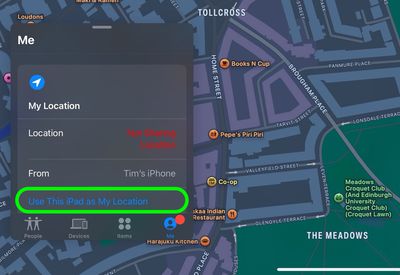
Remember that this trick only works as long as your decoy device stays put and powered on. Lastly, we trust that you'll use this tip responsibly – like keeping that upcoming surprise party under wraps!


Top Rated Comments

20 months ago
« If you're secretly shopping for a holiday gift or planning a surprise party » well sure…😏🤥
Score: 59 Votes (Like | Disagree)
20 months ago
Strip club, here I come!!!!! :D

j/k
Score: 43 Votes (Like | Disagree)
Dwalls90 Avatar
20 months ago
I have seen some use this functionality, and it wasn't for buying holiday gifts...
Score: 42 Votes (Like | Disagree)
20 months ago
I can't believe people let other people constantly track their location on their phone. I've never used this feature and never will, nor will I ever expect anyone else to have me constantly tracking them.
Score: 26 Votes (Like | Disagree)
20 months ago
I’m sure that’s exactly what people will use this for, much in the same way Craig Federighi hides Hair Track Pro on his phone. 😉
Score: 22 Votes (Like | Disagree)
brett_x Avatar
20 months ago
Cheaters gonna cheat
Score: 19 Votes (Like | Disagree)

Popular Stories

Aston Martin CarPlay Ultra Screen

Apple Says CarPlay Ultra is Coming to These Vehicle Brands

Thursday May 21, 2026 11:53 am PDT by
Last year, Apple launched CarPlay Ultra, the long-awaited next-generation version of its CarPlay software system for vehicles. Nearly a year later, CarPlay Ultra is still limited to Aston Martin's latest luxury vehicles, but that should change fairly soon. In May 2025, Apple said many other vehicle brands planned to offer CarPlay Ultra, including Hyundai, Kia, and Genesis. CarPlay Ultra...
iphone 18 pro blue%402x

iPhone 18 Pro: Dark Cherry, Light Blue, and Dark Gray Chassis Leaked [Update]

Thursday June 4, 2026 5:18 am PDT by
Update: Since publication, new information has come to light suggesting the images have been AI-manipulated and are not in fact iPhone 18 Pro chassis parts. The original article follows. The color options Apple is reportedly planning for the upcoming iPhone 18 Pro and ‌iPhone 18 Pro‌ Max have appeared online today in the form of images of chassis parts of unknown authenticity....
iOS 27 All the New App Features

iOS 27: All the Rumored App Features

Wednesday June 3, 2026 3:48 pm PDT by
Siri is getting a major overhaul in iOS 27, but Apple also has some big updates planned for apps like Camera, Photos, and Wallet. There are multiple new AI features in the works, plus some non-AI upgrades. Camera Apple is moving Visual Intelligence from the Camera Control button to the Camera app in iOS 27, according to Bloomberg. There will be a Siri mode that will be available alongside...













