HomePod Guide: How to Create Multiple Timers, Search for Lyrics, Find Your iPhone, and Make Calls - MacRumorsOpen MenuShow RoundupsShow Forums menuVisit ForumsOpen Sidebar
Skip to Content

HomePod Guide: How to Create Multiple Timers, Search for Lyrics, Find Your iPhone, and Make Calls

by

Apple's HomePod was updated this week to version 12, which debuted alongside iOS 12 for iPhones and iPads. The HomePod update brings about a handful of new abilities for Apple's smart speaker, including support for multiple timers, lyric search, find my iPhone, making and receiving phone calls, and more.

Because of all the useful and handy new additions arriving on HomePod this week, we've written this guide to provide quick steps that can help you figure out each new feature, and added in some tips as well.

Multiple Timers

On previous HomePod software you could only make one timer and not name it, but with the new software Apple is letting you create and name as many as over 20 timers at once (our testing reached about 23). This should greatly help out HomePod owners, especially those who have placed the speaker in their kitchen.

Note: Because HomePod relies entirely on voice controls for timers (and other features in this guide), there may be other sentence patterns that result in the same responses as the ones we've discovered. With that being said, below you'll find a few examples of Siri commands for multiple timers on HomePod. To create multiple timers, simply begin listing one timer after the other to Siri:

Setting Timers

  • "Hey Siri, set a 15 minute timer for food."
  • "Hey Siri, set a burger timer for 20 minutes."
  • "Hey Siri, set a 25 minute french fries timer."
  • "Hey Siri, set a 45 minute timer for the laundry."
  • "Hey Siri, set a 3 hour timer for the sprinklers."

Checking Individual Timers

  • "Hey Siri, what's left on the food timer?"
  • "Hey Siri, how's the french fries timer?"
  • "Hey Siri, what's the sprinklers timer at?"
  • "Hey Siri, how long until the laundry is done?"
  • "Hey Siri, is the burger timer almost done?"

Checking All Timers

  • "Hey Siri, where are the timers at?"
  • "Hey Siri, how much time is left?"
  • "Hey Siri, list the timers."

The limit of any timer is a maximum of 23 hours (as it was previously). If you create a timer but don't give it a name, Siri will name the timer by its original length, saying something like "There is 1 minute left on the 10 minute timer."

When you have multiple timers running and one ends, the usual timer ending chime will sound, but it will now be interspersed with Siri stating which timer is completed. As usual, you can tap the top of HomePod to silence the timer, or ask Siri to shut it off. If you have numerous timers running simultaneously and want to end them all, you can say "Hey Siri, stop/cancel all of the timers."

Lyric Search

Similar to Apple Music on iOS, you can now search for a song through its lyrics using Siri on HomePod. Try out these commands to start using voice-enabled lyric search:

  • "Hey Siri, search for a song with the lyrics [lyrics]."
  • "Hey Siri, play the song with the lyrics [lyrics]."
  • "Hey Siri, search for the song that goes [lyrics]."
  • "Hey Siri, play the song that goes [lyrics]."

If you just want to perform a search for a song based on its lyrics without playing it, you can say something like "Hey Siri, what song has the lyrics [lyrics]?"

Find My iPhone
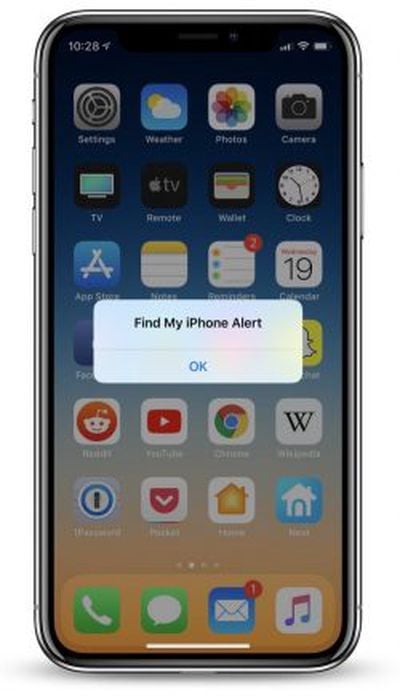
find my iphone homepodIf you've lost track of your iPhone but know it's somewhere nearby, HomePod can now send out a helpful ping so you can more easily locate your misplaced iPhone. Try these commands to get started:

  • "Hey Siri, find my iPhone."
  • "Hey Siri, find [iPhone name]."
  • "Hey Siri, where's my iPhone?"
  • "Hey Siri, ping my iPhone."
  • "Hey Siri, can you find my iPhone?"
  • "Hey Siri, is my iPhone nearby?"
  • "Hey Siri, I can't find my iPhone."

Siri will respond to each one of these commands by asking "Should I try to make it play a sound?", to which you'll need to reply yes or no.

This feature extends to any iOS or macOS device connected to your Apple ID, so you can also search for a missing iPad or MacBook, as long as they're all connected to the internet at the time of the search.

You can provide the specific name of each device to ping, but Siri does have some trouble recognizing custom names at times. When the alert is sent, you'll get a notification on the lost device and an email to your connected Apple ID account.

Phone Calls

One of the biggest new additions to HomePod this week is the ability to make and receive phone calls via your connected iPhone. Make sure your iPhone is on iOS 12 and your HomePod is updated (with Personal Requests turned on), and follow these steps to make calls on HomePod:
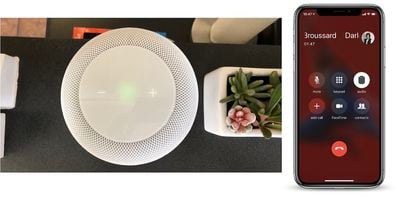
homepod phone call mitch Making a call: "Hey Siri, call Ben."
When a call comes in on iPhone: "Hey Siri, answer my phone."
Hanging up: "Hey Siri, hang up."
Checking a missed call: "Hey Siri, who just called?"

During a call, HomePod's top Siri waveform display will turn a bright green, indicating that you're on the phone with someone. If you don't want to speak to Siri to hang up, you can simply tap once on HomePod to end the call. Of course, the usual volume indicators can also make the person on the other end softer or louder.

If you answered a call on iPhone and want to move over to HomePod, follow these steps:

Transferring a call from iPhone to HomePod

  1. Answer or place a call on iPhone
  2. Tap "Audio" in the Phone app while the call is live
  3. Choose your HomePod speaker

Notably, you won't be able to perform any of Siri's basic search or query functionalities while HomePod is being used as a speakerphone. If someone else calls you while you're talking on HomePod, you can tap the green light at the top of HomePod to switch to it, or double tap the green light to end the current call and switch to the new one. To continuously switch between calls, tap the top of HomePod.

More details on HomePod's new update can be found in our launch post, and if you need a refresher on HomePod's overall set of features be sure to visit our full HomePod Roundup.


Related Roundup: HomePod
Buyer's Guide: HomePod (Caution)

Top Rated Comments

Kaibelf Avatar
106 months ago
Yes but before you could just say "Set a timer for x minutes" and it would only have the one timer. It'll then prompt you to amend the existing timer if you set another.

Now you can say "Set 15 minutes for the cuttlefish, set 3 minutes for the asparagus, set 50 minutes for the inevitable toilet break", and it'll have a separate timer for each, which you can also check by saying "How long on the cuttlefish?"

Seems like a reasonable article IMHO; I wouldn't have known this otherwise.
Cuttlefish, asparagus and a toilet break? Isn’t this part of the plot from the iPad episode of South Park?
Score: 1 Votes (Like | Disagree)
keysofanxiety Avatar
106 months ago
Gonna go out on a limb here but the entire point of Siri is that you can tell it what you want to do. So we should be able to assume that you simply ask it to do any of the things this guide includes.

If you want it to set a 15 minute timer, you ask it to set a 15 minute timer?! NO WAY!!
Yes but before you could just say "Set a timer for x minutes" and it would only have the one timer. It'll then prompt you to amend the existing timer if you set another.

Now you can say "Set 15 minutes for the cuttlefish, set 3 minutes for the asparagus, set 50 minutes for the inevitable toilet break", and it'll have a separate timer for each, which you can also check by saying "How long on the cuttlefish?"

Seems like a reasonable article IMHO; I wouldn't have known this otherwise.
Score: 1 Votes (Like | Disagree)

Popular Stories

homepod sound glow

HomePod 27.2 Adds Sound Glow to Existing HomePod Models

Monday October 19, 2026 1:31 pm PDT by
Apple's latest software update for the HomePod brings a new Sound Glow feature to the HomePod, HomePod mini, and HomePod mini 2. Apple introduced Sound Glow as a HomePod mini 2 feature, but it's available for the second-generation HomePod and the original HomePod mini too. HomePod Software 27.2 is available as a release candidate update for developers and public beta testers, but it should...
Apple TV 4K Four HomePods3

New Apple TV 4K Supports Surround Sound via Four HomePods

Tuesday October 13, 2026 9:29 am PDT by
As was rumored prior to today's announcements, the new Apple TV 4K can connect to up to four HomePods in front-left, front-right, rear-left, and rear-right positions, enabling an all-Apple surround sound system for home theater setups. You can connect four of the new HomePod mini 2 speakers to the new Apple TV 4K, or you can mix and match pairs of HomePod mini 2 and full-sized HomePod 2...
surround mixed 16x9

New Apple TV 4K Features 'Whole Room Audio' With Four HomePods

Tuesday October 20, 2026 7:02 am PDT by
The new fourth-generation Apple TV 4K announced last week can connect to up to four HomePods in front-left, front-right, rear-left, and rear-right positions, enabling an all-Apple surround sound system for home theater setups. There is also a related new feature that has not received as much attention: Whole Room Audio. Apple says the Whole Room Audio feature spreads sound evenly across four ...
Latest Stories
Siri AI Rumored to Become 'More Like an Agent' as Early as Next Year
6 hours ago
Apple Taking New Approach to Developing iOS 28 and macOS 28
7 hours ago
Early Apple Black Friday Deals on Apple Watch, MacBook Air, and More
1 day ago
'Backglow' Lets You Customize New MacBook Pro's Glowing Apple Logo
1 day ago
Top Stories: Apple Product Launches, iOS 27.3 Beta, and More
1 day ago
More Fun iPhone Duo Apps: 30 New Picks to Try
2 days ago
Hands-On With Apple's New OLED Touchscreen MacBook Pro
2 days ago
Apple Store With All-New Design Opening Soon in Southern California
2 days ago
Control the Glowing Apple Logo on Your New MacBook Pro
2 days ago
Apple Shares New 'Apple Card: Apply and Use in Minutes' Ad
2 days ago
Apple Says More Than 100,000 Apps Optimized for iPhone Duo, Here's What's Still Missing
2 days ago
Early Black Friday Deals Kickoff With Steep Discounts on Apple Watch Ultras and More
2 days ago
The MacRumors Show: iOS 27.3 Looks Like a Huge Update
2 days ago
Best Buy's Black Friday Event Begins With Sitewide Savings on Apple, TVs, More
2 days ago
Apple Releasing Yet Another Two New Products Next Week
2 days ago
MacBook Air Drops to Lowest Price in Months With Amazon's $250 Discount
2 days ago
Apple Rumored to Drop the iPhone's Action Button Next Year
2 days ago
Apple's Extended Return Policy Now in Effect for 2026 Holiday Season
2 days ago
Apple Music Classical Updated With New Icon and Refreshed Design
2 days ago
OLED iPad Mini, M6 iMac, and New MacBook Pros Available From Today
3 days ago
Apple Surveys iPhone Duo Buyers About Crease and Camera
3 days ago
Apple's First Touchscreen Mac is Now Arriving to Customers
3 days ago
Claude Gets Personal Finance Feature With Bank Account Linking
3 days ago
Apple Arcade Adds Crossy Road Rush and NBA 2K27
3 days ago
Apple's New HomeView Smart Home Hub: Here's How Much RAM It Has
3 days ago
iPad Mini vs. iPad Air Buyer's Guide: Now Just $50 Apart
3 days ago
First iOS 27.3 and macOS Golden Gate 27.3 Public Betas Now Available
3 days ago
Apple Announces a New Mac Sales Record
3 days ago
Paid $200 for Logic Pro? Apple Says You Won't Get This New Feature
3 days ago
Instagram's Edits Video Editor is Now Available on Mac
3 days ago