

How to Manage File Associations in macOS - MacRumorsOpen MenuShow RoundupsShow Forums menuVisit ForumsOpen Sidebar
Skip to Content

How to Manage File Associations in macOS

by

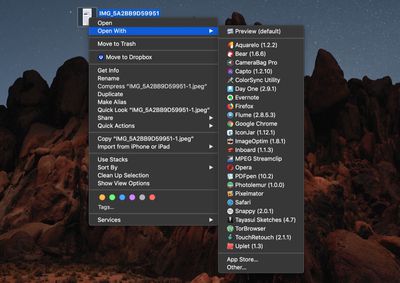
In macOS, the Open With contextual menu that appears when you right-click (or Ctrl-click) on a file provides links to all the applications installed on your Mac that are associated with that file type.
how to manage file associations on your mac
At the top of the list is the default app that macOS launches whenever you double-click on files that share the same suffix or extension, with other apps associated with the file type below that, and an Other... option at the bottom which lets you choose an alternative app in case the one you want to use isn't listed.
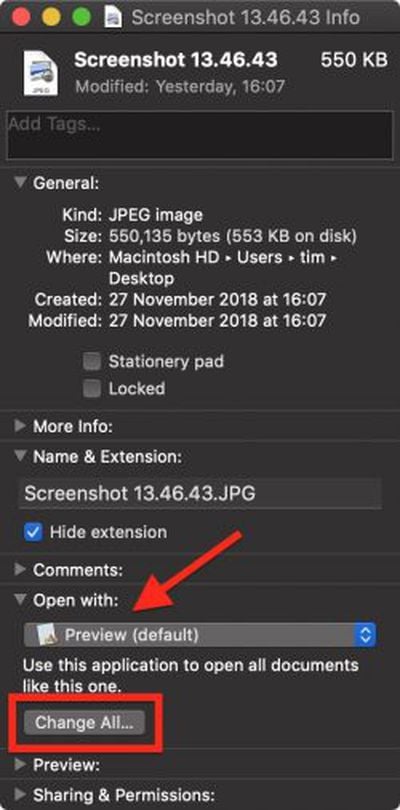
how to manage file associations on your mac 1You can easily change the default app associated with a particular file to something else. To do so, click Get Info in the contextual menu and select another app from the Open With: dropdown list in the file's Info pane. To use that app to open all files sharing the same extension, click the Change All... button and select Continue.

Clearing the Open With Menu

If you've installed a lot of applications on your Mac through the years, you may find that some apps appear in the Open With menu that really have no business being there given the kind of file you've selected.

As well as unrelated apps, you may even see references to "ghost" apps that you removed from your Mac long ago. All of which results in a long and cluttered list of launch service links you won't use.

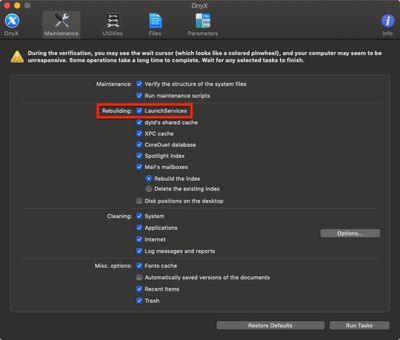
Unfortunately the list isn't directly editable, but there are a couple of ways that you can clear the cruft from it. One option is to grab Titanium Software's free Onyx system utility and run a task to rebuild the Launch Services database.
how to manage file associations on your mac 3
Alternatively, if you're comfortable with a command prompt you can open a Terminal window and run the following command, which does the same thing:

/System/Library/Frameworks/CoreServices.framework/Frameworks/
LaunchServices.framework/Support/lsregister -kill -r -domain local -domain system -domain user

how to manage file associations on your mac 4
Leave the command to run for a few minutes while the LaunchServices database rebuilds, and when the prompt reappears type killall Finder and press Enter to see the changes take effect.


Top Rated Comments

forzagaribaldi Avatar
99 months ago
I see a lot of the guides but i cant find them after few days :(. Is there a section on the website where all guides are located???
They seem to all be listed here: https://www.macrumors.com/how-to/
Score: 2 Votes (Like | Disagree)
Doctor Q Avatar
99 months ago
I sometimes just take apps I want to keep around but "inactive" and I compress them into a ZIP archive. Would that work for Photoshop CS5?
Presumably it would. Thanks for suggesting this.
Score: 1 Votes (Like | Disagree)
blackxacto Avatar
99 months ago
I liked storing PDFs in IBooks before Books. Once Mojave came, they’re outside here on.
Score: 1 Votes (Like | Disagree)
Doctor Q Avatar
99 months ago
I use Adobe Photoshop CC (subscription software) but I also keep a copy of Adobe Photoshop CS5 installed, in case my CC service is ever interrupted. I've associated Photoshop CC with my psd files, but sometimes double-clicking a psd file opens Photoshop CS5 instead, even if I associated psd files with Photoshop CC using that very psd file. I've never figured out why this happens.

Maybe Apple should bring back Type codes and Creator codes!
Score: 1 Votes (Like | Disagree)

Popular Stories

iCloud iPhone 17 Pro

iPhone Users Who Pay for iCloud Storage Get Two New Perks on iOS 27

Thursday July 2, 2026 6:10 am PDT by
If you pay for certain iCloud+ storage plans beyond the 5GB that Apple offers for free, you will receive two more perks on iOS 27 at no additional cost. A summary of the two new iCloud+ perks on iOS 27:Increased daily usage limits for some new Apple Intelligence features, including image generation in the revamped Image Playground app. HomeKit Secure Video cameras receive generated video...
iPhone 4 on Black Feature

Apple Facing One of Its Worst Leaks Since the iPhone 4

Thursday July 2, 2026 9:53 am PDT by
Apple supplier Tata Electronics recently suffered a cyberattack that resulted in thousands of confidential files being published on the dark web, and this reportedly included some photos and documents related to the upcoming iPhone 18 Pro. We have elected not to share any of the leaked photos in this story due to the illegal nature in which they were obtained, but they can easily be found...
American Express Gold Apple Pay Feature

American Express Announces New Apple Pay Feature

Tuesday June 30, 2026 10:27 am PDT by
American Express today announced that you can now redeem Membership Rewards points when checking out with Apple Pay on the web and in apps on the iPhone and iPad. When checking out with Apple Pay on iOS 18 or iPadOS 18 or later, tap on your eligible American Express card (Platinum, Gold, Green, and others) and select the Membership Rewards points option. You can use points to cover all or...













