

Meta's WhatsApp chat platform offers more than just the ability to send messages. It also provides various text formatting options to help you emphasize your messages. Whether you want to make your text bold, italicize it, strikethrough, or change the font, WhatsApp has you covered.

Here's a quick guide on how to use these text formatting features to enhance your chatting experience, including some additional options to create bullet lists, numbered lists, and more that WhatsApp introduced in February 2024.
Using WhatsApp's Text Formatting Options
1. Bold Text
To make your text bold, enclose it in asterisks *.
Example: *Hello* will appear as Hello.
2. Italic Text
If you want to italicize your text, place it between underscores _.
Example: _Hello_ will turn into Hello.
3. Strikethrough
For strikethrough text, use tildes ~ on either side of your text.
Example: ~Hello~ will be shown as Hello.
4. Monospace Font
To change the font to monospace, enclose your text in triple backticks ```.
Example: ```Hello``` will change the text to a monospace font.
5. Combining Formats
You can also combine these formatting options.
Example: *_Hello_* will make the text both bold and italic.
6. Removing Formatting
If you change your mind and want to remove any formatting, just remove the symbols, and the text will revert to normal. Text formatting in WhatsApp is a handy feature that lets you add a personal touch to your messages.

Whether you're emphasizing a point, expressing a mood, or just playing around with different styles, these simple formatting tricks can make your conversations more engaging and expressive.
New Formatting Options (February 2024)
As of February 21, 2024, WhatsApp users can use bulleted and numbered lists, block quotes, and inline code to communicate more effectively.
- Bulleted list: Start a new line with a - (dash) symbol, followed by a space.
- Numbered list: Start a new line with 1 or 2 digits, followed by a period and a space.
- Block quote: Start a new line with the > symbol, followed by a space.
- Inline code: Wrap any code or text you want to highlight using the ` symbol.
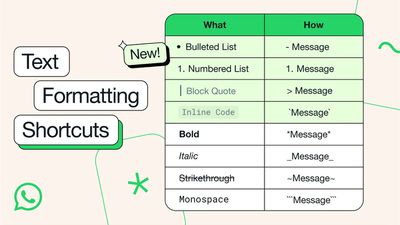
Remember, these formatting options are available across all WhatsApp platforms, including iOS, Android, and web versions.















