How to Save an Apple Fitness+ Workout to Your Favorites - MacRumorsOpen MenuShow RoundupsShow Forums menuVisit ForumsOpen Sidebar
Skip to Content

How to Save an Apple Fitness+ Workout to Your Favorites

by

If you come across an Apple Fitness+ workout that you particularly enjoy, you might want to save it to your playlist so that you can repeat it again later.

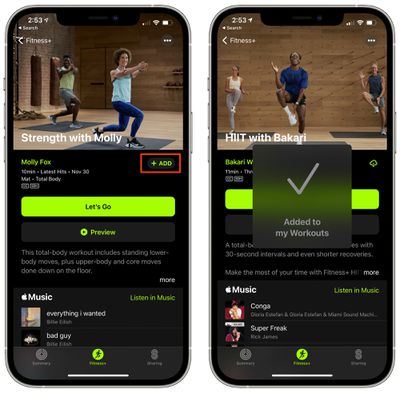
  1. Open the Fitness app. On iPhone, tap the Fitness+ tab.
  2. Find the video that you want to save. fitness plus add favorites
  3. Tap on the "Add" button.

To get to your saved workouts, go to the main Fitness+ interface and then scroll down to the bottom where your content is listed under "My Workouts."
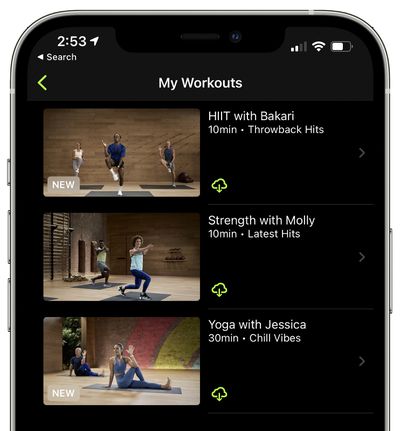
fitness plus my workouts
If you tap on one of your workouts, you can then tap on the iCloud icon to download it for offline viewing.

To remove a workout from your list, tap on the three dots at the top of one of the videos and then choose the "Remove from My Workouts" option.
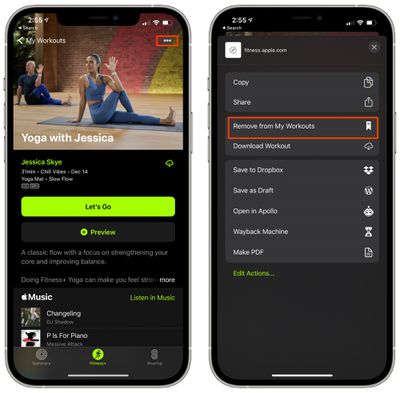
fitnessp plus remove download
For more on Fitness+, make sure to check out our full Fitness+ guide.

Popular Stories

Apple Wallet

iOS 27 Will Add Two New Apple Wallet Features to Your iPhone

Monday June 1, 2026 12:15 pm PDT by
Apple is set to unveil iOS 27 during its WWDC 2026 keynote on Monday, June 8, and the update will reportedly include two new Apple Wallet features. First, iOS 27 will reportedly let users create their own digital passes by scanning items like movie tickets, concert passes, and gym membership cards. Many apps already offer Apple Wallet passes, but now users will be able to create a custom...
Dynamic Island iPhone 18 Pro Feature

iPhone 18 Pro Battery Capacities Allegedly Leaked

Tuesday June 2, 2026 1:54 am PDT by
Battery capacities for Apple's upcoming iPhone 18 Pro have allegedly surfaced, and the numbers suggest only a modest increase over the iPhone 17 Pro. According to prolific Weibo-based leaker Digital Chat Station, Apple is testing the iPhone 18 Pro with different battery capacities for the China and U.S. versions of the device, similar to last year's iPhone 17 Pro models. The Chinese model is ...
macOS 27 on MacBook Pro

Apple Says macOS 27 Won't Be Compatible With These Macs

Wednesday June 3, 2026 8:29 am PDT by
During WWDC 2025, Apple revealed that macOS 26 Tahoe would be the final major macOS version for Intel-based Macs. macOS 27 will be compatible with Apple silicon Macs only, meaning that you will need a Mac with an M-series chip or a MacBook Neo with an A18 Pro chip in order to install the software update. Apple will unveil macOS 27 during its WWDC 2026 keynote this Monday, June 8, and the...