How to Use Google Lens on iPhone - MacRumorsOpen MenuShow RoundupsShow Forums menuVisit ForumsOpen Sidebar
Skip to Content

How to Use Google Lens on iPhone

by

Google Lens can now recognize over a billion items in the world around us, the search engine giant announced this week.

That's four times as many things that the AI-powered feature could identify when it was first launched last year, thanks partly to a huge number of Google Shopping products which have been added to its knowledge base.
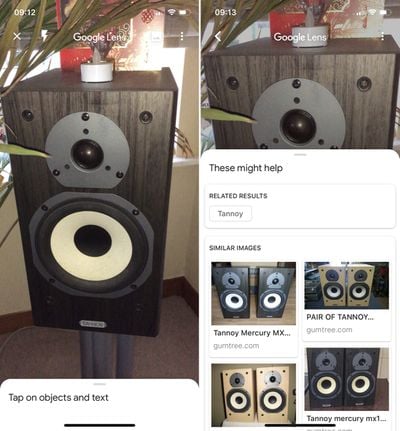
how to use google lens 5
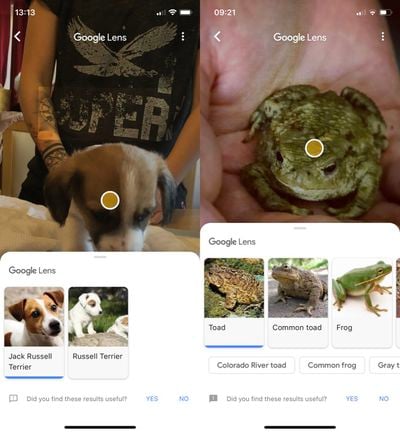
While its optical character recognition engine has been optimized to read more product labels, Google has also honed its machine learning and AI to recognize more animals, including common pet breeds.
how to use google lens 2
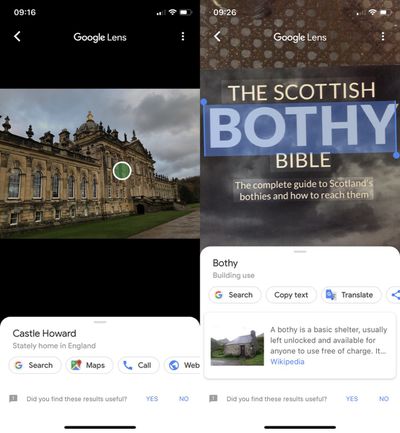
In addition, you can use Lens to get more information about places as well as word definitions and translations of words. Google Lens can now also recognize people, Wi-Fi network names for auto-connecting, and geometric shapes. And if it isn't sure what an object is, it will offer up similar photos that match.

Google Lens originally appeared on iOS as part of Google Photos and could only be used on pictures you'd taken. However, last week Google added the feature to its flagship search app, and this implementation is better since it allows you to aim your phone's camera at things in your environment in real time.
Follow the steps below if you'd like to give it a whirl.

How to Use Google Lens on iPhone

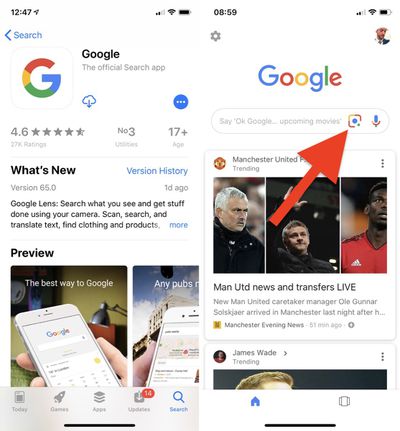
  1. If you don't have it already, download the Google app [Direct Link] from the App Store and launch it.
  2. Sign in with your Google credentials or create an account.

  3. Tap the Lens icon to the left of the microphone in the Search bar.
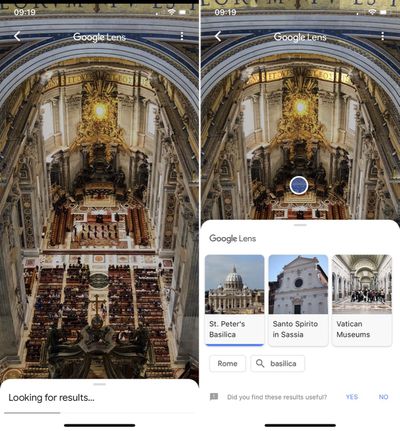
    how to use google lens 4

  4. Tap the blue button that says Turn on camera to use Lens.
  5. Tap OK in the permissions alert to allow Google to access your camera.
  6. Aim your device's camera at an object that you'd like more information about and tap on the circle that appears. If light is poor, you can activate your phone's flash using the lightning bolt button to illuminate whatever is in frame.
    how to use google lens 1

  7. If you want to use Google Lens on photos you've taken, tap the picture icon at the top right of the camera view, tap OK in the permissions alert to allow Google to access your photo library, then select a photo.
    how to use google lens 3

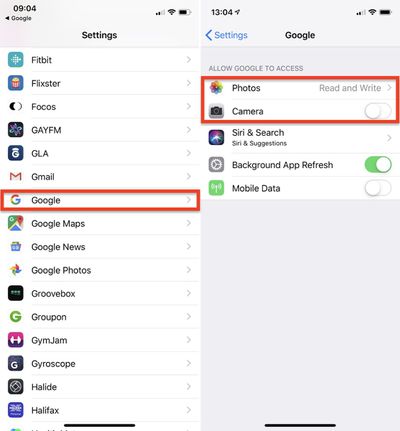
If you want to withdraw Google's access to your camera and photos you can do so anytime by following these steps.

How to Disable Google Search App Permissions

  1. Launch the Settings app.

  2. Select Google from the list of third-party apps.how to use google lens

  3. Turn off Google's access to your device's camera by toggling off the Camera switch.
  4. Tap Photos.
  5. Tap Never.
Tag: Google

Top Rated Comments

97 months ago
One can only wonder (shudder) how Google monetizes you with every picture you take using this service.
While Google is actually making use of AR for real world uses, Apple is making kids games with it.
Score: 9 Votes (Like | Disagree)
burgman Avatar
97 months ago
Not hot dog, very useful.
Score: 8 Votes (Like | Disagree)
iPlayStation Avatar
97 months ago
Yea...very accurate....

Attachment Image
Score: 6 Votes (Like | Disagree)
Kanyay Avatar
97 months ago
I pointed it at my wife's booty and it brought up her Wiki page. DAMN. Google's gone too far.
Score: 6 Votes (Like | Disagree)
djlythium Avatar
97 months ago
“Son, looks like we need have to have another ‘privacy’ talk.”
Score: 5 Votes (Like | Disagree)
97 months ago
“Son, looks like we need have to have another ‘privacy’ talk.”
One can only wonder (shudder) how Google monetizes you with every picture you take using this service.
Agreed. While I admire the tech and don't wanna be a luddite, my iPhone is proudly Google free (DNS, VPN and ad/tracker blockers to make sure) and I won't be using this.

To me privacy is important and this kinda tech bugs me when I know the only purpose of it is to be able to track people, so you can sell them out. Not interested...

This makes me wonder whether some day soon, privacy will come at a premium. For example, while travelling I love finding random little niche places that are untouched. A 'stuff you can't find on Google' tour would be pretty cool... I'd pay for it :D
Score: 4 Votes (Like | Disagree)

Popular Stories

gemini for mac app google

Google Maps for CarPlay Getting Gemini AI

Monday May 11, 2026 4:25 pm PDT by
The Google Maps app for CarPlay could soon include support for Gemini, based on code that MacRumors found in the Google Maps app. Gemini integration would allow CarPlay users to get detailed directions and information from Gemini. Strings in the app suggest users will be able to tell Gemini to navigate to a specific location after agreeing to new Terms of Service in the iPhone version of the ...
google gemini intelligence

Google Previews Android 17 With 'Gemini Intelligence' a Month Before Apple's iOS 27 Reveal

Tuesday May 12, 2026 12:21 pm PDT by
Google today previewed Android 17, the next version of Android that it is bringing to smartphones and other devices. Android 17 includes multiple new AI features, and it comes about a month ahead of when Apple plans to unveil iOS 27 with new AI capabilities. Google is now calling the AI features on Android "Gemini Intelligence," branding similar to Apple Intelligence. Google said it is...
android iphone airdrop quickshare

Google Makes It Easier to Share Files Between Android and iPhone

Tuesday May 12, 2026 2:48 pm PDT by
Google today said it is introducing updated file sharing features that will make it easier for Android users to send files to iPhone users. Quick Share is already compatible with Apple's AirDrop feature on select Android devices, but Google says the feature will expand to Samsung, OPPO, OnePlus, Vivo, Xiaomi, and HONOR devices in 2026. On Android devices that are not compatible with...