

Apple in iOS 12 introduced Screen Time, which is designed to provide you with information on how you're using your time on your iPhone and iPad.
With Screen Time, you can see how often you pick up your iOS device, which apps you're using, which apps are sending the most notifications, and other details.
Accessing Screen Time
There's no dedicated app for Screen Time, so it might not be immediately obvious how it's accessed when you first install iOS 12. All Screen Time features are actually available in the Settings app.
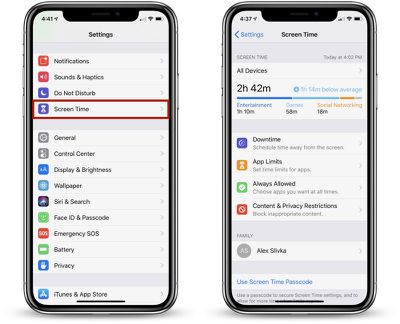
- Open up the Settings app.
- Scroll down to the "Screen Time" section that's grouped with Notifications, Sounds, and Do Not Disturb.
- Tap on "Screen Time" to see your usage statistics.
Screen Time Syncing
Screen Time statistics are collected from all iOS devices running iOS 12 where you're logged in with your iCloud account. That means it will aggregate data from all iPhones and iPads that you use during the course of a day.
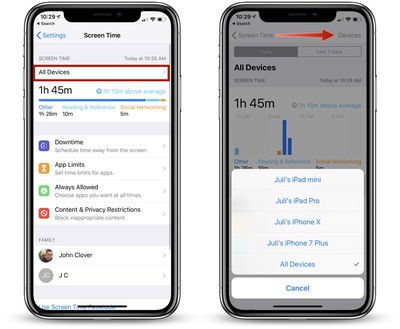
You can view your data across all devices or on a per device basis. To view other devices, tap on the "All Devices" label on the main Screen Time screen and then choose "Devices" from the upper right hand corner.
Info Available in Screen Time
When you open up Screen Time, a chart is displayed with information on your last 24 hours of iPhone usage, organized by each individual app or which app category you've used the most, such as Productivity, Games, Creativity, or Messages.
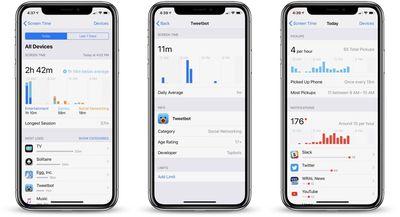
If you tap on that chart, you can see even more information from either the last 24 hours or the last 7 days, including your longest usage setting, the number of times you picked up your device during the day, and how many notifications you got, along with details on which apps are sending you the most notifications.
Other Screen Time Features
In the Screen Time section, you can set scheduled Downtime for yourself to restrict yourself (or a child) from using apps outside of those that have been allowed with App Limits, you can set specific time limits on app categories like social networking or games, and you can access Content & Privacy Restrictions, useful if you're managing a child's device.
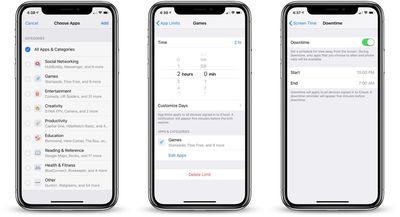
If you use Family Sharing with a spouse, friend, or child, and you're the family manager, you'll also see family members' names listed under "Family" and will be able to see and control their app usage.
These features are relatively simple to use, but we'll be looking into them in more depth in future how tos.
Disabling Screen Time
If you don't want to use Screen Time, you can turn it off in the Settings app.
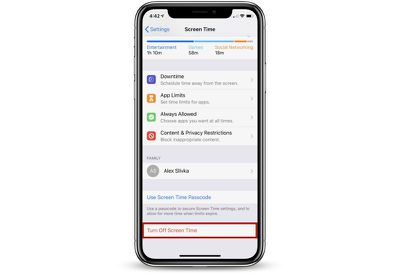
- Open the Settings app.
- Tap "Screen Time."
- Scroll down to "Turn Off Screen Time" and tap it.
Turning off Screen Time on your device will delete all app, website, and notification history. You can re-enable Screen Time at any time, but it does not save data nor does it begin collecting data until enabled.




















Top Rated Comments
He found two ways to disable it.
1) When Screentime goes on and it shuts off his apps, he can still get into settings then into Date and Time settings and change the time to a time when Screentime restrictions are not in place.
2) Even easier is he set his phone to be in 24 hour mode and for some reason Screentime does not understand 24 hour mode so Screentime never kicks in at 10pm, since its 22:00 instead.
Soon once we figure out some parameters I'll be able to help them get some control over their device usage. I even need that in my own life!