How to Sign Up for iCloud Family Storage Plans in iOS 11 - MacRumorsOpen MenuShow RoundupsShow Forums menuVisit ForumsOpen Sidebar
Skip to Content

How to Sign Up for iCloud Family Storage Plans in iOS 11

by

Apple's Family Sharing feature allows you to share music, movies, apps, photos, and more with family members, and in iOS 11, Family Sharing extends to Apple's iCloud Storage plans.

When you purchase a 200GB or 2TB iCloud Storage plan, all members of your family can share the storage space. Depending on how many family members you have, family plans offer more storage at a better price than individual plans.

For example, a 50GB storage plan is priced at $0.99 per person. For two people, the $2.99 200GB plan offers each person an additional 50GB of storage for only $1 more.

How to Upgrade to a Family iCloud Storage Plan

  1. Open the Settings app.
  2. Tap on your Apple ID profile at the top of the app.
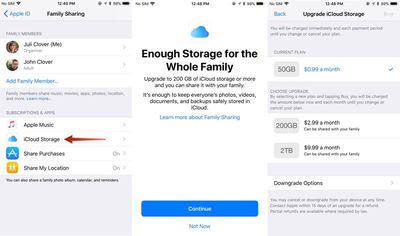
  3. Choose "Family Sharing," the sixth option in the list.icloudfamilysharing
  4. Tap on "iCloud Storage" to bring up a notice about the new Family Sharing options.
  5. Click "Continue" to choose a plan.
  6. Pick a 200GB or 2TB plan.

You can also access the plan settings through the standard iCloud Storage menu in the Settings app, accessible by going to iCloud > Manage Storage after tapping on your profile.

How to Stop Sharing iCloud Storage With Family

You can sign up for a 2TB or 200GB storage plan and keep family members from accessing your storage space. Here's how:

  1. Open the Settings app.
  2. Tap on your Apple ID profile.
  3. Choose "Family Sharing."
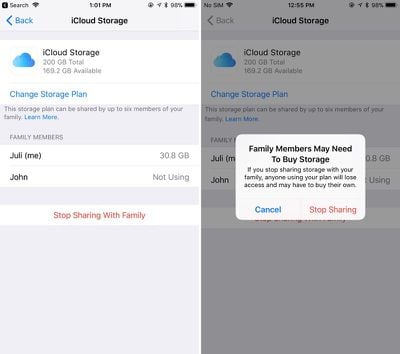
  4. Choose "iCloud Storage."familystoragestopsharing
  5. Tap on "Stop Sharing With Family."

How to Downgrade iCloud Storage

If you want to go back to a cheaper iCloud Storage option, downgrading is as simple as choosing a new plan. New rates won't kick in until the next billing period.

  1. Open the Settings app.
  2. Tap on your Apple ID profile.
  3. Choose "iCloud."
  4. Tap on "Manage Storage."
  5. Choose "Change" under the iCloud Storage option.
  6. Select a 5GB or 50GB plan to downgrade.

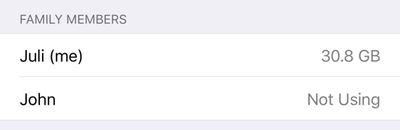
It's important to note that there's no way to allocate how much storage each person gets when using one of Apple's new iCloud Storage plans for families, so it's not always an even split. If a family member is hogging too much space, that's a problem that will need to be worked out offline. You can see how much storage each family member is using by going to profile > Family Sharing > iCloud Storage.
familystoragespaceused
When you choose a 200GB or 2TB storage plan and opt in to Family Sharing, family members who are on the free 5GB plan will be upgraded automatically and will begin using the family storage plan.

Family members who already have a paid plan will need to opt in to the family storage plan to transfer over from their own plans. If they want to have separate storage, your family members can continue to pay for their own plans and choose not to opt into the family plan.

To let your family know that you've signed up for a family iCloud plan, Apple offers an automatic iMessage alert that can be sent out to family members that lets them easily switch over to the family plan.


Tag: iCloud

Top Rated Comments

Blackstick Avatar
115 months ago
Great. When can I share the damn Photos library with my wife?
Score: 11 Votes (Like | Disagree)
115 months ago
This is a great question. I hope so because the shared folders are not full resolution. I want to share photo library with my wife but with current iCliud set up it can't be done. Basically the way it works now is one of us has he main photo library that is synced to the family iMac and one has another iCloud account where we have to airdrop the pics we want into the main one.
This is why my wife and I still use the same iCloud account when setting up our iPhones. I just make sure I turn some things off that conflict between the two (or that we don't want - iCloud Drive, iMessages and FaceTime for each others number etc), and just live with it. But in an ideal world, we should be able to have our own accounts under family sharing, and just sync the same default photo albums. I like how I can just open up my Photos app and see what photos my wife has taken of my kids today when they were out, and vice versa.
Score: 4 Votes (Like | Disagree)
load97 Avatar
115 months ago
+1, need! As it stands, we have to manually copy photos in to a shared album. It's silly.
It’s embarrassing for Apple.
Score: 3 Votes (Like | Disagree)
Anonymous Freak Avatar
115 months ago
Great. When can I share the damn Photos library with my wife?
+1, need! As it stands, we have to manually copy photos in to a shared album. It's silly.
Score: 3 Votes (Like | Disagree)
Eduardo1971 Avatar
115 months ago
Thank you for the reminder MR!!!

With all these iOS 11 goodies I totally forgot about this...I’m adding my family to this!!
Score: 3 Votes (Like | Disagree)
115 months ago
Wish you could use family sharing and still have each Apple ID on a separate credit card.
Score: 2 Votes (Like | Disagree)

Popular Stories

iCloud General Feature Redux

iCloud+ Subscribers Get Higher Apple Intelligence Usage Limits in iOS 27

Tuesday June 9, 2026 6:05 am PDT by
Certain Apple Intelligence features in iOS 27 will carry daily usage limits, with iCloud+ subscribers receiving higher allowances than free users. The company reiterated the details in its press release accompanying yesterday's Apple Intelligence announcements. Apple said the limits apply to features that rely on "powerful server models," with image generation cited as the primary example....
iCloud iPhone 17 Pro

iPhone Users Who Pay for iCloud Storage Get Two New Perks on iOS 27

Thursday July 2, 2026 6:10 am PDT by
If you pay for certain iCloud+ storage plans beyond the 5GB that Apple offers for free, you will receive two more perks on iOS 27 at no additional cost. A summary of the two new iCloud+ perks on iOS 27:Increased daily usage limits for some new Apple Intelligence features, including image generation in the revamped Image Playground app. HomeKit Secure Video cameras receive generated video...
iCloud General Feature Redux

Apple's New Hide My Email Domain Makes It Easier to Block iCloud Aliases

Wednesday June 17, 2026 7:41 am PDT by
Apple's decision to move Hide My Email to a dedicated "private.icloud.com" domain appears to have the consequence of making it easier for platforms that want to block iCloud aliases to do so. Apple is unifying the email domains used by Sign in with Apple and iCloud+ Hide My Email under a single private.icloud.com domain later this summer. Sign in with Apple currently uses...