

In iOS 17 and MacOS Sonoma, Apple added the ability to open and annotate PDFs right in the Notes app. Keep reading to learn how it's done.

In the latest version of iOS and macOS, Apple has updated the Notes app to support inline PDFs, which means you can insert a PDF into Notes and then read, annotate, and collaborate on the document. This functionality also works for scanned documents, and it is available on both the iPhone and the iPad.
Annotating PDFs in Notes on iPhone and iPad
If you're using an iPhone and want to annotate a PDF in Notes, the first thing to do is select the PDF file, then tap the Share button and choose the Copy option. Next, open the Notes app and create a new note, or select an existing one, then long press on an area in the note and choose the Paste option in the pop-up menu. The PDF should appear in the note.
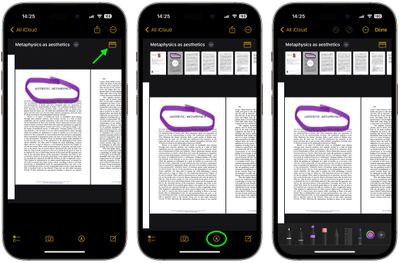
If the PDF is several pages, tap the thumbnail button to get a row of thumbnails across the top of the PDF that you can click to navigate to a specific page more quickly. To annotate the PDF, tap the Markup button.
You will see several options along the bottom of the screen to annotate your PDF, such as a marker, pencil, pen, and eraser. The + icon at the bottom-right corner also reveals options to add a Sticker, Signature, Text, and Shape to the PDF. After you've finished annotating the PDF file, simply tap Done at the top-right corner to save your changes.
Annotating PDFs in Notes on Mac
In macOS, you can simply drag PDF documents from your desktop into an open note. With the PDF embedded in the note, click the chevron icon next to the name of the PDF document, then choose Markup.

In the Markup window that opens, you will see all the tools you can use to add annotations to your PDF file, and you can turn the pages to annotate throughout the document. When you're done annotating, click Done to save your changes.



















