How to Import Your Safari Bookmarks to Chrome - MacRumorsOpen MenuShow RoundupsShow Forums menuVisit ForumsOpen Sidebar
Skip to Content

How to Import Your Safari Bookmarks to Chrome

by

Apple's native desktop browser is Safari, but just because it comes pre-installed on every Mac doesn't mean you have to use it. Chrome is actually more popular than Safari by far, and if you're new to Mac, it might already be your preferred browser.
safari chrome ios
If you've tried out Safari and decided you want to switch to Google's equivalent, you can easily import any bookmarks you've used in Apple's browser straight to Chrome. The following steps show you how.

How to Import Safari Bookmarks to Chrome

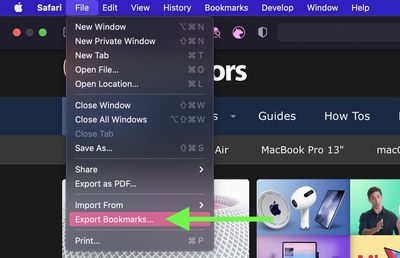
  1. Launch Safari on your Mac and select File -> Export Bookmarks... from the menu bar.
    safari

  2. Name the file containing your bookmarks and save it in a convenient location on your Mac.
  3. Launch Google Chrome on your Mac.
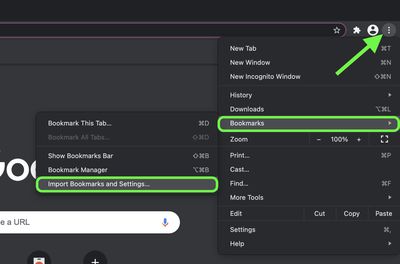
  4. Click the customize button in the top-right corner of the browser window (the vertical column of three dots).

  5. Select Bookmarks -> Import Bookmarks and settings....
    import safar passwords chrome

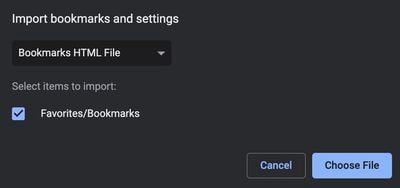
  6. In the window that appears, select Safari in the dropdown.

  7. Check the box next to Favorites/Bookmarks.
  8. Select Bookmarks HTML file in the dropdown, then click Choose File and select the Safari-exported file.
    chrome

  9. Click the Import button. Once the import is complete, click Done.
To sync your imported bookmarks to your Google account, click the circular profile icon in the top-right corner of the Chrome window and log into your Google account.


Tags: Chrome, Safari

Popular Stories

Chrome Feature 22

Chrome Sets Browser Speed Records on M5 MacBook Pro

Friday June 5, 2026 10:38 am PDT by
Google's Chrome browser hit new records on browser benchmarking tools Speedometer 3.1 and JetStream 3, Google said today. Chrome earned a score of 61 on Speedometer, a five percent improvement since last year. It earned a 469 on JetStream 3, a 10 percent improvement since the beginning of 2026. Tests were done on an M5 MacBook Pro running macOS 26.0.1. Google says it holds a dual record...
safari notify macos 27

New Safari Can Monitor a Webpage and Notify You of Updates

Monday June 8, 2026 11:04 am PDT by
Apple's new version of Safari browser in macOS 27 and iOS 27 can be tasked to monitor a webpage and notify you of any changes, thanks to a new built-in feature. With "Notify Me," Safari can keep checking a website on your behalf – such as a product you've been watching for when it comes back in stock – and alert you when a change occurs. In other upcoming feature additions, using the ...
safari tab groups apple intelligence

Apple Brings AI Tab Organization and AI-Generated Extensions to Safari

Monday June 8, 2026 1:18 pm PDT by
Apple today unveiled a raft of Safari upgrades powered by Apple Intelligence, including automatic tab organization, AI-generated custom extensions, and new privacy-first browsing tools. The centerpiece feature is automatic tab organization, which uses Apple Intelligence to group a user's open tabs into relevant topics without any manual intervention. If someone is planning a weekend trip,...