

Apple's M1 Macs, which are the first to be powered by an Apple-designed Arm-based chip, are able to run iOS and iPadOS apps because of the common architecture between the different operating systems.
Some iOS developers have been updating their apps to make them compatible with macOS, but there are ways to download apps that haven't been optimized and even apps that developers have prevented from being available on macOS. Watch our YouTube video for instructions, or read through the steps below.
Installing iOS and iPadOS Apps From the Mac App Store
In the Mac App Store, you can download many of the apps you've previously purchased on your iPhone or your iPad.
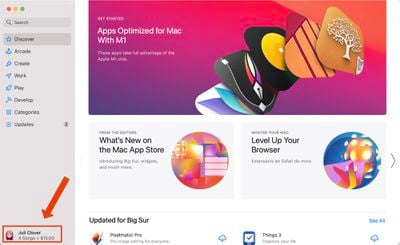
- Open the Mac App Store.
- Click on your profile in the bottom left of the app.
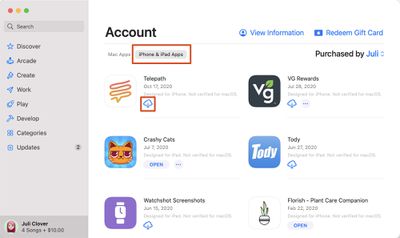
- Under account, choose "iPhone & iPad Apps."
- Next to any app in the list, click on the download button.

- The iOS app will be installed like any other Mac app and can be opened up from Launchpad or the Applications folder.
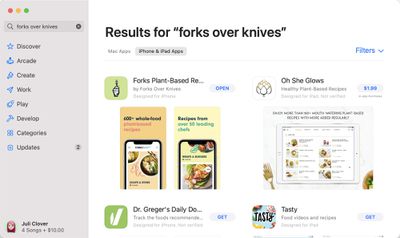
Note that you can also search for iPhone and iPad app names in the Mac App Store and click on the "iPhone & iPad Apps" tab under the results list to see apps that were originally designed for iOS devices.
Some of the apps that you see in the Mac App Store are labeled with a warning that says "Not Verified for macOS," which means it is not optimized for use on a Mac.
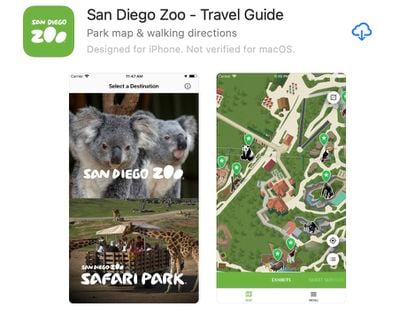
Other apps that do not have this wording have been checked over by the developer and should work well on an M1 Mac, even if the design isn't perfect because it's iOS first and not Mac first.
Installing Apps Not Available Through the Mac App Store
App developers can choose not to make their iPhone and iPad apps available on M1 Macs through the Mac App Store, and many popular apps like Netflix, Hulu, and others have made this choice. There used to be a workaround for installing these apps using third-party software, but in January 2021, Apple disabled the sideloading of iPhone and iPad apps. The instructions below no longer work, but we've left them available in case Apple's policies change in the future. Here's how sideloading used to work with a third-party app like iMazing, which could be used to download app .ipa files.
- Download and launch iMazing.
- Plug your iPhone or iPad into your Mac.
- Select your device and then choose the Manage Apps feature.
- Select Library and then you'll see a list of all the apps that you own.
- Right click on an app and choose the Download option to download it to your Library.
- Right click on the same app again and then choose the Export .ipa option.
- Choose a destination for the export like the Applications folder.
- From the Applications folder, click on the app icon to install the app.
Apps installed this way are not optimized for M1 Macs and macOS in any way and are designed for touchscreen devices, so expect to run into some bugs and issues when using them. For the most part, iOS apps seem to work well on the Mac even when not optimized.
If you're planning to download and use apps like Hulu and Netflix, be warned that there's no option to put these apps in fullscreen mode to watch content, but there is an option to download content for offline usage just like on an iPhone or iPad.
In the future, we'll likely have far more iOS apps that are also designed with Macs in mind, but for now, these options provide ways to access and use your favorite iOS apps on Mac devices.

















Top Rated Comments
Now Cultured Code can’t charge us $50 for a Mac app (Things) that’s identical to the $10 iOS app!
:eek: