How to Install iOS 12 Public Beta on iPhone, iPad, and iPod Touch - MacRumorsOpen MenuShow RoundupsShow Forums menuVisit ForumsOpen Sidebar
Skip to Content

How to Install iOS 12 Public Beta on iPhone, iPad, and iPod Touch

by

ios 12 iconApple today released the first public beta of iOS 12 for compatible iPhone, iPad, and iPod touch models, enabling users who aren't signed up for the Apple Developer Program to test the software update ahead of its official release in the fall.

While iOS 12 introduces several new features, it is designed to work on all iPhone, iPad, and iPod touch models that can run iOS 11, and the company says it has focused on bringing performance improvements to both old and new devices.

That said, iOS 12 is pre-release software, so installing the Public Beta on a secondary device is highly recommended. The stability of beta software cannot be guaranteed, as it often contains bugs and issues that have yet to be ironed out, so installing it on your day-to-day device isn't advised.

Installing the Public Beta shouldn't take longer than half an hour, but first you should create a backup of your device's contents and settings. The following step-by-step instructions are given for iPhone, but apply to iPad and iPod touch just the same.

How to Create a Backup of Your Device in iTunes

  1. Connect your iOS device to a Mac or PC using a Lightning to USB cable.

  2. Open iTunes.

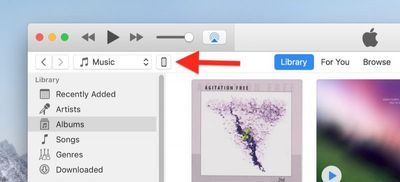
  3. Click the device's icon in the top-left menu.
    backup ios device 1

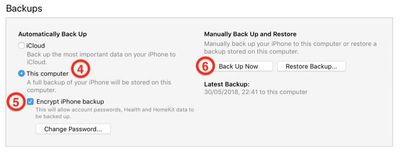
  4. Under Backups, click This computer.

  5. Tick the Encrypt iPhone backup checkbox if you want to back up your login credentials and any Health and HomeKit data.
    backup ios device 2

  6. Click Back Up Now.

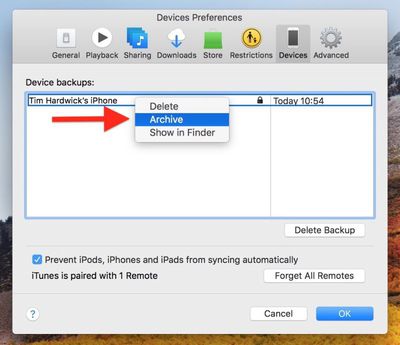
  7. Click iTunes -> Preferences… in the macOS menu bar.

  8. Click the Devices tab.
    backup ios device 3

  9. Right-click (or Ctrl-click) the new backup, and select Archive from the contextual dropdown menu.
How to Enroll in the Apple Beta Software Program

Now that you've backed up your device, you're ready to download the iOS 12 Public Beta. To do so, you must enroll your iPhone, iPad, or iPod touch in the free Apple Beta Software Program.

  1. Open Safari on your iOS device and navigate to the Apple Beta Software Program.

  2. Tap the Sign up button, or sign in if you're already a member.

  3. Enter your Apple ID credentials and tap the Sign in button.

  4. Agree to the Apple Beta Software Program terms and conditions if necessary.

  5. A Guide for Public Betas screen will appear. Select the iOS tab, scroll down to the Get Started section and tap enroll your iOS device.

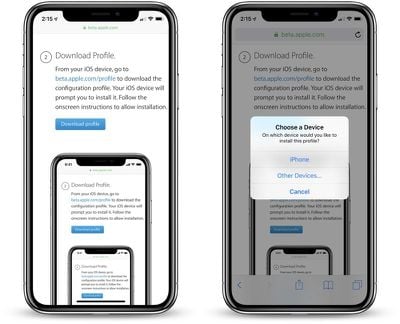
  6. On the Enroll Your Devices screen, with the iOS tab selected, scroll down and tap the Download profile button. ios12installbetaprofile

  7. Tap "iPhone" or "iPad" when prompted to choose a device.

  8. Tap Allow.

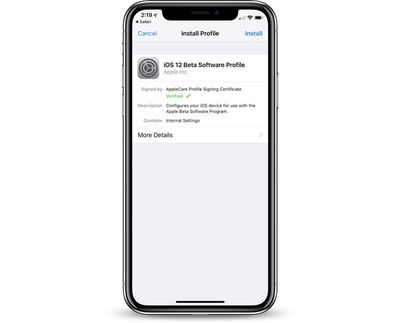
  9. Tap Install and follow the prompts to install the iOS Beta Software Profile. ios12betaprofileiphone

  10. Restart your device after installing the profile by tapping the restart popup.
How to Install the iOS 12 Public Beta

Once you're enrolled in the Apple Beta Software Program, you can install the iOS 12 Public Beta on your iOS device just as you would a regular software update.

  1. Launch the Settings app on your iPhone, iPad, or iPod touch.

  2. Tap General.

  3. Tap Software Update.

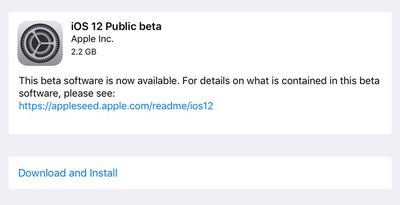
  4. Tap Download and Install.ios12publicbetainstall

  5. Tap Install Now.


If you come across any issues installing the iOS 12 Public Beta, it may help to clear any previous profiles lingering on your device. You can find these in the Settings app under General -> Profile.


Related Forum: iOS 12

Top Rated Comments

109 months ago
Now to find an older device... anybody have experience of speed increases on older hardware?
5s feels like a new phone. Not the same speed as iOS 7 but pretty good

- battery also last longer
- tiny little stutter while scrolling really fast

but I am not a heavy user, so do not know how it is under heavy stress
Score: 2 Votes (Like | Disagree)
saudade Avatar
109 months ago
I’m not installing this as it will be full of bugs.

Dud r u da kind of men who safely remove a pendrive from a computer too?

Be a man like me and install thiz. Who cares if a female or the ios12 is full of bugs. Just do it. This is America. Land of the BRAVE
Score: 1 Votes (Like | Disagree)
Apple_Robert Avatar
109 months ago
I’m not installing this as it will be full of bugs.
Get a can of bug spray.
Score: 1 Votes (Like | Disagree)
Apple_Robert Avatar
109 months ago
Good article for the newbies.
[doublepost=1529972626][/doublepost]
Whatever you do, make two backups. One with iCloud and one with iTunes or Apple Configurator.
iCloud backup does not archive like iTunes does. Best stick to iTunes and or use iMazing, if one needs to roll back.
Score: 1 Votes (Like | Disagree)
Knightcastle Avatar
109 months ago
Now to find an older device... anybody have experience of speed increases on older hardware?
Noticeably faster on my iPad Mini 4. Currently on Dev Beta 1.
Score: 1 Votes (Like | Disagree)

Popular Stories

duo aquarium

More Fun iPhone Duo Apps: 30 New Picks to Try

Friday November 6, 2026 3:27 pm PST by
When the iPhone Duo launched, we shared a list of some of the fun apps developers created for the new form factor. Two weeks out, developers are continuing to come up with fresh ideas, so we thought we'd share some of our favorites. Games Marbles Unhinged ($2.99) - Marbles Unhinged is a marble maze designed for the Duo. When you fold it, the floor turns into a ramp. If you stand the top...
apple pro tell logo

Apple Launching Five New Products Today

Thursday November 5, 2026 12:59 am PST by
Apple is launching five new products on Friday, November 6, following pre-orders that opened last week, including its first touchscreen MacBook Pro models. The following new products will be available from today: iPad mini with OLED display and A20 Pro chip iMac with M6 chip 14-inch MacBook Pro with M6 chip 14-inch MacBook Pro with OLED touchscreen 16-inch MacBook Pro with OLED...
silver iphone 18 pro

Apple Rumored to Drop the iPhone's Action Button Next Year

Friday November 6, 2026 6:07 am PST by
Apple plans to merge the iPhone's Action button with the Camera Control starting next year, according to the leaker known as "Instant Digital." In a new post on Weibo, the leaker claimed that a single press of the combined button would open the camera, while a long press would trigger the function assigned to the Action button. They explicitly clarified that the dedicated Action button would ...
Latest Stories
Siri AI Rumored to Become 'More Like an Agent' as Early as Next Year
8 hours ago
Apple Taking New Approach to Developing iOS 28 and macOS 28
10 hours ago
Early Apple Black Friday Deals on Apple Watch, MacBook Air, and More
1 day ago
'Backglow' Lets You Customize New MacBook Pro's Glowing Apple Logo
1 day ago
Top Stories: Apple Product Launches, iOS 27.3 Beta, and More
1 day ago
More Fun iPhone Duo Apps: 30 New Picks to Try
2 days ago
Hands-On With Apple's New OLED Touchscreen MacBook Pro
2 days ago
Apple Store With All-New Design Opening Soon in Southern California
2 days ago
Control the Glowing Apple Logo on Your New MacBook Pro
2 days ago
Apple Shares New 'Apple Card: Apply and Use in Minutes' Ad
2 days ago
Apple Says More Than 100,000 Apps Optimized for iPhone Duo, Here's What's Still Missing
2 days ago
Early Black Friday Deals Kickoff With Steep Discounts on Apple Watch Ultras and More
2 days ago
The MacRumors Show: iOS 27.3 Looks Like a Huge Update
2 days ago
Best Buy's Black Friday Event Begins With Sitewide Savings on Apple, TVs, More
2 days ago
Apple Releasing Yet Another Two New Products Next Week
2 days ago
MacBook Air Drops to Lowest Price in Months With Amazon's $250 Discount
2 days ago
Apple Rumored to Drop the iPhone's Action Button Next Year
2 days ago
Apple's Extended Return Policy Now in Effect for 2026 Holiday Season
2 days ago
Apple Music Classical Updated With New Icon and Refreshed Design
3 days ago
OLED iPad Mini, M6 iMac, and New MacBook Pros Available From Today
3 days ago
Apple Surveys iPhone Duo Buyers About Crease and Camera
3 days ago
Apple's First Touchscreen Mac is Now Arriving to Customers
3 days ago
Claude Gets Personal Finance Feature With Bank Account Linking
3 days ago
Apple Arcade Adds Crossy Road Rush and NBA 2K27
3 days ago
Apple's New HomeView Smart Home Hub: Here's How Much RAM It Has
3 days ago
iPad Mini vs. iPad Air Buyer's Guide: Now Just $50 Apart
3 days ago
First iOS 27.3 and macOS Golden Gate 27.3 Public Betas Now Available
3 days ago
Apple Announces a New Mac Sales Record
3 days ago
Paid $200 for Logic Pro? Apple Says You Won't Get This New Feature
3 days ago
Instagram's Edits Video Editor is Now Available on Mac
3 days ago