How to Install the iOS 16 Public Beta - MacRumorsOpen MenuShow RoundupsShow Forums menuVisit ForumsOpen Sidebar
Skip to Content

How to Install the iOS 16 Public Beta

by

Apple today seeded new iOS 16 and iPadOS 16 beta updates to its public beta testing group, giving non-developers an opportunity to try out the new software ahead of its fall launch.


Signing up to get the iOS 16 or iPadOS 16 beta is simple, and can be done by enrolling an iPhone or iPad in Apple's free Apple Beta Software Program. Instructions are below.
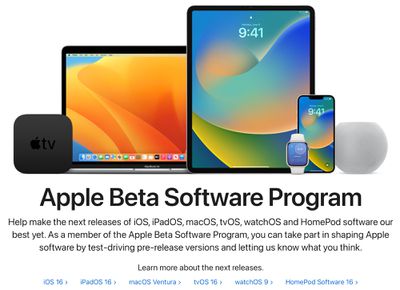
apple beta software ios 16

  1. On your iOS device, open up Safari and navigate to the Apple Beta Software Program website.
  2. Tap the Sign up button and enter your Apple ID credentials, or sign in with your ‌Apple ID‌ if you've signed up to beta test a previous update.
  3. Agree to the Apple Beta Software Program terms and conditions if required.
  4. After signing in, you'll see a main screen that's a Guide for Public Betas. Click on iOS (or iPadOS if you're installing on an ‌iPad‌).
  5. Read through Apple's instructions carefully, and then using the link in the "Get Started" section, select "enroll your iOS device."
  6. Make sure to make an archived backup of your current version of iOS using Finder by following Apple's instructions or using our tutorial below. This will allow you to downgrade back to iOS 15 if necessary and is crucial if you don't enjoy the iOS 16 testing experience.
  7. Scroll down and tap on the "Download profile" button.
  8. When you see a popup that says the website is trying to download a configuration profile, tap on "Allow."
  9. Open up the Settings app on your iOS device and then tap on the "Profile Downloaded" section that's located right below your ‌Apple ID‌ information.
  10. In the upper right corner of the screen, tap on "Install."
  11. Enter your passcode and then tap "Install" again. If you have a prior beta profile installed, you may need to remove it at this point under General > Profile and redo the above steps. Otherwise, agree to the consent text and tap "Install" a third time.
  12. Tap Done.
  13. Your phone will prompt you to restart. From there, go back to the main Settings screen.
  14. Under "General," choose "Software Update" and then "Download and Install."
  15. Once the beta update has been downloaded you can tap on "Install Now" to get it set up, and from there, the iPhone will install the software, restart, and you'll be up and running with the iOS 16 software.

Compatibility

iOS 16 is compatible with the iPhone 8 and later, and it unfortunately drops support for the iPhone 6s and iPhone 7 models. iPhones able to run iOS 16 are listed below.

  • iPhone 13
  • iPhone 13 mini
  • iPhone 13 Pro
  • iPhone 13 Pro Max
  • iPhone 12
  • iPhone 12 mini
  • iPhone 12 Pro
  • iPhone 12 Pro Max
  • iPhone 11
  • iPhone 11 Pro
  • iPhone 11 Pro Max
  • iPhone XS
  • iPhone XS Max
  • iPhone XR
  • iPhone X
  • iPhone 8
  • iPhone 8 Plus
  • iPhone SE (2nd generation or later)

iPadOS 16 is compatible with the following iPads:

  • iPad Pro (all models)
  • iPad Air (3rd generation and later)
  • ‌iPad‌ (5th generation and later)
  • iPad mini (5th generation and later)

How to Make an Archived Backup

As mentioned in our tutorial for installing the public beta, it's essential to make an archived backup of your device if you want to be able to downgrade to a version of iOS 15. Once you upgrade to iOS 16, an iOS 16 backup cannot be restored to the iOS 15 software, which is why you need to make a backup beforehand. Here's how:

  1. Plug your iPhone, ‌iPad‌, or iPod touch into your Mac using the supplied cable.
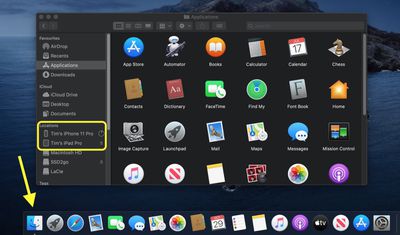
  2. Open a Finder window by clicking the Finder icon in the Dock.
  3. Click your iOS device's name in the sidebar.
    finder
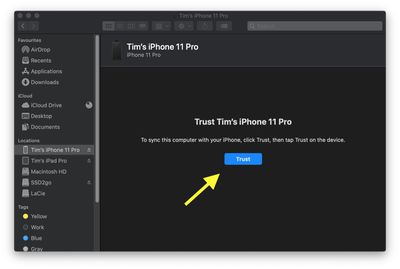
  4. If this is the first time connecting your device to your Mac, click Trust in the Finder window.
    finder
  5. Tap Trust on your device when prompted, then enter your passcode to confirm.
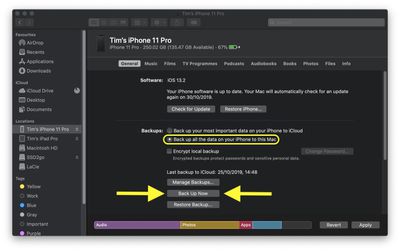
  6. In the General tab, click the circle next to where it says Back up all of the data on your [iPhone/iPad/iPod touch] to this Mac.
  7. If you don't want to create an encrypted backup, or you've already set up encrypted backups, click Back Up Now at the bottom of the General tab.
    finder

When the backup is finished, you can find the date and time of the last backup in the General tab, just above the Manage Backups button.

iOS 16 Features

iOS 16 is a significant update that brings an entirely overhauled Lock Screen experience on the iPhone, letting you customize the look of your device in new ways. Lock Screens can now have widgets, and can be linked to Focus modes.

FaceTime supports Handoff, there are new health and fitness features, Apple added better photo sharing with iCloud Shared Photo Library, and tons more. A full list of iOS 16 features can be found in our dedicated iOS 16 roundup.

Some of the iOS 16 features are not yet functional and won't be implemented until later in the beta testing period, which is something to be aware of. iOS and iPadOS 16 will be in beta testing for several months as Apple refines and updates the software ahead of its fall release.


Related Forum: iOS 16

Top Rated Comments

MacHiavelli Avatar
57 months ago
I use my iPhone to run the International Space station, control all the nuclear weapons on the planet, manage the electricity, gas, and water supplies of over eight billion people, and to take endless selfies of my over-inflated ego. Safe to install this beta?
Score: 23 Votes (Like | Disagree)
Apple_Robert Avatar
57 months ago
For the newbies: if you only have 1 phone, it is not a good idea to install the beta on your primary device. Too many bad things can go wrong using a beta and potentially leave you unable to use necessary apps or worse, the phone itself. It doesn't matter if 50% of the beta users here say they don't usually have any problems. What matters, is not putting yourself in a situation where you can't use your phone.


Score: 12 Votes (Like | Disagree)
57 months ago
If you don't know how to install this beta yourself, then you'd better not do it.
Score: 9 Votes (Like | Disagree)
iGeneo Avatar
57 months ago
Here we go folks... be nice to the newbies
Score: 6 Votes (Like | Disagree)
Rafagon Avatar
57 months ago

For the newbies: if you only have 1 phone, it is not a good idea to install the beta on your primary device. Too many bad things can go wrong using a beta and potentially leave you unable to use necessary apps or worse, the phone itself. It doesn't matter if 50% of the beta users here say they don't usually have any problems. What matters, is not putting yourself in a situation where you can't use your phone.
Thank you for this post. I don't consider myself a newbie, but I do have many apps that I wouldn't want to go without.

For a brief moment, I felt like trying out the beta, but your post convinced me not to. Two months is not a long time to wait to experience iOS 16.
Score: 5 Votes (Like | Disagree)
57 months ago

If you don't know how to install this beta yourself, then you'd better not do it.
This argument is pretty weak, we’ve all done it for the first time right?
Score: 5 Votes (Like | Disagree)

Popular Stories

duo aquarium

More Fun iPhone Duo Apps: 30 New Picks to Try

Friday November 6, 2026 3:27 pm PST by
When the iPhone Duo launched, we shared a list of some of the fun apps developers created for the new form factor. Two weeks out, developers are continuing to come up with fresh ideas, so we thought we'd share some of our favorites. Games Marbles Unhinged ($2.99) - Marbles Unhinged is a marble maze designed for the Duo. When you fold it, the floor turns into a ramp. If you stand the top...
apple pro tell logo

Apple Launching Five New Products Today

Thursday November 5, 2026 12:59 am PST by
Apple is launching five new products on Friday, November 6, following pre-orders that opened last week, including its first touchscreen MacBook Pro models. The following new products will be available from today: iPad mini with OLED display and A20 Pro chip iMac with M6 chip 14-inch MacBook Pro with M6 chip 14-inch MacBook Pro with OLED touchscreen 16-inch MacBook Pro with OLED...
silver iphone 18 pro

Apple Rumored to Drop the iPhone's Action Button Next Year

Friday November 6, 2026 6:07 am PST by
Apple plans to merge the iPhone's Action button with the Camera Control starting next year, according to the leaker known as "Instant Digital." In a new post on Weibo, the leaker claimed that a single press of the combined button would open the camera, while a long press would trigger the function assigned to the Action button. They explicitly clarified that the dedicated Action button would ...
Latest Stories
Siri AI Rumored to Become 'More Like an Agent' as Early as Next Year
8 hours ago
Apple Taking New Approach to Developing iOS 28 and macOS 28
10 hours ago
Early Apple Black Friday Deals on Apple Watch, MacBook Air, and More
1 day ago
'Backglow' Lets You Customize New MacBook Pro's Glowing Apple Logo
1 day ago
Top Stories: Apple Product Launches, iOS 27.3 Beta, and More
2 days ago
More Fun iPhone Duo Apps: 30 New Picks to Try
2 days ago
Hands-On With Apple's New OLED Touchscreen MacBook Pro
2 days ago
Apple Store With All-New Design Opening Soon in Southern California
2 days ago
Control the Glowing Apple Logo on Your New MacBook Pro
2 days ago
Apple Shares New 'Apple Card: Apply and Use in Minutes' Ad
2 days ago
Apple Says More Than 100,000 Apps Optimized for iPhone Duo, Here's What's Still Missing
2 days ago
Early Black Friday Deals Kickoff With Steep Discounts on Apple Watch Ultras and More
2 days ago
The MacRumors Show: iOS 27.3 Looks Like a Huge Update
2 days ago
Best Buy's Black Friday Event Begins With Sitewide Savings on Apple, TVs, More
2 days ago
Apple Releasing Yet Another Two New Products Next Week
2 days ago
MacBook Air Drops to Lowest Price in Months With Amazon's $250 Discount
2 days ago
Apple Rumored to Drop the iPhone's Action Button Next Year
2 days ago
Apple's Extended Return Policy Now in Effect for 2026 Holiday Season
2 days ago
Apple Music Classical Updated With New Icon and Refreshed Design
3 days ago
OLED iPad Mini, M6 iMac, and New MacBook Pros Available From Today
3 days ago
Apple Surveys iPhone Duo Buyers About Crease and Camera
3 days ago
Apple's First Touchscreen Mac is Now Arriving to Customers
3 days ago
Claude Gets Personal Finance Feature With Bank Account Linking
3 days ago
Apple Arcade Adds Crossy Road Rush and NBA 2K27
3 days ago
Apple's New HomeView Smart Home Hub: Here's How Much RAM It Has
3 days ago
iPad Mini vs. iPad Air Buyer's Guide: Now Just $50 Apart
3 days ago
First iOS 27.3 and macOS Golden Gate 27.3 Public Betas Now Available
3 days ago
Apple Announces a New Mac Sales Record
3 days ago
Paid $200 for Logic Pro? Apple Says You Won't Get This New Feature
3 days ago
Instagram's Edits Video Editor is Now Available on Mac
3 days ago