iOS 16: How to Invite Someone to Your iCloud Shared Photo Library - MacRumorsOpen MenuShow RoundupsShow Forums menuVisit ForumsOpen Sidebar
Skip to Content

iOS 16: How to Invite Someone to Your iCloud Shared Photo Library

by

In iOS 16, it's possible to create a shared iCloud Photo Library and then invite up to five other friends with Apple products to view photos, contribute photos, and edit photos.

iOS 16 iCloud Photos Guide Feature
If you've already created an iCloud Shared Photo Library and still have space for more friends and family to join, you can do so by following the steps below.

Just be aware that as the creator of the shared library, you are considered the "host," and therefore it is your ‌iCloud‌ storage space that will be used when anyone contributes photos to it.

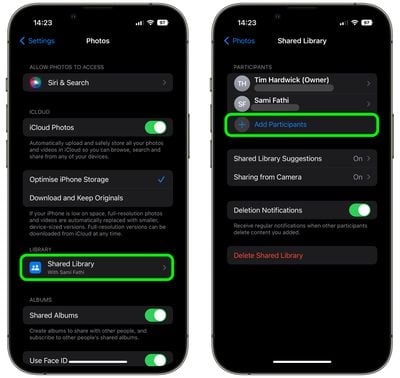
  1. Launch the Settings app on your iPhone.
  2. Scroll down and tap Photos.
  3. Under "Library," tap Shared Library.
  4. Tap Add Participants.
    settings

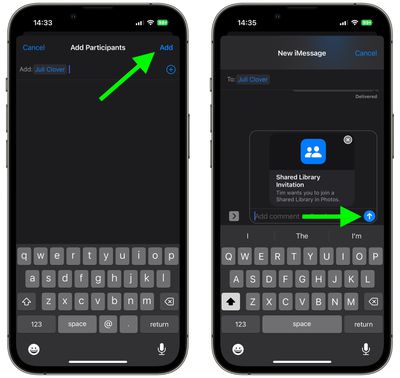
  5. Input the name of the person(s) you'd like to invite, then select their email address or number from the search of your contacts list. Tap the encircled + button if you want to add more people.
  6. Tap Add when you're done.
  7. Include a comment if desired, then tap the arrow in the blue circle to send them a shared library invitation over iMessage.
    settings

That's all there is to it. You will be notified by the Photos app when the invitation is accepted and the person(s) is added to the library as a participant.

Popular Stories

apple intelligence photos tools

Apple to Bring AI Reframing and Editing Tools to Photos App

Monday June 8, 2026 11:16 am PDT by
Apple today announced new AI-powered photo editing tools coming to the Photos app as part of Apple Intelligence, including an upgraded Clean Up tool, a new Extend tool, and a new Spatial Reframing feature. Spatial Reframing allows users to reposition the virtual camera angle of a photo after it has already been taken. By touching and dragging, users can adjust the framing and perspective of...
iOS 26 Glass Photos Feature

Apple Photos Finally Gets a Slideshow Maker

Monday June 8, 2026 5:04 pm PDT by
Apple today announced new slideshow features coming to the Photos app, allowing users to play any set of photos and videos as a slideshow. There are options to set the slide duration, transition style, and music. iOS 27 also lets users save any slideshow directly as a video to their Photos library for easy playback later. Additional new features include the ability to save individual...
iCloud iPhone 17 Pro

iPhone Users Who Pay for iCloud Storage Get Two New Perks on iOS 27

Thursday July 2, 2026 6:10 am PDT by
If you pay for certain iCloud+ storage plans beyond the 5GB that Apple offers for free, you will receive two more perks on iOS 27 at no additional cost. A summary of the two new iCloud+ perks on iOS 27:Increased daily usage limits for some new Apple Intelligence features, including image generation in the revamped Image Playground app. HomeKit Secure Video cameras receive generated video...