How to Use the New Control Center in iOS 10 - MacRumorsOpen MenuShow RoundupsShow Forums menuVisit ForumsOpen Sidebar
Skip to Content

How to Use the New Control Center in iOS 10

by

Although iOS 10 brings with it a few subtle visual and mechanical changes, some of its alterations to the most-used iPhone software features will probably be pretty easy to spot. One of those is the new Control Center, which has not only received a cosmetic upgrade, but has gotten a few new added abilities as well.


The Control Center, in essence, is no longer a single card stocked with all of the expected iOS features you've become used to seeing (like the flashlight, calculator, and timer) — it's now a sliding collection of three panels. The first is a basic launchpad of settings like Wi-Fi and Bluetooth, the second is dedicated to Apple Music, and the third houses your favorite accessories from Apple's new HomeKit-focused app "Home."
How To Control Center 6

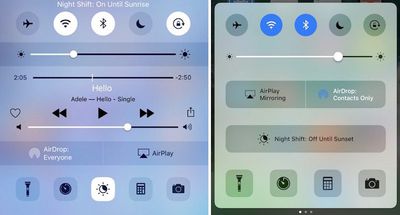
Control Center in iOS 9 (left) and iOS 10 (right)

Some of these shuffled-around buttons can make Control Center in iOS 10 a bit discombobulating when you first bring it up, so follow this guide to get a general impression of how to use Control Center, and how to find your favorite features that may not be where they were before.

Navigating Control Center in iOS 10

From anywhere in iOS 10 (including the main lock screen), swipe up from the bottom of the iPhone to bring up Control Center. The landing tab of Control Center mirrors a lot of the features from iOS 9 and prior versions of iOS, because it's there you'll find Airplane Mode, Wi-Fi, Bluetooth, Do Not Disturb, and Portrait Orientation Lock buttons lined up along the top of the tab, all sitting above the brightness toggle.

The second row of buttons brings the first major Control Center change in iOS 10: two medium-sized squares for AirPlay Mirroring and AirDrop, whose locations have been flipped this time around. AirPlay Mirroring lets you mirror your iPhone screen on a connected Apple TV, while the AirDrop button lets you toggle between "Receiving Off," "Contacts Only," and "Everyone" for Apple's media sharing tool.
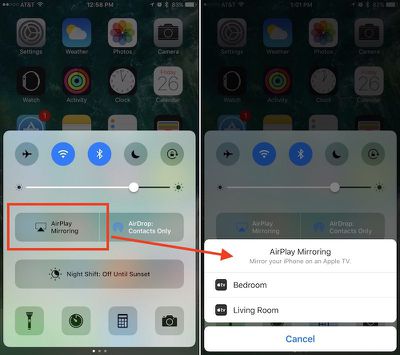
How To Control Center 2
Night Shift has its own dedicated row, so you can enable or disable the feature before its scheduled on/off times — in iOS 9 it was a small icon between timer and calculator. Lastly, at the bottom of the first Control Center tray, you'll find the Flashlight, Timer, Calculator, and Camera, unchanged from iOS 9. New, however, are 3D Touch shortcuts for each app: the Flashlight can change intensity, Timer includes common interval options, Calculator lets you copy the last result, and Camera has multiple picture options.

Controlling Music

While in the first panel of Control Center, swipe left to switch over to the Apple Music panel. With the iOS 10 update, Apple has moved music playback and volume controls into its own separate panel. The change will undoubtedly be a hassle for many iOS users who listen to music regularly, but with a dedicated section of Control Center a few of the controls have been enlarged and a new feature has been added.

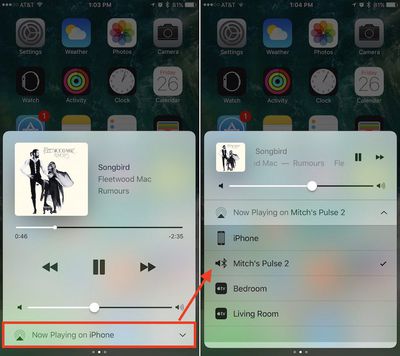
After starting a song in Apple Music, the new panel will come alive with the currently playing track, name of the artist and album, and scrub controls to jump to any section of the song. You can tap on any of these text readouts, and even the album artwork, to jump into the full Apple Music app. In addition to basic play, pause, rewind, and fast-forward buttons, and a volume toggle, Apple has introduced a new broadcast feature in Control Center as well.
How To Control Center 3
The button is located all the way at the bottom of the Apple Music section, and should default to "iPhone," so tap on it to see a list of potential devices you can connect to in order to expand the listening capabilities of the current track to a larger group. These devices could include any Bluetooth speaker within range that you've already set up via Settings, or a 3rd or 4th generation Apple TV. Choose whichever output you prefer to transfer playback to, and you can reset the iPhone as default by returning to Control Center, or simply powering down the connected device.

Controlling Home

If you plan on using Apple's new HomeKit app "Home," the third panel of Control Center should prove useful. Once synced up with any compatible HomeKit accessories in the main app, you can swipe left twice from the Control Center launchpad to gain a few basic controls over your smart light bulbs, thermostat, and more.

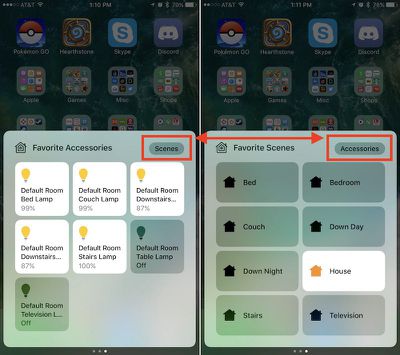
Before you get started in Control Center, make sure you have your accessories installed in Home. On the main screen in the app, tap "Edit" in the top right corner to rearrange your favorite accessories, the top nine of which will appear in Control Center. You can follow the same process to prioritize your favorite scenes to activate in Control Center.
Control Center How To 4
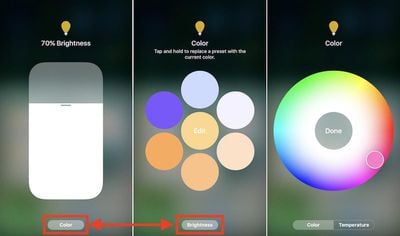
Within its section of Control Center, Home's actions are straightforward: you can tap each accessory to either turn it on or off, depending on its current state. More useful is a clever 3D Touch gesture that brings up a brightness toggle that allows for incremental percentage control of a connected lightbulb such as Hue, for example. Tap "Color" at the bottom of this screen to dive into a dynamic color wheel to pick six preset color options, or edit one to jump into a rainbow color selector to truly customize your lights within Control Center.

A "Temperature" wheel further lets you choose from brighter blue light or softer orange light. Although not automatic, this option is similar to Night Shift, letting you generate softer light at night to encourage better sleep. You can tap any empty space in these 3D Touch menus to return to Control Center.
How To Control Center 5
To get a glimpse of your favorite scenes — which are grouped collections of HomeKit accessories — tap the "Scenes" button in the top right of Control Center's third panel. Here you'll see your top eight favorite scenes, which offer similar on/off controls for each scene, but without any expanded 3D Touch support. Tap "Accessories" to return to the favorite accessories tab.

iOS 10 is full of new features that you'll find when you start playing around with the software update. Keep checking back with MacRumors for more helpful how-tos on everything from creating and sending handwritten text messages to avoiding tolls in Apple Maps to using lyrics in Apple Music and more.


Related Forum: iOS 10

Top Rated Comments

133 months ago
Why does the Night Shift button have to be so huge? There could be place for more buttons for useful settings instead of just this big button...
Score: 14 Votes (Like | Disagree)
133 months ago
Let me summarize:

iOS 9 - swipe up, touch, touch, done.

iOS 10 - swipe up, touch swipe left/right, touch, done

The controls aren't logically grouped either - splitting Airplay sound and Airplay mirroring in particular is just plain dumb.

While I appreciate larger fonts and controls, the whole OS update is cartoonishly large - one of the ugliest iOS versions of all. They've reduced information density and increased the amount of navigation required to complete a task - it's a terribly inefficient UI.

And don't get me started on the music app.
Score: 8 Votes (Like | Disagree)
133 months ago
While I appreciate larger fonts and controls, the whole OS update is cartoonishly large - one of the ugliest iOS versions of all. They've reduced information density and increased the amount of navigation required to complete a task - it's a terribly inefficient UI.

And don't get me started on the music app.
You mean the
Music App?
Score: 6 Votes (Like | Disagree)
133 months ago
I think the new control panel is a step down. Everything use to be in one place which worked for me now it's all divided up making too many swipes or gestures just to do the same thing. It also appears no one was using night mode in iOS 9 as now they are giving it a wider space all to its own (make that wasted space) to do the same thing. There a point where going too simplistic is getting a bit child like. Apple thinks we don't know where to go so they try and make it simpler and simplier and starts to get a little juvenile.
Score: 6 Votes (Like | Disagree)
133 months ago
I'm one of those who quite dislike the new control center, because I listen to music a lot and use the cc controls quite often.
The swiping is a nuisance and I didn't get any new features for it, so I don't really see the point of having that extra page. The album art is not worth it.
Score: 6 Votes (Like | Disagree)
Christoffee Avatar
133 months ago
Why does the Night Shift button have to be so huge? There could be place for more buttons for useful settings instead of just this big button...
Yup. Like power save!
Score: 5 Votes (Like | Disagree)

Popular Stories

apple pro tell logo

Apple Launching Five New Products Today

Thursday November 5, 2026 12:59 am PST by
Apple is launching five new products on Friday, November 6, following pre-orders that opened last week, including its first touchscreen MacBook Pro models. The following new products will be available from today: iPad mini with OLED display and A20 Pro chip iMac with M6 chip 14-inch MacBook Pro with M6 chip 14-inch MacBook Pro with OLED touchscreen 16-inch MacBook Pro with OLED...
duo aquarium

More Fun iPhone Duo Apps: 30 New Picks to Try

Friday November 6, 2026 3:27 pm PST by
When the iPhone Duo launched, we shared a list of some of the fun apps developers created for the new form factor. Two weeks out, developers are continuing to come up with fresh ideas, so we thought we'd share some of our favorites. Games Marbles Unhinged ($2.99) - Marbles Unhinged is a marble maze designed for the Duo. When you fold it, the floor turns into a ramp. If you stand the top...
silver iphone 18 pro

Apple Rumored to Drop the iPhone's Action Button Next Year

Friday November 6, 2026 6:07 am PST by
Apple plans to merge the iPhone's Action button with the Camera Control starting next year, according to the leaker known as "Instant Digital." In a new post on Weibo, the leaker claimed that a single press of the combined button would open the camera, while a long press would trigger the function assigned to the Action button. They explicitly clarified that the dedicated Action button would ...
Latest Stories
Early Apple Black Friday Deals on Apple Watch, MacBook Air, and More
17 hours ago
'Backglow' Lets You Customize New MacBook Pro's Glowing Apple Logo
17 hours ago
Top Stories: Apple Product Launches, iOS 27.3 Beta, and More
1 day ago
More Fun iPhone Duo Apps: 30 New Picks to Try
2 days ago
Hands-On With Apple's New OLED Touchscreen MacBook Pro
2 days ago
Apple Store With All-New Design Opening Soon in Southern California
2 days ago
Control the Glowing Apple Logo on Your New MacBook Pro
2 days ago
Apple Shares New 'Apple Card: Apply and Use in Minutes' Ad
2 days ago
Apple Says More Than 100,000 Apps Optimized for iPhone Duo, Here's What's Still Missing
2 days ago
Early Black Friday Deals Kickoff With Steep Discounts on Apple Watch Ultras and More
2 days ago
The MacRumors Show: iOS 27.3 Looks Like a Huge Update
2 days ago
Best Buy's Black Friday Event Begins With Sitewide Savings on Apple, TVs, More
2 days ago
Apple Releasing Yet Another Two New Products Next Week
2 days ago
MacBook Air Drops to Lowest Price in Months With Amazon's $250 Discount
2 days ago
Apple Rumored to Drop the iPhone's Action Button Next Year
2 days ago
Apple's Extended Return Policy Now in Effect for 2026 Holiday Season
2 days ago
Apple Music Classical Updated With New Icon and Refreshed Design
2 days ago
OLED iPad Mini, M6 iMac, and New MacBook Pros Available From Today
2 days ago
Apple Surveys iPhone Duo Buyers About Crease and Camera
3 days ago
Apple's First Touchscreen Mac is Now Arriving to Customers
3 days ago
Claude Gets Personal Finance Feature With Bank Account Linking
3 days ago
Apple Arcade Adds Crossy Road Rush and NBA 2K27
3 days ago
Apple's New HomeView Smart Home Hub: Here's How Much RAM It Has
3 days ago
iPad Mini vs. iPad Air Buyer's Guide: Now Just $50 Apart
3 days ago
First iOS 27.3 and macOS Golden Gate 27.3 Public Betas Now Available
3 days ago
Apple Announces a New Mac Sales Record
3 days ago
Paid $200 for Logic Pro? Apple Says You Won't Get This New Feature
3 days ago
Instagram's Edits Video Editor is Now Available on Mac
3 days ago
Prevent Siri and Search From Accessing Specific iPhone Apps
3 days ago
Best Early Black Friday Deals on iPhone 18 Pro and iPhone Duo
3 days ago








































