Messages in iOS 10: How to Use Digital Touch - MacRumorsOpen MenuShow RoundupsShow Forums menuVisit ForumsOpen Sidebar
Skip to Content

Messages in iOS 10: How to Use Digital Touch

by

In iOS 10, the Messages app is gaining Digital Touch, a communication feature that was previously limited to watchOS. With Digital Touch, you can send friends and family drawings, heartbeats, fireballs, kisses, and more, all with just a few taps.


Sketches, taps, and other Digital Touch messages created on your iPhone are also viewable on the Apple Watch and vice versa, giving you plenty of ways to express yourself. Here's how to use the new feature.
openingdigitaltouch

Accessing Digital Touch

  1. Open the Messages app.
  2. Open an existing conversation or start a new one.
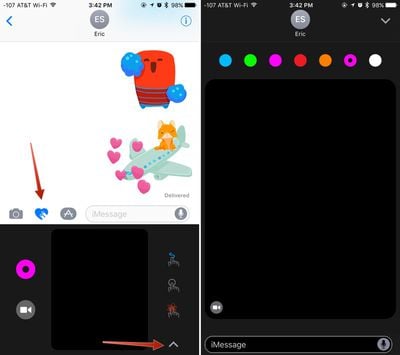
  3. Tap the icon that looks like two fingers over a heart.
  4. Tap on the arrow on the right hand side to expand the Digital Touch window.

You can send taps and drawings by using the smaller Digital Touch interface that replaces the keyboard, but there's more screen real estate to work with when it's expanded to the size of the full iPhone display.

The Digital Touch interface supports several tap-based gestures to send various taps and icons, plus it allows for drawing with a finger and annotating short videos with the included video tool.

Drawing

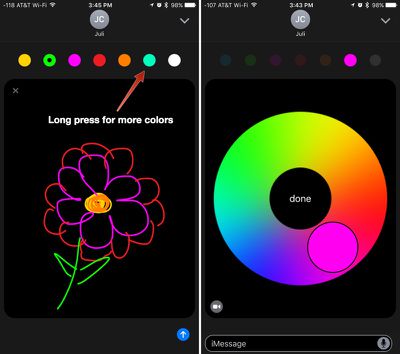
To draw with Digital Touch, just start sketching in the black Digital Touch box, visible both in standard view mode and full screen mode. When using the standard view, tap the small circle on the left side of the screen to see the different color options. In full screen mode, the colors are all available at the top.

TIP: To access custom colors, long press on any of the color swatches. It'll bring up a color wheel with custom color options for more personalized drawings.
digitaltouchdrawing
On the Apple Watch, Digital Touch drawings are sent as soon as your finger is removed from the screen for a few seconds, but on the iPhone and the iPad, you can take your time because drawings aren't sent until you tap the send arrow.

The person who receives your Digital Touch drawing will see it drawn out in real time, just as you sketched it. If you make a flower, for example, it'll play like a video, showing each petal drawn in succession.

When you receive a Digital Touch drawing in Messages, tap it and you can see it full screen.

Annotating Photos and Videos

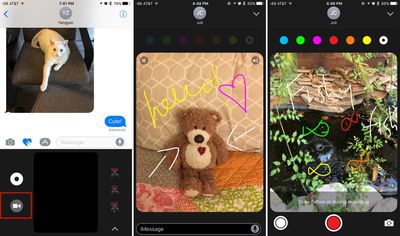
A Digital Touch feature unique to the iPhone and the iPad is the ability to snap photos or record short 10 second videos that can be annotated using Digital Touch sketching tools. Here's how:

  1. In the Digital Touch interface, tap on the Camera icon.
  2. Choose the front-facing or rear-facing camera by pressing the smaller camera icon on the bottom right of the screen. The front-facing camera is the default.
  3. Tap the red button to start recording. While the video is recording, you can use the Digital Touch tools to draw on top of it.

    digitaltouchphotos

  4. Alternatively, if you want to draw on the screen before you start recording, simple start sketching with a finger. When finished, tap record and your video will record with your drawing on top.
  5. To take a photo, press the white button instead of the red button, and then draw on top of it as you would for a video.
  6. In addition to drawing on photos and videos, use tap gestures to add taps, heartbeats, kisses, and more.
  7. Press the blue arrow to send your finished photo or video.
Taps, Kisses, and Heartbeats

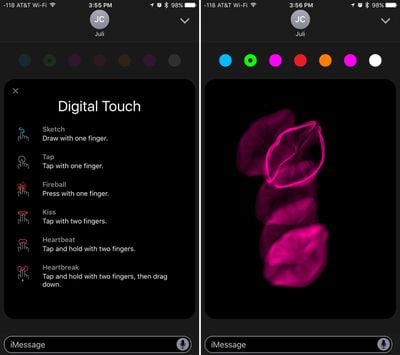
There are several different Digital Touch gestures, each with a different effect. You can send kisses, heartbeats, taps, fireballs, and more. Below is a list of the gestures and their effects.

  • Single finger on the screen - Starts a drawing.
  • Single finger tap - Sends circular "taps" in the selected color. One tap sends one circle, and you can send multiples.
  • Single finger press - Sends a fireball. Hold down longer for a longer lasting fireball animation.
  • Two finger tap - Sends a kiss. Tap multiple times to send multiple kisses.
  • Two finger tap and hold - Sends a beating heart.
  • Two finger tap and hold, then a downward drag - Sends a heart that beats and then breaks in two.

Sending Digital Touch content can only be done on an iPhone running iOS 10 or an Apple Watch running watchOS 2 or 3, but it can be viewed on iOS devices running older versions of the operating system and on Macs in the Mac Messages app.
digitaltouchgestures
You can combine all of the photo, sketching, and gesture tools in Digital Touch to create unique multimedia messages to share with friends and family and make communicating more fun.

As a side note, Digital Touch messages are temporary. They will be deleted after a few minutes unless you tap on "Keep" in the messages window to permanently save them.


Related Forum: iOS 10

Top Rated Comments

Cineplex Avatar
133 months ago
Okay. The messages app is a mess! The interface is not clean and intuitive at all. Its is so anti-Apple it's not funny.

Score: 5 Votes (Like | Disagree)
133 months ago
The "digital touch" messages seem to send instantly. Example - I press/hold with one finger to send the "fireball", and as soon as I lift my finger from the screen it automatically sends - no "blue send button", no "do you want to send" prompt...just sends instantly. Am I doing it wrong or missing something? Not really a fan of having these messages just send on their own.
Score: 3 Votes (Like | Disagree)
132 months ago
I would prefer the "adult" setting for Messages, which removes most of the new/cute features. Many of the new features are obviously aimed at the under-16 age group. And yes, the interface with all that cutsie stuff is a mess.
Why is it adult or some other type of irrelevant overgeneralized stereotypical grouping that needs to be used there. You want a set of options to control what is available in the Messages app (and perhaps other places), it's that simple and straightforward. For the time being, simply not using those things mostly does the job in a similar fashion.
Score: 2 Votes (Like | Disagree)

Popular Stories

apple pro tell logo

Apple Launching Five New Products Today

Thursday November 5, 2026 12:59 am PST by
Apple is launching five new products on Friday, November 6, following pre-orders that opened last week, including its first touchscreen MacBook Pro models. The following new products will be available from today: iPad mini with OLED display and A20 Pro chip iMac with M6 chip 14-inch MacBook Pro with M6 chip 14-inch MacBook Pro with OLED touchscreen 16-inch MacBook Pro with OLED...
duo aquarium

More Fun iPhone Duo Apps: 30 New Picks to Try

Friday November 6, 2026 3:27 pm PST by
When the iPhone Duo launched, we shared a list of some of the fun apps developers created for the new form factor. Two weeks out, developers are continuing to come up with fresh ideas, so we thought we'd share some of our favorites. Games Marbles Unhinged ($2.99) - Marbles Unhinged is a marble maze designed for the Duo. When you fold it, the floor turns into a ramp. If you stand the top...
silver iphone 18 pro

Apple Rumored to Drop the iPhone's Action Button Next Year

Friday November 6, 2026 6:07 am PST by
Apple plans to merge the iPhone's Action button with the Camera Control starting next year, according to the leaker known as "Instant Digital." In a new post on Weibo, the leaker claimed that a single press of the combined button would open the camera, while a long press would trigger the function assigned to the Action button. They explicitly clarified that the dedicated Action button would ...
Latest Stories
Early Apple Black Friday Deals on Apple Watch, MacBook Air, and More
19 hours ago
'Backglow' Lets You Customize New MacBook Pro's Glowing Apple Logo
19 hours ago
Top Stories: Apple Product Launches, iOS 27.3 Beta, and More
1 day ago
More Fun iPhone Duo Apps: 30 New Picks to Try
2 days ago
Hands-On With Apple's New OLED Touchscreen MacBook Pro
2 days ago
Apple Store With All-New Design Opening Soon in Southern California
2 days ago
Control the Glowing Apple Logo on Your New MacBook Pro
2 days ago
Apple Shares New 'Apple Card: Apply and Use in Minutes' Ad
2 days ago
Apple Says More Than 100,000 Apps Optimized for iPhone Duo, Here's What's Still Missing
2 days ago
Early Black Friday Deals Kickoff With Steep Discounts on Apple Watch Ultras and More
2 days ago
The MacRumors Show: iOS 27.3 Looks Like a Huge Update
2 days ago
Best Buy's Black Friday Event Begins With Sitewide Savings on Apple, TVs, More
2 days ago
Apple Releasing Yet Another Two New Products Next Week
2 days ago
MacBook Air Drops to Lowest Price in Months With Amazon's $250 Discount
2 days ago
Apple Rumored to Drop the iPhone's Action Button Next Year
2 days ago
Apple's Extended Return Policy Now in Effect for 2026 Holiday Season
2 days ago
Apple Music Classical Updated With New Icon and Refreshed Design
2 days ago
OLED iPad Mini, M6 iMac, and New MacBook Pros Available From Today
2 days ago
Apple Surveys iPhone Duo Buyers About Crease and Camera
3 days ago
Apple's First Touchscreen Mac is Now Arriving to Customers
3 days ago
Claude Gets Personal Finance Feature With Bank Account Linking
3 days ago
Apple Arcade Adds Crossy Road Rush and NBA 2K27
3 days ago
Apple's New HomeView Smart Home Hub: Here's How Much RAM It Has
3 days ago
iPad Mini vs. iPad Air Buyer's Guide: Now Just $50 Apart
3 days ago
First iOS 27.3 and macOS Golden Gate 27.3 Public Betas Now Available
3 days ago
Apple Announces a New Mac Sales Record
3 days ago
Paid $200 for Logic Pro? Apple Says You Won't Get This New Feature
3 days ago
Instagram's Edits Video Editor is Now Available on Mac
3 days ago
Prevent Siri and Search From Accessing Specific iPhone Apps
3 days ago
Best Early Black Friday Deals on iPhone 18 Pro and iPhone Duo
3 days ago









































