

Messages in iOS 10: How to Send Handwritten Notes - MacRumorsOpen MenuShow RoundupsShow Forums menuVisit ForumsOpen Sidebar
Skip to Content

Messages in iOS 10: How to Send Handwritten Notes

by

The Messages app in iOS 10 has been entirely overhauled, adding a slew of new capabilities that make it more fun to keep in touch with friends and family. One of the more personal touches added to Messages is a new handwriting feature, which allows users to send handwritten messages to their loved ones.

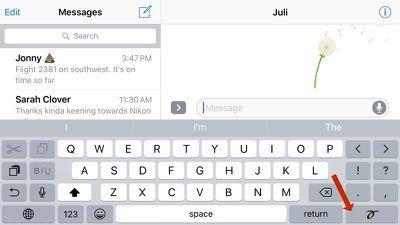
Using the handwriting feature is simple, but it's also a bit hidden on the iPhone, because the button to activate it won't show up unless you're in landscape mode. Here's how to do it:

  1. On an iPhone, turn it to landscape mode. On the iPad, you can use handwriting in landscape or portrait mode.
    handwrittennote

  2. Tap the handwriting squiggle to the right of the return key on the iPhone or to the right of the number key on the iPad. On the iPhone 6 and 6s, the handwriting screen will pop up automatically.
  3. Use a finger to write whatever you would like to say on the screen. Once you reach the end of the screen, press the arrow if you would like to keep writing. Go back to the beginning by using a two finger swipe.

    handwrittenote2

  4. Alternatively, tap one of the pre-written options below, which include phrases like "thank you," "happy birthday," and "I'm sorry."
  5. When finished, tap "Done" to return to the standard keyboard. Your handwritten message will be available as an image to send in the message compose box.

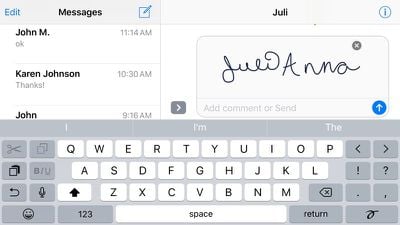
    handwrittennote3

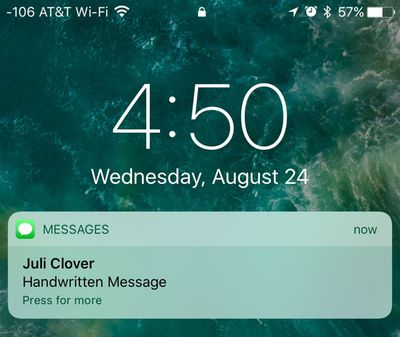
After you send your handwritten message to someone, it will display as a neat little animation that lets the person on the other end watch as you write each letter. Handwritten messages need to be viewed within the Messages app and notifications for them will simply read "Handwritten Message."
handwrittenmessagenotification
Message length is limited to two screens on the iPhone or iPad, so the handwriting feature is primarily designed for short phrases meant to complement longer text messages, but it's a simple addition that adds a sweet personal touch to your conversations. As a bonus, it can also be used to send little drawings, much like Digital Touch.


Related Forum: iOS 10

Top Rated Comments

128 months ago
For all the complaints about how all the messaging features have just bloated things, they've kinda dramatically changed how I communicate with people. It's more fun and engaging and man if we are going to restrict our communication to texting, we should be trying to make it as engaging as possible.
Score: 4 Votes (Like | Disagree)
riverfreak Avatar
128 months ago
Good write-ups on the new features of messages, Juli. Thanks.
Score: 3 Votes (Like | Disagree)
128 months ago
Excellent use of the 3.3 billion transistors in the A10 chip. Finger painting like a cave man. How far we've come.

(someone had to make the first snarky remark)
Score: 2 Votes (Like | Disagree)
DCJ001 Avatar
128 months ago
Is it possible to see the handwritten message if you're not on iOS 10?
Yes!
Score: 1 Votes (Like | Disagree)
128 months ago
Is it possible to see the handwritten message if you're not on iOS 10?
Score: 1 Votes (Like | Disagree)
myrtlebee Avatar
128 months ago
Don't care what anyone says, this is pretty fun. Actually loving iOS 10.
Score: 1 Votes (Like | Disagree)

Popular Stories

iCloud iPhone 17 Pro

iPhone Users Who Pay for iCloud Storage Get Two New Perks on iOS 27

Thursday July 2, 2026 6:10 am PDT by
If you pay for certain iCloud+ storage plans beyond the 5GB that Apple offers for free, you will receive two more perks on iOS 27 at no additional cost. A summary of the two new iCloud+ perks on iOS 27:Increased daily usage limits for some new Apple Intelligence features, including image generation in the revamped Image Playground app. HomeKit Secure Video cameras receive generated video...
iPhone 4 on Black Feature

Apple Facing One of Its Worst Leaks Since the iPhone 4

Thursday July 2, 2026 9:53 am PDT by
Apple supplier Tata Electronics recently suffered a cyberattack that resulted in thousands of confidential files being published on the dark web, and this reportedly included some photos and documents related to the upcoming iPhone 18 Pro. We have elected not to share any of the leaked photos in this story due to the illegal nature in which they were obtained, but they can easily be found...
American Express Gold Apple Pay Feature

American Express Announces New Apple Pay Feature

Tuesday June 30, 2026 10:27 am PDT by
American Express today announced that you can now redeem Membership Rewards points when checking out with Apple Pay on the web and in apps on the iPhone and iPad. When checking out with Apple Pay on iOS 18 or iPadOS 18 or later, tap on your eligible American Express card (Platinum, Gold, Green, and others) and select the Membership Rewards points option. You can use points to cover all or...















