How to Create Your iPhone Contact Poster - MacRumorsOpen MenuShow RoundupsShow Forums menuVisit ForumsOpen Sidebar
Skip to Content

How to Create Your iPhone Contact Poster

by

With iOS 17, Apple introduced Contact Posters to its stock Phone and Contacts apps. Keep reading to learn what Contact Posters are and how to use them.
Contact Posters iOS 17
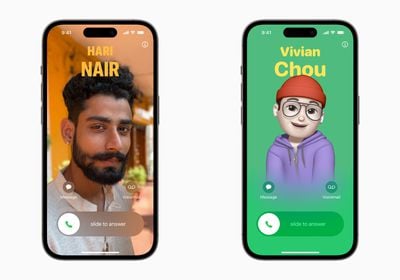
Apple in iOS 17 offers iPhone users a novel way to express themselves when it comes to calls, with the addition of personalizable Contact Posters.

Contact Posters allow you to customize how you're represented when you call another iPhone owner. You can use photos and emoji to personalize your Contact Poster, which appears on a person's iPhone when you call them. And like the iPhone Lock Screen, you can match images with eye-catching typography.

But your Contact Poster doesn't just show up in calls. It's also part of your contact card in the Contacts app, giving consistency in the places where you communicate and share. Apple has also made APIs available to developers so that Contact Posters appear for third-party VoIP apps, too.

As mentioned above, customizing your Contact Poster works a lot like personalizing your Lock Screen. You can choose an image, font, and color. The following steps show you how it's done on devices running iOS 17 and later.

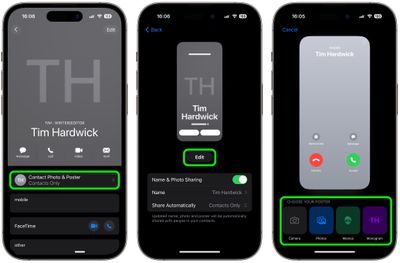
  1. Open the Contacts app and tap on your own name.
  2. Tap the Contact Photo & Poster option.
  3. Tap Edit, then tap Customize.
  4. Tap Poster.
  5. Use the buttons at the bottom of the screen to take a photo, choose a photo you want to use from your library, pick a Memoji, or add a simple Monogram of your initials.
    contacts

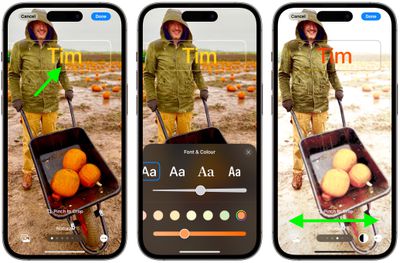
  6. To go along with your chosen image, you can optionally customize the font size, style, and color. (Note that you cannot change your name from this interface - that needs to be done by changing your contact info.)
  7. Swipe across the poster to preview a selection of filters, including black and white, duotone, and color wash in the color of your choice.
  8. When you're ready, tap Done to preview what a person sees when you call them. If you're happy with the look, tap Continue.
  9. Now you can opt to edit the crop of your Contact Photo, choose a different photo to use, or Skip this step.
    contacts

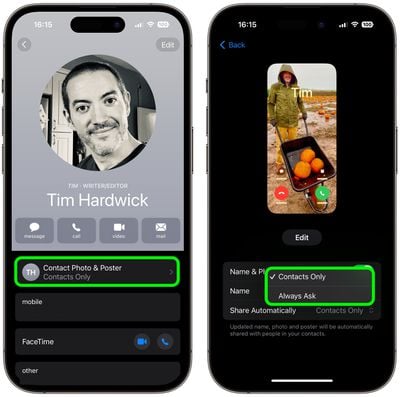
That's your Contact Poster and Contact Photo complete. Contact Posters can be shared with your contacts automatically, or you can wait to be prompted to share your poster with anyone who calls you so that no one sees your custom imagery without your permission.

Note that to account for Contact Posters, the design of the Contacts app has been tweaked. When you tap on a contact, you'll now see that their contact image, Memoji, or initials take up a much larger portion of the screen. This also counts for contacts where you've assigned an image.
contacts
You can tap on the Contact Photo and Poster option underneath the person's name to choose to update to the latest info automatically when your contact changes something like their profile photo, or turn on manual updates so you're prompted for the update.


Top Rated Comments

jaster2 Avatar
41 months ago
Hmm… so if someone creates their contact poster with some kind of obscene or NSFW image, it’s going to display on the unlucky recipient’s phone?
Score: 16 Votes (Like | Disagree)
JungleNYC Avatar
41 months ago

Hmm… so if someone creates their contact poster with some kind of obscene or NSFW image, it’s going to display on the unlucky recipient’s phone?
Making my poster now! 😉
Score: 6 Votes (Like | Disagree)
41 months ago

It’s weird how they seem to have decided to merge the setting of your iCloud / Apple ID Profile Picture with the settings of your Caller ID Poster like those are two completely different things? It took me forever to figure out how to change my iCloud Account photo (the one in a circle) and not the Call Poster unless I missed some settings somewhere.

Also you can do the same changes in settings > Messages which makes it even more confusing
This reminds me of the iOS 16 locked screen image/style/widget management accessed from the locked screen rather than from the device settings where we typically do everything - it's completely counterintuitive, I've had to explain how to get there to several folks around me, but somehow Apple thinks it's where it belongs.

Score: 6 Votes (Like | Disagree)
contacos Avatar
41 months ago
It’s weird how they seem to have decided to merge the setting of your iCloud / Apple ID Profile Picture with the settings of your Caller ID Poster like those are two completely different things? It took me forever to figure out how to change my iCloud Account photo (the one in a circle) and not the Call Poster unless I missed some settings somewhere.

Also you can do the same changes in settings > Messages which makes it even more confusing
Score: 6 Votes (Like | Disagree)
41 months ago
For those of you who say that Apple doesnt innovate any longer. How do you explain contact posters? Checkmate ppl....
Score: 5 Votes (Like | Disagree)
kingtj1971 Avatar
41 months ago

If you were at my dinner party your phone would be in your jacket pocket in the cloakroom. Give your fellow diners and your hosts your full attention or hit the road. :)
Fair enough. I'm not the kind to attend dinner parties formal enough to require suit jackets or restaurants with coat rooms, though. (After buying the new iPhone, my budget is more Arby's or Wendy's. Heh.)
Score: 4 Votes (Like | Disagree)

Popular Stories

duo aquarium

More Fun iPhone Duo Apps: 30 New Picks to Try

Friday November 6, 2026 3:27 pm PST by
When the iPhone Duo launched, we shared a list of some of the fun apps developers created for the new form factor. Two weeks out, developers are continuing to come up with fresh ideas, so we thought we'd share some of our favorites. Games Marbles Unhinged ($2.99) - Marbles Unhinged is a marble maze designed for the Duo. When you fold it, the floor turns into a ramp. If you stand the top...
apple pro tell logo

Apple Launching Five New Products Today

Thursday November 5, 2026 12:59 am PST by
Apple is launching five new products on Friday, November 6, following pre-orders that opened last week, including its first touchscreen MacBook Pro models. The following new products will be available from today: iPad mini with OLED display and A20 Pro chip iMac with M6 chip 14-inch MacBook Pro with M6 chip 14-inch MacBook Pro with OLED touchscreen 16-inch MacBook Pro with OLED...
iOS 28 AI

Apple Taking New Approach to Developing iOS 28 and macOS 28

Sunday November 8, 2026 7:42 am PST by
Apple has made a change to its development process for iOS 28, macOS 28, and corresponding software updates, according to Bloomberg's Mark Gurman. In his Power On newsletter today, he said Apple separates development of each year's new operating systems into three major stages. Typically, he said each stage consists of four weeks of coding followed by a four-week "convergence" period where...
Latest Stories
Apple Store Subscription Sign-Up Controversy Exposed
45 minutes ago
Siri AI Rumored to Become 'More Like an Agent' as Early as Next Year
11 hours ago
Apple Taking New Approach to Developing iOS 28 and macOS 28
13 hours ago
Early Apple Black Friday Deals on Apple Watch, MacBook Air, and More
1 day ago
'Backglow' Lets You Customize New MacBook Pro's Glowing Apple Logo
1 day ago
Top Stories: Apple Product Launches, iOS 27.3 Beta, and More
2 days ago
More Fun iPhone Duo Apps: 30 New Picks to Try
2 days ago
Hands-On With Apple's New OLED Touchscreen MacBook Pro
2 days ago
Apple Store With All-New Design Opening Soon in Southern California
2 days ago
Control the Glowing Apple Logo on Your New MacBook Pro
2 days ago
Apple Shares New 'Apple Card: Apply and Use in Minutes' Ad
2 days ago
Apple Says More Than 100,000 Apps Optimized for iPhone Duo, Here's What's Still Missing
2 days ago
Early Black Friday Deals Kickoff With Steep Discounts on Apple Watch Ultras and More
2 days ago
The MacRumors Show: iOS 27.3 Looks Like a Huge Update
3 days ago
Best Buy's Black Friday Event Begins With Sitewide Savings on Apple, TVs, More
3 days ago
Apple Releasing Yet Another Two New Products Next Week
3 days ago
MacBook Air Drops to Lowest Price in Months With Amazon's $250 Discount
3 days ago
Apple Rumored to Drop the iPhone's Action Button Next Year
3 days ago
Apple's Extended Return Policy Now in Effect for 2026 Holiday Season
3 days ago
Apple Music Classical Updated With New Icon and Refreshed Design
3 days ago
OLED iPad Mini, M6 iMac, and New MacBook Pros Available From Today
3 days ago
Apple Surveys iPhone Duo Buyers About Crease and Camera
3 days ago
Apple's First Touchscreen Mac is Now Arriving to Customers
3 days ago
Claude Gets Personal Finance Feature With Bank Account Linking
3 days ago
Apple Arcade Adds Crossy Road Rush and NBA 2K27
3 days ago
Apple's New HomeView Smart Home Hub: Here's How Much RAM It Has
3 days ago
iPad Mini vs. iPad Air Buyer's Guide: Now Just $50 Apart
3 days ago
First iOS 27.3 and macOS Golden Gate 27.3 Public Betas Now Available
3 days ago
Apple Announces a New Mac Sales Record
3 days ago
Paid $200 for Logic Pro? Apple Says You Won't Get This New Feature
3 days ago