iOS 18: Arrange Icons Around Your iPhone Wallpaper - MacRumorsOpen MenuShow RoundupsShow Forums menuVisit ForumsOpen Sidebar
Skip to Content

iOS 18: Arrange Icons Around Your iPhone Wallpaper

by

With iOS 18, Apple overhauled the Home Screen, introducing design changes that allow for more customization and personalization. One of the changes is the freedom to arrange icons and widgets with space between them, opening up a variety of new layout options.
ios 18 home screen icons
In iOS 17, new apps added to the ‌Home Screen‌ automatically occupy the next available spot, and there is no way to space out icons on the same page. But with iOS 18, you have more flexibility in arranging your ‌Home Screen‌.

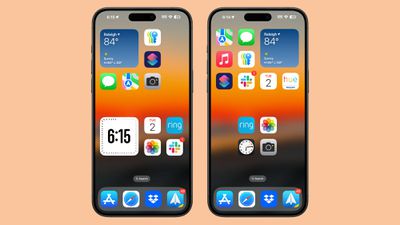
You can now choose the exact location for new apps, allowing for app icon-sized gaps between apps, entire empty rows, or entire empty columns. However, due to the invisible grid system, icons and widgets cannot be placed with uneven spacing, so this should be considered when arranging your ‌Home Screen‌.

This design enables a variety of layouts: For example, you can place a single app in the center of a page, create a row of apps at the top and bottom, form a column of apps, and more. Apple's goal here is to let you organize apps and widgets around wallpapers and create more functional and visually appealing layouts.

Here's how to place your icons where you want in iOS 18.

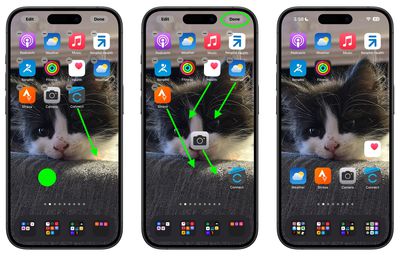
  1. Long press an empty space on the ‌Home Screen‌ to enter jiggle mode.
  2. Move your app icons into the desired positions within the invisible grid.
  3. Tap Done.

arrange home screen icons 1
In iOS 18, you can also make your icons bigger by removing the app names from them. Click the link to learn how it's done. iOS 18 is currently in public beta and will see a general release in the fall.


Top Rated Comments

iMac The Knife Avatar
25 months ago
Wow, it's 2024 and you now have the freedom to arrange icons and widgets with space between them. Brilliant.
Score: 15 Votes (Like | Disagree)
klky Avatar
25 months ago
It's insane that it's taken this long. Who did they hire that finally figured out this wizardry?
Score: 8 Votes (Like | Disagree)
coffeemilktea Avatar
25 months ago
I've been planning to remove all the icons so I can see my cat wallpaper with zero distractions. 😻
Score: 8 Votes (Like | Disagree)
Dr McKay Avatar
25 months ago

Wow, it's 2024 and you now have the freedom to arrange icons and widgets with space between them. Brilliant.
I wonder if the people I saw saying to others “If you want to have your icons anywhere, buy an android” will make use of this feature 🤔
Score: 5 Votes (Like | Disagree)
klky Avatar
25 months ago
I'm praying there's a way to disable or at least hide the stupid App Library page at the end. I hated it from day one and it's an absolute eye sore. Also it just seems completely unnecessary.

We've been able to arrange apps into folders for some time now. Soon we'll be able to place apps and folders wherever we want on the home screen. If they still force the App Library page at the end of all that, it would actually be hilarious. Basically, "Arrange things however you want, but we're still gonna do it our way and force you to see it".
Score: 5 Votes (Like | Disagree)
Unity451 Avatar
25 months ago
Maybe I'm in the minority here, but I genuinely wonder how many people take the time to organize their home screens to this level. I have accumulated so many apps on my phone that, with the exception of maybe less than 10, I just swipe down and search. Those 10 are so apps have been in the same place for so long that I have muscle memory of where they are. Moving them to try and organize the view would cause more problems than it would fix.
Score: 3 Votes (Like | Disagree)

Popular Stories

iCloud iPhone 17 Pro

iPhone Users Who Pay for iCloud Storage Get Two New Perks on iOS 27

Thursday July 2, 2026 6:10 am PDT by
If you pay for certain iCloud+ storage plans beyond the 5GB that Apple offers for free, you will receive two more perks on iOS 27 at no additional cost. A summary of the two new iCloud+ perks on iOS 27:Increased daily usage limits for some new Apple Intelligence features, including image generation in the revamped Image Playground app. HomeKit Secure Video cameras receive generated video...
Apple Event Logo

Apple Just Released a New Product

Thursday July 2, 2026 8:04 am PDT by
Apple's first product release of summer 2026 occurred this week, but do not get too excited, as it is merely the Beats Solo Buds in a new color. Beats Solo Buds are now offered in orange through Best Buy in the U.S., with availability set to expand to 7-Eleven stores in Japan on July 4. Apple already offered orange Solo Buds in India for free with the purchase of an iPhone 15 or iPhone 15 ...
iPhone 4 on Black Feature

Apple Facing One of Its Worst Leaks Since the iPhone 4

Thursday July 2, 2026 9:53 am PDT by
Apple supplier Tata Electronics recently suffered a cyberattack that resulted in thousands of confidential files being published on the dark web, and this reportedly included some photos and documents related to the upcoming iPhone 18 Pro. We have elected not to share any of the leaked photos in this story due to the illegal nature in which they were obtained, but they can easily be found...