

iOS 26: Restore Safari's Old Layout From iOS 18 - MacRumorsOpen MenuShow RoundupsShow Forums menuVisit ForumsOpen Sidebar
Skip to Content

iOS 26: Restore Safari's Old Layout From iOS 18

by

Missing the familiar Safari design from iOS 18? In iOS 26, currently in beta, Apple has learned from past criticism and made it easy to ditch the new Compact layout in favor of the classic tab layouts you may well prefer.

safari iphone
iOS 26 introduces a new "Compact" Safari design as the default, but Apple has included two additional layout options that essentially restore the iOS 18 experience. Here's how to get your old Safari back in just a few taps.

How to Switch to the iOS 18 Layouts

  1. Open Settings on your iPhone.
  2. Scroll down and tap Apps, then locate and tap Safari in the alphabetical list.
  3. Scroll down to the "Tabs" section.
  4. Select either Bottom or Top instead of Compact.
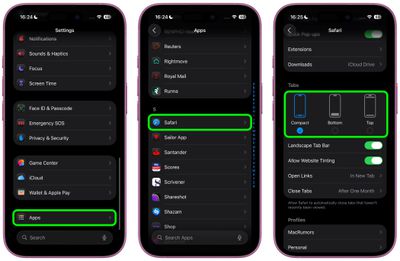
safari tabs settings ios

Both the Bottom and Top options function exactly like the Safari tab bar layouts from iOS 18, so you don't need to relearn how to navigate between tabs or access your bookmarks.

What's the Difference?

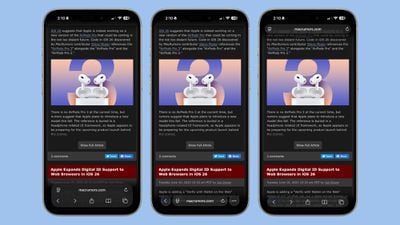
  • Compact Layout (Default): Hides the share, bookmark, and tab settings behind a three-dot button on the right side of the URL bar. It saves screen space but requires an extra tap to access frequently used features.
  • Bottom Layout: Places all Safari controls at the bottom of the screen, making them easily reachable with your thumb during one-handed use.
  • Top Layout: Keeps the traditional desktop-style layout with controls at the top of the browser.
ios 26 safari design dark mode

iOS 26's three Tab options from left to right: Bottom, Compact, Top

All three options now feature Apple's new Liquid Glass translucent design that blends the URL bar and buttons into the background of whatever webpage you're viewing. The translucent effect works in both Light and Dark Mode, and auto-adapts to match the webpage's color scheme.

Apple Learned From Its Mistake

This isn't the first time Apple has rethought Safari's design after user feedback. During iOS 15's beta testing, Apple initially changed Safari's design without providing layout alternatives and received full-throated negative feedback in return. It ultimately added options to revert to the original design. This time, Apple has gotten ahead of potential complaints by building choice directly into iOS 26, which will see a general release in September 2025.


Tag: Safari

Top Rated Comments

15 months ago
I just want to know which layout doesn't drain my battery by 1% every minute just reading MacRumors content.
Score: 8 Votes (Like | Disagree)
longofest Avatar
15 months ago

What lunatic puts the address bar to the bottom when every browser since Netscape 1.0 had it placed at the top.
The lunatics that realized that on a phone, your fingers/thumbs are at the bottom of the screen and so its easier to tap on the URL bar when its at the bottom of the window rather than the top for mobile browsers.
Score: 6 Votes (Like | Disagree)
n-evo Avatar
15 months ago
I’m really bummed out by the fact Safari for Mac doesn’t have a compact option anymore.
Score: 6 Votes (Like | Disagree)
transpo1 Avatar
15 months ago
Thank you, Apple, for giving us a choice in this matter. Now give us the choice to fully revert Photos to the iOS17 layout.

Again, thank you.
Score: 6 Votes (Like | Disagree)
15 months ago
Gotta say, the new design is much cleaner. Everything gets out of your way.

I’m not too sure how those who must have the address bar at the top manage, for me everything is within access of my thumb.

Good work.
Score: 4 Votes (Like | Disagree)
15 months ago
Good to see that users are given an option to choose from. I prefer the top version, however don't mind the compact version too.
Score: 3 Votes (Like | Disagree)

Popular Stories

iOS 27 Next to iPhone

Here's When iOS 27 Rolls Out Today in Every Time Zone [Update: It's Out]

Sunday September 13, 2026 3:00 am PDT by
Update 10:04 a.m.: iOS 27 is rolling out now, though it may take a bit for all users to see it, so keep checking! Apple is about to release iOS 27, which will finally deliver more advanced Siri AI capabilities as well as a variety of other refinements, improvements, and new features to iPhones. It's Apple's biggest software update of the year, and Apple announced at Wednesday's iPhone event...
iOS 27 Icon iPhone

iOS 27 Available Now With These 8 New Features

Monday September 14, 2026 9:00 am PDT by
Update — 10 a.m. Pacific Time: Apple has released iOS 27. During its iPhone 18 Pro and iPhone Duo event last week, Apple announced that iOS 27 will be released widely on Monday, September 14. iOS 27 should be available around 10 a.m. Pacific Time / 1 p.m. Eastern Time today via the Settings app, under General → Software Update. Below, we have highlighted eight new features and...
Apple iCloud Plus expansion hero

iCloud+ Now Includes Apple TV, Apple Arcade, and Curated Apple Music Stations in Over 100 Countries

Tuesday September 15, 2026 1:43 am PDT by
Apple today announced a new subscription initiative that turns paid iCloud+ subscriptions into a broader services bundle in more than 100 countries. In select countries, Apple says every paid iCloud+ plan, including the cheapest 50GB tier, now includes Apple TV and Apple Arcade "at no additional cost," while family sharing extends the storage, TV and Arcade access to up to five people....















