

How to Save Battery Life in iOS 9 With Low Power Mode - MacRumorsOpen MenuShow RoundupsShow Forums menuVisit ForumsOpen Sidebar
Skip to Content

How to Save Battery Life in iOS 9 With Low Power Mode

by

One frequent complaint of smartphone users is the limited amount of battery life our tech devices have. With the constant trend toward making devices thinner and lighter, battery life is a key tradeoff to be considered, and some users find their devices not lasting as long as they'd prefer.

For those pushing their devices to the limit, Apple has added a new feature to iOS 9 that is designed to help you conserve those last few drops of juice when you wont be able to charge your iPhone anytime soon. The new feature is known as Low Power Mode, and it can increase your battery life up to three hours but at the expense of some functions of your device. It is only available on iPhone devices running iOS 9.
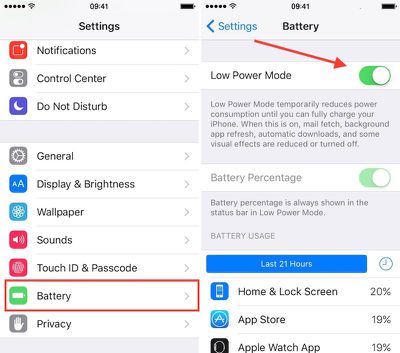
Low Power Mode
Enabling Low Power Mode only takes a few steps.

  1. Open the Settings app on your iPhone.
  2. Select Battery from the menu list.
  3. Toggle Low Power Mode to the On position.
  4. The battery icon will turn yellow to indicate that you are using Low Power Mode.

Low Power Mode reduces your iPhone's performance and cuts out some background activities. For example, mail must be fetched manually, background app refresh is disabled, and motion and brightness are reduced.

Benchmarks have shown the iPhone's CPU performance with Low Power Mode on is significantly reduced in an effort to save on power consumption, so while simple tasks may continue to work just fine on an iPhone in Low Power Mode, more demanding ones may become sluggish.

You don't have to keep Low Power Mode on all of the time; you can manually shut it off whenever you want. However, the general impression of users has been that the real-world slowdown is not so severe that you can't continue to use your iPhone.

With iOS 9, you will receive a prompt when your iOS device goes below 20 percent of its battery power left. The popup will allow you to quickly toggle Low Power Mode on so you can still use your device for only the most necessary of functions until you are able to recharge it.

This feature might be familiar to Apple Watch owners, as Power Reserve is a somewhat similar feature designed to allow the wrist-worn device to continue functioning as a basic watch as the battery drains toward zero by cutting off all other functions of the device.

Low Power Mode is a nice addition to iOS 9 for improving the performance of your iPhone's battery.


Related Forum: iOS 9

Top Rated Comments

143 months ago
A shame that they didn’t include an option to automatically enable it without a popup. I also think that they should have added it to the control centre.
Score: 10 Votes (Like | Disagree)
Westside guy Avatar
143 months ago
It's too bad you can't just pick a battery level and tell iOS to automatically turn on Low Power Mode when it hits that point.

I'll go out on a limb and predict this idea will be in a new jailbreak tweak within a few days of iOS 9 being jailbroken, because it's so bleeding obvious.
Score: 4 Votes (Like | Disagree)
143 months ago
Wonder why this feature hasn't been added to both the iPad and iPod Touch.
Score: 2 Votes (Like | Disagree)
rediffusion Avatar
143 months ago
I wish you could set specific times of the day to automatically go into Low Battery mode (i.e. night time, when I'm at work, etc)
Score: 2 Votes (Like | Disagree)
143 months ago
A shame that they didn’t include an option to automatically enable it without a popup. I also think that they should have added it to the control centre.
That's actually a great, simple idea. I would much rather have a Low Power Mode in CC than the Camera, especially since my Camera app is in my dock.
Score: 2 Votes (Like | Disagree)
143 months ago
Looks like IOS9 turns low power mode off automatically.

I left my phone in low power mode last night, but charging. This morning, I missed the exact message, but it had automatically turned off low power mode and said something like "Low Power mode turned off because you now have sufficient battery charge".
true. this happens at 80% battery level
Score: 2 Votes (Like | Disagree)

Popular Stories

iOS 27 Next to iPhone

Here's When iOS 27 Rolls Out Today in Every Time Zone [Update: It's Out]

Sunday September 13, 2026 3:00 am PDT by
Update 10:04 a.m.: iOS 27 is rolling out now, though it may take a bit for all users to see it, so keep checking! Apple is about to release iOS 27, which will finally deliver more advanced Siri AI capabilities as well as a variety of other refinements, improvements, and new features to iPhones. It's Apple's biggest software update of the year, and Apple announced at Wednesday's iPhone event...
iOS 27 Icon iPhone

iOS 27 Available Now With These 8 New Features

Monday September 14, 2026 9:00 am PDT by
Update — 10 a.m. Pacific Time: Apple has released iOS 27. During its iPhone 18 Pro and iPhone Duo event last week, Apple announced that iOS 27 will be released widely on Monday, September 14. iOS 27 should be available around 10 a.m. Pacific Time / 1 p.m. Eastern Time today via the Settings app, under General → Software Update. Below, we have highlighted eight new features and...
Apple iCloud Plus expansion hero

iCloud+ Now Includes Apple TV, Apple Arcade, and Curated Apple Music Stations in Over 100 Countries

Tuesday September 15, 2026 1:43 am PDT by
Apple today announced a new subscription initiative that turns paid iCloud+ subscriptions into a broader services bundle in more than 100 countries. In select countries, Apple says every paid iCloud+ plan, including the cheapest 50GB tier, now includes Apple TV and Apple Arcade "at no additional cost," while family sharing extends the storage, TV and Arcade access to up to five people....













