iOS 18: Add Multiple Pages to Control Center - MacRumorsOpen MenuShow RoundupsShow Forums menuVisit ForumsOpen Sidebar
Skip to Content

iOS 18: Add Multiple Pages to Control Center

by

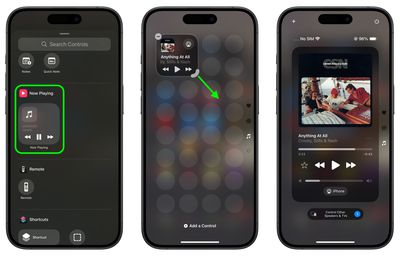
iOS 18 overhauls the Control Center by letting you reorder, resize, and remove buttons, access a controls gallery, and add multiple screens, moving away from the single-screen layout of recent years. In this article we are going to show you how you can create dedicated pages for various control types, such as connectivity, HomeKit devices, and Accessibility options.
ios 18 control center pages
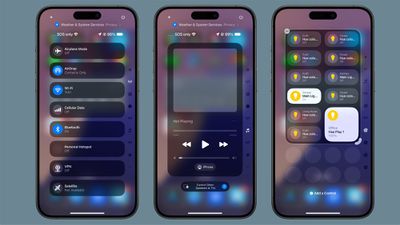
The new Control Center comes pre-configured with multiple default pages, which you can freely customize, add to, or remove. The system accommodates up to 15 separate screens, offering unprecedented flexibility when compared to previous versions of iOS.

Navigation between these pages is easy. You can swipe up and down through Control Center, tap small icons on the right side of the display, or hold and scrub through these icons for quick access. The following steps explain how to add additional pages to your Control Center.

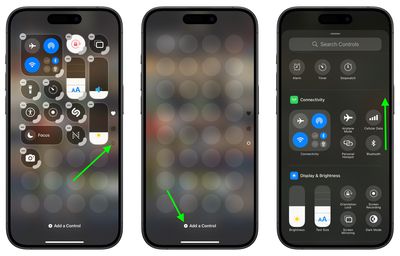
  1. Swipe down from the top-right corner of the screen to launch Control Center.
  2. Tap the circle icon at the bottom of the icon list, which indicates a new blank page.
  3. Tap Add a Control to open the Controls Gallery.
  4. Use the search field at the top, or browse the controls with a finger scroll to find the control that you want to include on the page, then tap it.
    control center

  5. Using the corner anchor, drag with your finger to expand the control if you wish.
  6. When finished, tap a space on the page to exit editing mode.
    control center

Control Center intelligently assigns icons to each page based on its content. When controls exceed the available space on a page, or if a resized control becomes too large, Control Center automatically creates a new page and relocates the excess controls. Bear in mind that the option to create a new page only appears when an existing page is approximately half full, ensuring adequate spacing between icons and maintaining a clean, organized layout.

iOS 18 and iPadOS 18 are currently in beta and expected to go on general release around mid-September.


Top Rated Comments

22 months ago
Reorganizing Control Center is a complete disaster. It has a fixed grid...so WHY does it have to automatically rearrange EVERYTHING on the page when I try to move a control from 1 spot to another? It's like having a rubix cube mini game in the way.
Score: 10 Votes (Like | Disagree)
Radin.Y Avatar
22 months ago
There is no constancy in design language here. there are way too many different designs. And the team that worked on this was not in communication with the rest of iOS teams, so the UI is so fragmented. This screen is so ugly!!
And with ever-growing size of displays, it is getting more and more difficult to reach the top corner to access the Control Center.
Score: 6 Votes (Like | Disagree)
miamialley Avatar
22 months ago
I took away the extra pages, only to leave the one page of shortcuts.
Score: 5 Votes (Like | Disagree)
22 months ago
iOS is becoming as complex as Windows 7.
Score: 5 Votes (Like | Disagree)
22 months ago
Would be more useful if Control Center were most easily accessed, rather than having to stretch all the way up to reach for the tiny corner.
Score: 4 Votes (Like | Disagree)
Kylo83 Avatar
22 months ago
To much it should just be one place and swipe from the bottom, it’s to complicated and over done now
Score: 4 Votes (Like | Disagree)

Popular Stories

Apple Card iPhone 16 Pro Feature

Apple Card Promo to Offer Free AirPods Pro 3

Friday May 15, 2026 8:59 am PDT by
Starting as early as next week, customers who sign up for an Apple Card at Apple's retail stores in the U.S. will receive $249 cash back when they purchase AirPods Pro 3, according to Bloomberg's Mark Gurman. The promotion has yet to be officially announced by Apple, so exact terms and conditions are not available at this time. AirPods Pro 3 are priced at $249 in the U.S., so customers who...
Apple WWDC25 iOS 26 CarPlay Light mode 250609

Six Popular iPhone Apps Now Available on CarPlay

Thursday May 14, 2026 9:10 am PDT by
Apple's CarPlay system for accessing iPhone apps on a vehicle's dashboard screen has received six popular apps in recent weeks: ChatGPT, Perplexity, Grok, Google Meet, WhatsApp, and the indie artist streaming platform Audiomack. Make sure you have the latest version of each app and they will automatically appear on CarPlay. ChatGPT Starting with iOS 26.4, CarPlay supports voice-based...
ipad mini 7 blue

OLED iPad Mini: Release Date, Pricing, and What to Expect

Thursday May 14, 2026 5:08 am PDT by
According to the latest rumors, Apple is close to launching its next-generation iPad mini. So what should we expect from the successor to the iPad mini 7 that Apple released over a year ago? Read on to find out. Processor and Performance Apple is working on a next-generation version of the iPad mini (codename J510/J511) that features the A19 Pro chip, according to information found in code...