

iOS 26: Customize iPhone Alarm Snooze Duration (Finally!) - MacRumorsOpen MenuShow RoundupsShow Forums menuVisit ForumsOpen Sidebar
Skip to Content

iOS 26: Customize iPhone Alarm Snooze Duration (Finally!)

by

iOS 26 finally breaks free from the tyranny of the 9-minute snooze. Apple's latest update (currently in beta) lets you customize your iPhone's alarm snooze duration anywhere from 1 to 15 minutes, which may well put an end to years of morning routine frustration.
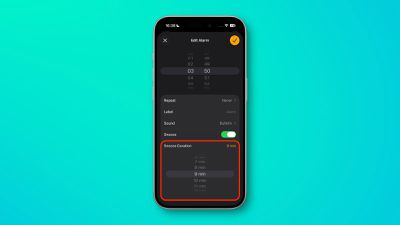
alarm snooze duration ios 26
Whether you only need a quick 2-minute buffer before rising from your slumber, or prefer a longer window to properly wake up, iOS 26 finally hands over the decision to you, the user. The rigid 9-minute default (a holdover from mechanical alarm clock limitations) never made sense anyway in the smartphone era.

Setting Your Custom Snooze Duration

Here's how to customize your alarm snooze time:

  1. Open the Clock app on your iPhone, then tap the Alarm tab at the bottom.
  2. Tap any existing alarm or create a new one by tapping the + button, top-left.
  3. In the alarm settings, make sure the Snooze option is toggled on, then tap the number next to Snooze Duration.
  4. Select your preferred duration from 1 to 15 minutes.
  5. Tap the big orange check mark to confirm your changes.

Remember that the custom snooze setting applies to individual alarms, so you can set, say, different durations for weekday versus weekend alarms.

New Ringtone Worth Trying
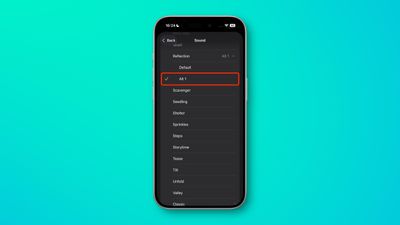
alarm
While you're customizing your alarm settings, check out the new "Reflection Alt 1" ringtone that Apple added in iOS 26. It offers a fresh take on the familiar "Reflection" tone with the same cool, glassy sound but a slightly different rhythm that might be perfect for waking up.

iOS 26 is currently in beta and is set to be released this fall.

Popular Stories

Apple Wallet

iOS 27 Will Add Two New Apple Wallet Features to Your iPhone

Monday June 1, 2026 12:15 pm PDT by
Apple is set to unveil iOS 27 during its WWDC 2026 keynote on Monday, June 8, and the update will reportedly include two new Apple Wallet features. First, iOS 27 will reportedly let users create their own digital passes by scanning items like movie tickets, concert passes, and gym membership cards. Many apps already offer Apple Wallet passes, but now users will be able to create a custom...
Dynamic Island iPhone 18 Pro Feature

iPhone 18 Pro Battery Capacities Allegedly Leaked

Tuesday June 2, 2026 1:54 am PDT by
Battery capacities for Apple's upcoming iPhone 18 Pro have allegedly surfaced, and the numbers suggest only a modest increase over the iPhone 17 Pro. According to prolific Weibo-based leaker Digital Chat Station, Apple is testing the iPhone 18 Pro with different battery capacities for the China and U.S. versions of the device, similar to last year's iPhone 17 Pro models. The Chinese model is ...
macOS 27 on MacBook Pro

Apple Says macOS 27 Won't Be Compatible With These Macs

Wednesday June 3, 2026 8:29 am PDT by
During WWDC 2025, Apple revealed that macOS 26 Tahoe would be the final major macOS version for Intel-based Macs. macOS 27 will be compatible with Apple silicon Macs only, meaning that you will need a Mac with an M-series chip or a MacBook Neo with an A18 Pro chip in order to install the software update. Apple will unveil macOS 27 during its WWDC 2026 keynote this Monday, June 8, and the...
















