iOS 27 Lets You Hide the Messages Button Everyone Hits by Mistake - MacRumorsOpen MenuShow RoundupsShow Forums menuVisit ForumsOpen Sidebar
Skip to Content

iOS 27 Lets You Hide the Messages Button Everyone Hits by Mistake

by

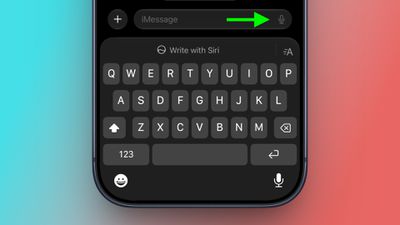
If you accidentally press the dictation or voice icon after sending a text in Messages, your music may pause while your iPhone starts listening. It's a small annoyance, but a frequent one, since the dictation/audio icon sits so close to the send arrow that stray taps are almost inevitable. In iOS 27 and iPadOS 27, Apple has finally given you a way to get rid of it.
messages
The issue is one that popstar Justin Bieber publicly complained about, claiming that the send button shouldn't have multiple functions so close together. The post went viral, and in iOS 27, Apple has done something about it.

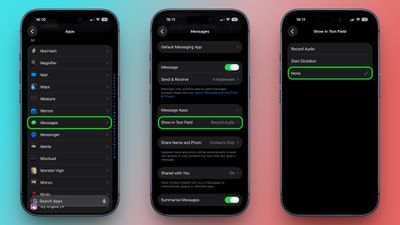
Quite simply, the message text field now has a new setting. You can choose whether it displays the audio waveform icon for recording a voice message, the microphone icon for dictation, or nothing at all. Here's how to find it:

  1. Open the Settings app on your iPhone or iPad.
  2. Tap Apps at the bottom of the list.
  3. Tap Messages.
  4. Tap Show in Text Field.
  5. Choose one of the three options: Record Audio, Start Dictation, or None.
    settings

If you keep tapping the text field icon by mistake, you'll want to choose None.

If you occasionally record voice messages, don't worry – you can still use the plus button to the left of the input field to enable Audio. If it's dictation you sometimes use, you'll find the microphone key at the bottom right of the iOS keyboard (if it's not there, go to Settings ➝ General ➝ Keyboard and turn on Enable Dictation.)

iOS 27 is remains in beta, with a public release expected sometime this September.

Related Roundups: iOS 27, iPadOS 27
Related Forum: iOS 27

Popular Stories

iOS 27 Next to iPhone

Here's When iOS 27 Rolls Out Today in Every Time Zone [Update: It's Out]

Sunday September 13, 2026 3:00 am PDT by
Update 10:04 a.m.: iOS 27 is rolling out now, though it may take a bit for all users to see it, so keep checking! Apple is about to release iOS 27, which will finally deliver more advanced Siri AI capabilities as well as a variety of other refinements, improvements, and new features to iPhones. It's Apple's biggest software update of the year, and Apple announced at Wednesday's iPhone event...
iOS 27 Icon iPhone

iOS 27 Available Now With These 8 New Features

Monday September 14, 2026 9:00 am PDT by
Update — 10 a.m. Pacific Time: Apple has released iOS 27. During its iPhone 18 Pro and iPhone Duo event last week, Apple announced that iOS 27 will be released widely on Monday, September 14. iOS 27 should be available around 10 a.m. Pacific Time / 1 p.m. Eastern Time today via the Settings app, under General → Software Update. Below, we have highlighted eight new features and...
iPhone Handoff Feature

iOS 27 Introduces New 'iPhone Handoff' Feature

Wednesday September 2, 2026 12:35 pm PDT by
Apple has added a new "iPhone Handoff" feature to iOS 27 that will allow you to switch between two iPhones while using the same phone number on each device. This functionality was briefly mentioned during the WWDC 2026 keynote in June, on a slide that listed hundreds of new features coming in iOS 27 and corresponding software updates, but Apple never shared any further details at the time. ...