iOS 18: Enhance Your Notes With These 4 New Features - MacRumorsOpen MenuShow RoundupsShow Forums menuVisit ForumsOpen Sidebar
Skip to Content

iOS 18: Enhance Your Notes With These 4 New Features

by

With iOS 18, Apple introduced several handy improvements to the Notes app, making it easier to organize information and add visual flair to your notes. Read on to learn how these new features can improve your note-taking experience.

iOS 18 Notes Feature
The following four new Notes features are worth getting acquainted with in iOS 18.

  • Collapsible sections allow for better organization of lengthy notes around titles and headers, making it easier to navigate complex documents.
  • New text highlighting options provide a way to emphasize important information visually, aiding in study and review.
  • Simplified file attachments streamline the process of creating comprehensive notes that incorporate various types of content.
  • Built-in audio recording feature that streamlines the process of capturing and transcribing voice notes.

Together, these updates make Notes a more powerful tool for capturing and organizing your ideas. Here's how to take advantage of the new collapsible sections, text highlighting, file attachment, and audio transcription options in iOS 18:

Collapsing Sections for Better Organization

To streamline longer notes, add collapsible sections in the following way:

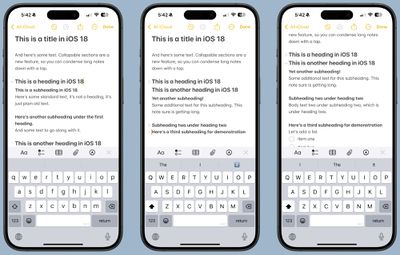
  1. Create a title, heading or subheading in your note.
  2. Tap the heading to select it.
  3. Tap the chevron that appears next to the heading to collapse the section and hide the associated text.
  4. Tap the arrow again to expand the section and reveal the associated text.
ios 18 notes collapsible headings

This feature works with any level of heading, allowing you to create a compact outline of your note's contents.

Adding Color With Text Highlighting

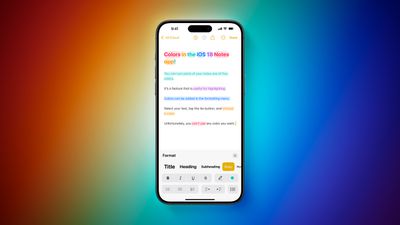
For the first time, Notes supports colored text highlighting. Here's how to highlight a portion of text:

  1. Select the word or phrase you want to highlight.
  2. Tap the "Aa" button in the formatting menu.
  3. Choose from five new highlight colors: Pink, purple, orange, mint, and blue.
iOS 18 Notes Highlight Feature 2
This simple addition allows you to emphasize important information or categorize different parts of your notes visually.

Attaching Files More Easily

In iOS 18, Apple has streamlined the process of adding files to your notes. Previously, you had to copy and paste a file into notes to add it, a process that required several steps. Now you can select the option from the toolbar icon:

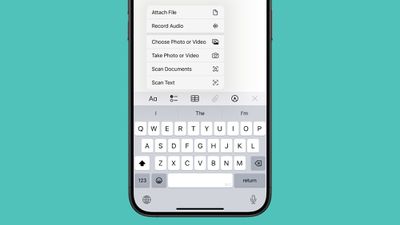
  1. Tap the new paperclip icon in the note toolbar.
  2. Select "Add File" from the menu.
  3. Choose a file from the Files app to attach it directly to your note.
ios 18 attach file
As an alternative, you can now long-press on a note in the list view and select "Add Attachment" to quickly add files without opening the note.

Recording Audio Within a Note

The new audio recording tool in Notes offers more than just simple voice capture. As you record, the app automatically generates a real-time transcript, making it easier to review and search through recorded content. It's particularly useful if attending lectures, meetings, or whenever you need to quickly capture and reference spoken information. The new audio recording and transcription functionality in Notes is available on iPhone 12 and later models.

  1. Open the Notes app and create a new note or open an existing one.
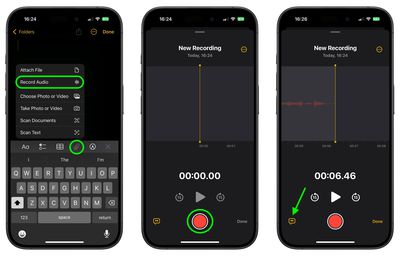
  2. Tap inside the note, then select the paperclip icon from the menu above the keyboard.
  3. Choose Record Audio from the pop-up menu.
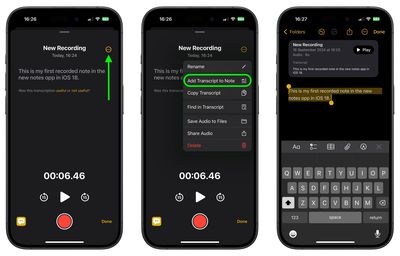
  4. Press the red record button to start recording, and tap it again to stop. To view the transcript, tap the quote bubble icon in the bottom-left corner.
    notes

  5. To add the full transcript to the note, tap the three-dot menu in the upper right corner.
  6. Select Add Transcript to Note from the dropdown menu.
    notes

That's all there is to it. While the audio recording feature offers new note-taking abilities, it's worth noting that it currently only supports English, but Apple will likely bring support for additional languages in a future update.

Summing Up

These new features in iOS 18's Notes app offer more flexibility in organizing information, emphasizing key points, and incorporating various types of content into your notes. Familiarize yourself with these tools and you'll be able to create more dynamic and useful notes for work, study, or personal use.

On October 28, 2024, Apple released iOS 18.1, which introduces new Writing Tools to Notes and other Apple apps, thanks to Apple Intelligence. With Writing Tools, AI features can proofread, summarize, and even rewrite your text. See our dedicated Writing Tools roundup for all the details.


Popular Stories

apple pro tell logo

Apple Launching Five New Products Today

Thursday November 5, 2026 12:59 am PST by
Apple is launching five new products on Friday, November 6, following pre-orders that opened last week, including its first touchscreen MacBook Pro models. The following new products will be available from today: iPad mini with OLED display and A20 Pro chip iMac with M6 chip 14-inch MacBook Pro with M6 chip 14-inch MacBook Pro with OLED touchscreen 16-inch MacBook Pro with OLED...

duo aquarium

More Fun iPhone Duo Apps: 30 New Picks to Try

Friday November 6, 2026 3:27 pm PST by
When the iPhone Duo launched, we shared a list of some of the fun apps developers created for the new form factor. Two weeks out, developers are continuing to come up with fresh ideas, so we thought we'd share some of our favorites. Games Marbles Unhinged ($2.99) - Marbles Unhinged is a marble maze designed for the Duo. When you fold it, the floor turns into a ramp. If you stand the top...


silver iphone 18 pro

Apple Rumored to Drop the iPhone's Action Button Next Year

Friday November 6, 2026 6:07 am PST by
Apple plans to merge the iPhone's Action button with the Camera Control starting next year, according to the leaker known as "Instant Digital." In a new post on Weibo, the leaker claimed that a single press of the combined button would open the camera, while a long press would trigger the function assigned to the Action button. They explicitly clarified that the dedicated Action button would ...
Latest Stories
Early Apple Black Friday Deals on Apple Watch, MacBook Air, and More
18 hours ago
'Backglow' Lets You Customize New MacBook Pro's Glowing Apple Logo
18 hours ago
Top Stories: Apple Product Launches, iOS 27.3 Beta, and More
1 day ago
More Fun iPhone Duo Apps: 30 New Picks to Try
2 days ago
Hands-On With Apple's New OLED Touchscreen MacBook Pro
2 days ago
Apple Store With All-New Design Opening Soon in Southern California
2 days ago
Control the Glowing Apple Logo on Your New MacBook Pro
2 days ago
Apple Shares New 'Apple Card: Apply and Use in Minutes' Ad
2 days ago
Apple Says More Than 100,000 Apps Optimized for iPhone Duo, Here's What's Still Missing
2 days ago
Early Black Friday Deals Kickoff With Steep Discounts on Apple Watch Ultras and More
2 days ago
The MacRumors Show: iOS 27.3 Looks Like a Huge Update
2 days ago
Best Buy's Black Friday Event Begins With Sitewide Savings on Apple, TVs, More
2 days ago
Apple Releasing Yet Another Two New Products Next Week
2 days ago
MacBook Air Drops to Lowest Price in Months With Amazon's $250 Discount
2 days ago
Apple Rumored to Drop the iPhone's Action Button Next Year
2 days ago
Apple's Extended Return Policy Now in Effect for 2026 Holiday Season
2 days ago
Apple Music Classical Updated With New Icon and Refreshed Design
2 days ago
OLED iPad Mini, M6 iMac, and New MacBook Pros Available From Today
2 days ago
Apple Surveys iPhone Duo Buyers About Crease and Camera
3 days ago
Apple's First Touchscreen Mac is Now Arriving to Customers
3 days ago
Claude Gets Personal Finance Feature With Bank Account Linking
3 days ago
Apple Arcade Adds Crossy Road Rush and NBA 2K27
3 days ago
Apple's New HomeView Smart Home Hub: Here's How Much RAM It Has
3 days ago
iPad Mini vs. iPad Air Buyer's Guide: Now Just $50 Apart
3 days ago
First iOS 27.3 and macOS Golden Gate 27.3 Public Betas Now Available
3 days ago
Apple Announces a New Mac Sales Record
3 days ago
Paid $200 for Logic Pro? Apple Says You Won't Get This New Feature
3 days ago
Instagram's Edits Video Editor is Now Available on Mac
3 days ago
Prevent Siri and Search From Accessing Specific iPhone Apps
3 days ago
Best Early Black Friday Deals on iPhone 18 Pro and iPhone Duo
3 days ago