iOS 18: Recording Audio With Transcripts in Notes - MacRumorsOpen MenuShow RoundupsShow Forums menuVisit ForumsOpen Sidebar
Skip to Content

iOS 18: Recording Audio With Transcripts in Notes

by

In iOS 18, Apple has made a significant enhancement to the Notes app, introducing a built-in audio recording feature that streamlines the process of capturing and transcribing voice notes. The new functionality is available on iPhone 12 and later models, and allows you to record audio directly within a note, eliminating the need to use separate apps or share files.
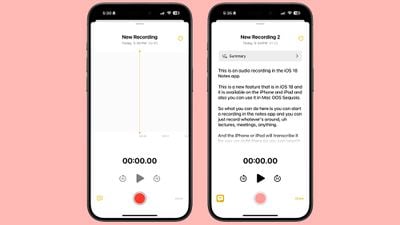
ios 18 notes app voice recording
The new audio recording tool in Notes offers more than just simple voice capture. As users record, the app automatically generates a real-time transcript, making it easier to review and search through recorded content. This feature is particularly useful for students attending lectures, professionals in meetings, or anyone who needs to quickly capture and reference spoken information.

Record a Voice Note and Get a Transcript

To use the new audio recording feature in iOS 18's Notes app, simply follow these steps:

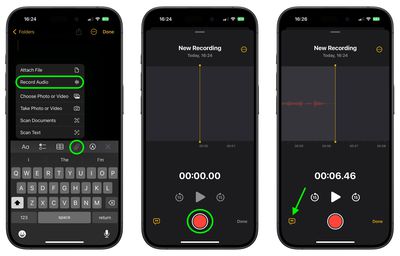
  1. Open the Notes app and create a new note or open an existing one.
  2. Tap inside the note, then select the paperclip icon from the menu above the keyboard.
  3. Choose Record Audio from the pop-up menu.
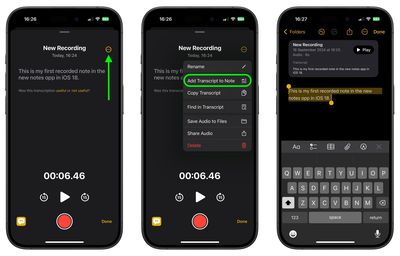
  4. Press the red record button to start recording, and tap it again to stop. To view the transcript, tap the quote bubble icon in the bottom-left corner.
    notes

  5. To add the full transcript to the note, tap the three-dot menu in the upper right corner.
  6. Select Add Transcript to Note from the dropdown menu.
    notes

That's all there is to it. While the audio recording feature offers new note-taking abilities, it's worth noting that it currently only supports English, but Apple will likely bring support for additional languages in a future update.

In an iOS 18 update coming later this year, Apple Intelligence will also be able to generate transcription summaries, offering a distilled, more easily digestible version of your voice recordings.


Top Rated Comments

Jxdawg Avatar
23 months ago
If only this was available when I was a student…

Also, proud of Apple for not slapping the AI label on it like so many other companies have been.
Score: 7 Votes (Like | Disagree)
23 months ago
An outstanding feature...one I'll be using a lot!
Score: 5 Votes (Like | Disagree)
23 months ago

If only this was available when I was a student…

Also, proud of Apple for not slapping the AI label on it like so many other companies have been.
I hear you...now everything from a data dashboard to a bayesian filter has now been rebranded as AI. Pretty soon my next cheeseburger will be AI-enhanced.

On another note, unless you are at least five years into retirement, we are all still students. The world is accelerating way, way too fast to not be studying (or practicing) something at all times. So I welcome any technology that helps us learn...including, almost ironically given my earlier statement...AI.
Score: 5 Votes (Like | Disagree)
kiranmk2 Avatar
23 months ago
Seems a bit complicated - too much clicking on strange icons or the three dots to find "hidden" options. I would have thought a better approach was to make this part of the Voice Recordings app and give a (clear) option to transcribe the recording and add this to the Notes app.
Score: 4 Votes (Like | Disagree)
23 months ago
I kind of wish the transcription text was actually transcribed onto the note itself (or at least be an option to do so) instead of being contained in the little voice module inside the note. A small annoyance but it would make navigating those much easier for me personally. For example, being able to use “Find in Note” directly from the note itself and not having to first click into the recording. Also, even if you don’t give the recording a title it doesn’t carry over to being the title of the actual note. Quite an annoying to have to title things twice.
Score: 3 Votes (Like | Disagree)
23 months ago
Isn't communicating without keeping a copy of the conversation the main idea of making a phone call?
Score: 3 Votes (Like | Disagree)

Popular Stories

iOS 27 and Notes Feature

iOS 27 Adds Four New Features to Notes App, Including Markdown Copy-and-Paste

Wednesday June 17, 2026 10:11 am PDT by
The upcoming iOS 27 update that Apple unveiled last week includes some new features and enhancements for Apple's Notes app on the iPhone. iOS 27 is currently available as a developer beta, with a public beta to follow in July. The update is expected to be released to all users in September. Below, we have outlined four additions to Apple's Notes app on iOS 27. Siri AI On the iPhone...
iCloud iPhone 17 Pro

iPhone Users Who Pay for iCloud Storage Get Two New Perks on iOS 27

Thursday July 2, 2026 6:10 am PDT by
If you pay for certain iCloud+ storage plans beyond the 5GB that Apple offers for free, you will receive two more perks on iOS 27 at no additional cost. A summary of the two new iCloud+ perks on iOS 27:Increased daily usage limits for some new Apple Intelligence features, including image generation in the revamped Image Playground app. HomeKit Secure Video cameras receive generated video...
iPhone 4 on Black Feature

Apple Facing One of Its Worst Leaks Since the iPhone 4

Thursday July 2, 2026 9:53 am PDT by
Apple supplier Tata Electronics recently suffered a cyberattack that resulted in thousands of confidential files being published on the dark web, and this reportedly included some photos and documents related to the upcoming iPhone 18 Pro. We have elected not to share any of the leaked photos in this story due to the illegal nature in which they were obtained, but they can easily be found...