iOS 26: Save Physical Card Details in Wallet App - MacRumorsOpen MenuShow RoundupsShow Forums menuVisit ForumsOpen Sidebar
Skip to Content

iOS 26: Save Physical Card Details in Wallet App

by

Apple's Wallet app in iOS 26 includes a new feature that lets you store physical card information alongside your digital payment cards. This allows you to quickly access account numbers, expiry dates, and other details without carrying the physical card.
Apple Wallet
It's a simple addition in iOS 26, but it brings the Wallet app closer to being a comprehensive card management tool, filling the gap that third-party apps like 1Password typically fill. With the full card information to hand, you can check your card's expiry date for a subscription service or provide account details over the phone, without needing to dig through your physical wallet or memorize card numbers. It also means you don't have to delve into settings to find Safari's Autofill fields.

Adding Physical Card Information

To store your physical card details, follow these steps:

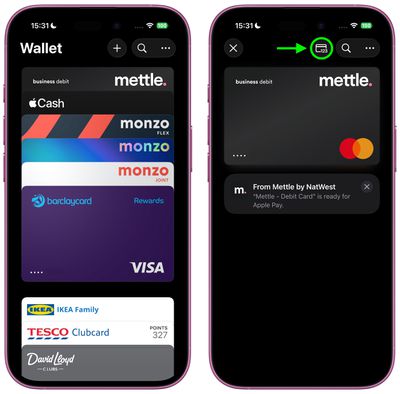
  1. Open the Wallet app on your iPhone, then tap one of your stored cards. Alternatively, add a new card using the + button, then select it in Wallet.
  2. Tap the "123" card symbol at the top, then authenticate with Face ID or your passcode.
    add physical card info wallet ios1

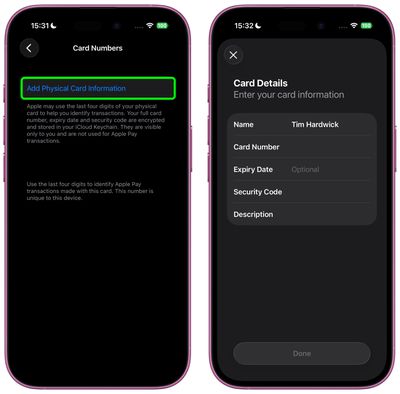
  3. Select Add Physical Card Information.
  4. Fill in your card details including name, number, expiry date (optional), and security code.
  5. Add a description to help identify the card.
  6. Tap Done to save.
    add physical card info wallet ios2

Apple encrypts and stores this information in your iCloud Keychain, keeping it secure and accessible only to you. The details are not used for Apple Pay transactions.

Viewing Stored Information

After adding your details, simply tap the card in Wallet and then tap the same "123" button at the top. You'll need to authenticate with Face ID or your passcode before the information displays, adding an extra layer of security to your stored card data.

Note that this is a feature of iOS 26, which is currently in beta. Apple will roll out a public release of iOS 26 sometime in September.
Popular Stories

Apple Says iOS 27 Adds These 12 New Features to Your iPhone Feature

Apple Says iOS 27 Adds These 12 New Features to Your iPhone

Tuesday June 9, 2026 9:47 am PDT by
iOS 27's key new feature is a more intelligent and personal version of Siri, but the changes go well beyond that. In a press release, Apple outlined additional enhancements coming across Apple Maps, Find My, Apple Wallet, Apple Music, and more. Apple Maps has gained an enhanced Flyover experience powered by AI, enabling you to view aerial imagery in "stunning detail" for select cities. In ...
iOS 27 Adds These New Features to Your iPhones Wallet Feature

iOS 27 Adds Six New Features to Apple Wallet on Your iPhone

Wednesday June 10, 2026 7:25 am PDT by
The upcoming iOS 27 update that Apple unveiled this week includes many new features and enhancements for Apple's Wallet app on the iPhone. Below, we have outlined six additions to the Apple Wallet app on iOS 27. New Features Enhanced Passes iOS 26 introduced enhanced Apple Wallet boarding passes, and iOS 27 will gradually expand this improved experience to all other types of passes in...
Disney MagicMobile Feature

Walt Disney World to Offer iOS 27's Upgraded Apple Wallet Key Feature

Tuesday June 16, 2026 9:02 am PDT by
Starting with iOS 27, the Apple Wallet app will offer enhanced digital keys at participating hotels and resorts. Apple said you can view more details about your trips, receive updates about booked activities, access services available during your stay, and more. Apple did not share a list of hotels and resorts that will be offering these upgraded keys, but TechRadar reported that Walt Disney ...