

iOS 18.1: How to Type to Siri - MacRumorsOpen MenuShow RoundupsShow Forums menuVisit ForumsOpen Sidebar
Skip to Content

iOS 18.1: How to Type to Siri

by

With the introduction of Apple Intelligence in iOS 18.1, communicating with Siri has become more flexible since you can easily type your requests instead of speaking them. It's a subtle but powerful change that's perfect for those moments when you need to be quiet or discreet.
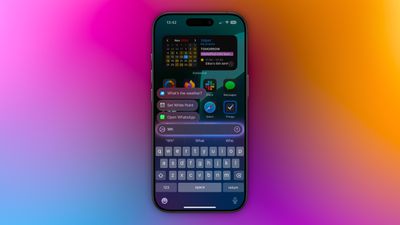
type to siri 1
Enabling Type to Siri is straightforward. Head to Settings -> Apple Intelligence & Siri, tap Talk & Type to Siri, and make sure the Type to Siri toggle is switched on. Once enabled, you can summon the typing interface with a quick double-tap at the bottom edge of your iPhone's display.

The typing interface includes suggested requests to help you get started, and you can type virtually anything you'd normally say to Siri. Simply enter your query and tap the up arrow to submit. Siri will respond just as it would to a voice command, maintaining context between messages for natural back-and-forth conversations.

This text-based interaction is particularly useful during meetings or in quiet spaces, when you're in a noisy environment where Siri might struggle to hear you, or if you prefer typing to speaking for more precise queries. It can also help when you want to maintain privacy in public places.
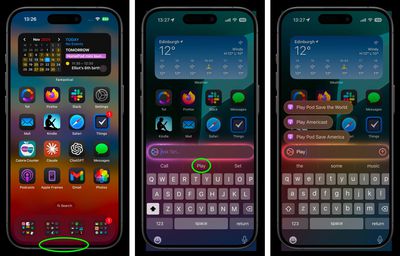
siri
The feature integrates seamlessly with Siri's expanded knowledge base in iOS 18.1, including Apple product support and settings navigation. You can even use natural language to find settings when you're not sure of their exact names.

Whether you're a longtime Siri user looking for more flexibility or someone who's been hesitant to use voice commands in public, Type to Siri offers a handy alternative for interacting with Apple's virtual assistant.
Popular Stories

apple watch series 12

Three All-New 'Audio Intelligence' Features Arrive With Apple Watch Series 12 and Ultra 4

Wednesday September 9, 2026 2:23 pm PDT by
Apple today announced "Audio Intelligence," a new suite of Apple Intelligence-powered features for the Apple Watch Series 12 and Apple Watch Ultra 4 that use the built-in microphone to help users catch missed moments in conversation and stay aware of important sounds. The Apple Watch's Audio Intelligence comprises four features: Siri Recap: Uses ambient listening to generate high-level...
apple ios 27 health app watch

iOS 27.2 Beta Previews New Apple Intelligence Health App

Wednesday September 16, 2026 10:32 am PDT by
The first beta of iOS 27.2 includes Apple's redesigned Health app, giving developers a chance to try out the features ahead of launch later this year. Apple's developer notes for the feature say the Health app is being tested in this beta, but it won't be in the launch version of iOS 27.2. It will instead come later in the year. The Health app will incorporate Apple Intelligence to turn...
iOS 27 Next to iPhone

Here's When iOS 27 Rolls Out Today in Every Time Zone [Update: It's Out]

Sunday September 13, 2026 3:00 am PDT by
Update 10:04 a.m.: iOS 27 is rolling out now, though it may take a bit for all users to see it, so keep checking! Apple is about to release iOS 27, which will finally deliver more advanced Siri AI capabilities as well as a variety of other refinements, improvements, and new features to iPhones. It's Apple's biggest software update of the year, and Apple announced at Wednesday's iPhone event...













