

iOS 16: How to Undo and Redo Individual Edits to Photos - MacRumorsOpen MenuShow RoundupsShow Forums menuVisit ForumsOpen Sidebar
Skip to Content

iOS 16: How to Undo and Redo Individual Edits to Photos

by

In iOS 16, Apple has brought some notable improvements to the Photos app, one of which is the ability to undo and redo individual adjustments that you make to your pictures. Keep reading to learn how it's done.

iOS 16 Photos and Camera Guide Feature
In previous versions of iOS, whenever you made edits to a picture in Apple's stock ‌Photos‌ app, if you weren't happy with the results then you had to manually change the edited parameters or else revert all of the changes in one go and reinstate the look of the original. What you didn't have the ability to do though was undo or redo individual adjustments during the editing process.

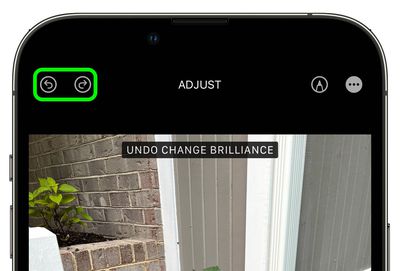
That's all changed in iOS 16, because Apple has added handy Undo and Redo buttons to the Photo app's editing interface. Now when you select an image in your Photo Library and tap Edit to make changes, if at any point in the process you're not happy with the results, you can tap the Undo icon in the upper left corner of the screen to revert each effect one by one, right back to the original image.
photos
What's more, if you find you preferred a specific adjustment after you've undone it, you can simply tap the Redo icon to re-apply the effect. That's all there is to it.


Popular Stories

apple intelligence photos tools

Apple to Bring AI Reframing and Editing Tools to Photos App

Monday June 8, 2026 11:16 am PDT by
Apple today announced new AI-powered photo editing tools coming to the Photos app as part of Apple Intelligence, including an upgraded Clean Up tool, a new Extend tool, and a new Spatial Reframing feature. Spatial Reframing allows users to reposition the virtual camera angle of a photo after it has already been taken. By touching and dragging, users can adjust the framing and perspective of...
iOS 26 Glass Photos Feature

Apple Photos Finally Gets a Slideshow Maker

Monday June 8, 2026 5:04 pm PDT by
Apple today announced new slideshow features coming to the Photos app, allowing users to play any set of photos and videos as a slideshow. There are options to set the slide duration, transition style, and music. iOS 27 also lets users save any slideshow directly as a video to their Photos library for easy playback later. Additional new features include the ability to save individual...
iCloud iPhone 17 Pro

iPhone Users Who Pay for iCloud Storage Get Two New Perks on iOS 27

Thursday July 2, 2026 6:10 am PDT by
If you pay for certain iCloud+ storage plans beyond the 5GB that Apple offers for free, you will receive two more perks on iOS 27 at no additional cost. A summary of the two new iCloud+ perks on iOS 27:Increased daily usage limits for some new Apple Intelligence features, including image generation in the revamped Image Playground app. HomeKit Secure Video cameras receive generated video...












