iOS 27's New Compact Clock Gives Your Wallpaper Room to Breathe - MacRumorsOpen MenuShow RoundupsShow Forums menuVisit ForumsOpen Sidebar
Skip to Content

iOS 27's New Compact Clock Gives Your Wallpaper Room to Breathe

by

In iOS 26, Apple let you stretch the Lock Screen clock down your iPhone's display until it dwarfed everything else. In iOS 27, now available to download, Apple has a new clock option that does the opposite, with the introduction of a compact mode that shrinks the time to roughly the size of the date and tucks it into the row at the top of the screen.
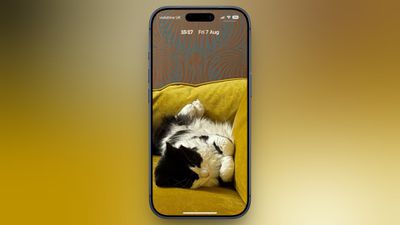
betsy-cat-lock-screen
The result is a Lock Screen that genuinely shows off your wallpaper, while still displaying the time and date. If you picked a photo that looks better in its complete framing, this is the first time iOS gives you the opportunity to see more of it unobstructed.

How to Switch to the Compact Clock

The following steps show you how it's done.

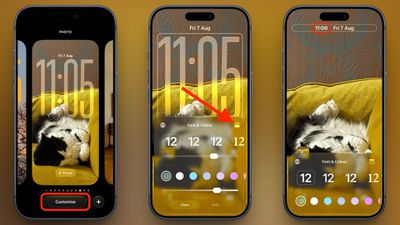
  1. Touch and hold the Lock Screen, then tap Customize.
  2. Tap inside the currently set clock frame to open the Font & Color panel.
  3. Tap the new icon made of two horizontal bars in the top-right corner of the panel to set the clock to compact mode.
  4. If you're happy with the new look, tap anywhere else on the wallpaper, then tap Done in the top-right corner of the screen.
compact clock steps

You'll see that the clock shrinks immediately and moves up beside the date, so you can judge the effect against your wallpaper before saving. To go back, simply tap the same icon in the Font & Color panel again. The clock will return to its previous position and size.

Customizations

The new compact clock keeps your existing clock customizations like font, weight, and color, and these can still be adjusted, but you do lose access to the Liquid Glass slider in compact mode.

Bear in mind that the option applies to individual Lock Screens rather than being a global setting, so you can have a compact clock on one wallpaper and a full-size one on another – for a Focus mode, for example. iOS 27 is available now.


Related Roundups: iOS 27, iPadOS 27
Related Forum: iOS 27

Top Rated Comments

PBG4 Dude Avatar
6 weeks ago
This is the internet. Everything moves to make space for cat pics.


Attachment Image
Score: 17 Votes (Like | Disagree)
6 weeks ago
I’m getting older so last thing I want is for the time and date on the screen to be smaller. I will leave it clearly visible, thank you, so I can easily see it at a glance when I pull my phone out.
Score: 17 Votes (Like | Disagree)
6 weeks ago
choice is good. i personally like the oversized clock so its easier to see when the screen is dimmed on lock.
Score: 14 Votes (Like | Disagree)
Slo Pesci Avatar
6 weeks ago
nice clean look, I like it.
Score: 10 Votes (Like | Disagree)
6 weeks ago
Good to see this. Always good to have maximum customization options possible so that everyone can set it to their preferred style.
Score: 9 Votes (Like | Disagree)
BlankStar Avatar
6 weeks ago
They made this change for the smaller screen of the closed iPhone Fold/Ultra
Score: 8 Votes (Like | Disagree)

Popular Stories

iOS 27 Next to iPhone

Here's When iOS 27 Rolls Out Today in Every Time Zone [Update: It's Out]

Sunday September 13, 2026 3:00 am PDT by
Update 10:04 a.m.: iOS 27 is rolling out now, though it may take a bit for all users to see it, so keep checking! Apple is about to release iOS 27, which will finally deliver more advanced Siri AI capabilities as well as a variety of other refinements, improvements, and new features to iPhones. It's Apple's biggest software update of the year, and Apple announced at Wednesday's iPhone event...
iOS 27 Icon iPhone

iOS 27 Available Now With These 8 New Features

Monday September 14, 2026 9:00 am PDT by
Update — 10 a.m. Pacific Time: Apple has released iOS 27. During its iPhone 18 Pro and iPhone Duo event last week, Apple announced that iOS 27 will be released widely on Monday, September 14. iOS 27 should be available around 10 a.m. Pacific Time / 1 p.m. Eastern Time today via the Settings app, under General → Software Update. Below, we have highlighted eight new features and...
iPhone Handoff Feature

iOS 27 Introduces New 'iPhone Handoff' Feature

Wednesday September 2, 2026 12:35 pm PDT by
Apple has added a new "iPhone Handoff" feature to iOS 27 that will allow you to switch between two iPhones while using the same phone number on each device. This functionality was briefly mentioned during the WWDC 2026 keynote in June, on a slide that listed hundreds of new features coming in iOS 27 and corresponding software updates, but Apple never shared any further details at the time. ...