

iOS 18.1: Use the New Reduce Interruptions Focus - MacRumorsOpen MenuShow RoundupsShow Forums menuVisit ForumsOpen Sidebar
Skip to Content

iOS 18.1: Use the New Reduce Interruptions Focus

by

As part of Apple Intelligence, iOS 18.1 includes a new dedicated Reduce Interruptions focus mode that only shows you important notifications that need attention while filtering out everything else. Keep reading to learn how to use it.
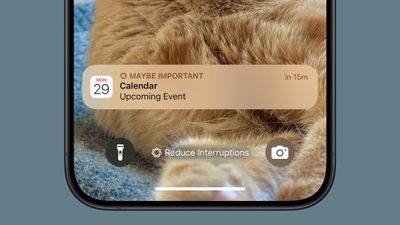
ios 18 1 focus reduce interruptions
The Reduce Interruptions focus offers a middle ground between receiving all notifications and using Do Not Disturb. Essentially it acts as a smart filter for your notifications, so you see only what's truly important in the moment. For example, it might allow messages about schedule changes, urgent work communications, and time-sensitive alerts, while bundling less urgent updates for later review.

As an Apple Intelligence feature, Reduce Interruptions requires an iPhone 16 series or iPhone 15 Pro model running iOS 18.1 or later. You'll need your device set to U.S. English with Apple Intelligence enabled to get started (Settings ➝ Apple Intelligence & Siri).

  1. Open Settings and tap Focus.
  2. Tap Reduce Interruptions.
  3. Tap People to select contacts who can break through.
  4. Tap Apps to choose which apps can send immediate notifications.
  5. Enable Intelligent Breakthrough & Silencing for AI-based filtering.
  6. Open Control Center, long press Focus, and tap Reduce Interruptions to enable it.
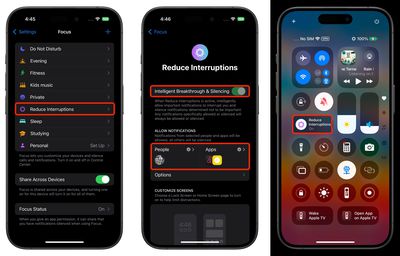
focus
Whenever you customize an existing Focus mode or create a new one, you will see the new toggle to turn on Intelligent Breakthrough and Silencing. This option allows important notifications to interrupt you, while muting notifications that are not important, which is the same thing that the Reduce Notifications focus does. You can override the notification settings for specific apps and people, which is how it worked prior to iOS 18.1.

Popular Stories

Apple Intelligence General Feature 2

Google Gemini Could Be the Ceiling on Apple's AI Ambitions

Monday June 8, 2026 5:31 am PDT by
Apple analyst Ming-Chi Kuo says the real test of today's WWDC keynote is whether Apple can deliver better AI experiences than Google using the same Gemini models. Apple is using Google's Gemini to underpin the revamped version of Siri and new Apple Intelligence features. The key takeaway from WWDC, Kuo argues in a new post on X, will not be the short-term market reaction after the event. It...
apple intelligence architecture

Apple Reveals New AI Architecture Built Around Google Gemini Models

Monday June 8, 2026 10:38 am PDT by
Apple today announced a major overhaul of its Apple Intelligence platform, revealing a new architecture built on foundation models developed in collaboration with Google using the technologies behind the Gemini family. The new architecture centers on Apple Foundation Models co-developed with Google, which Apple says are adapted to run both on-device and on servers through its existing...
siri mode in camera

Apple Expands Visual Intelligence With Bill Splitting, Nutrition Insights, and visionOS Support

Monday June 8, 2026 10:59 am PDT by
Apple today unveiled significant upgrades to Visual Intelligence, including a new Siri mode in the Camera app that can analyze real-world objects and take actions directly from what the iPhone sees. Apple's vice president of software engineering Sebastien Marineau-Mes detailed the enhancements during today's WWDC keynote, explaining that the new Siri mode in Camera uses image understanding...















