

How to Use the iPad App Switcher - MacRumorsOpen MenuShow RoundupsShow Forums menuVisit ForumsOpen Sidebar
Skip to Content

How to Use the iPad App Switcher

by

On the iPad, iOS 11 and iOS 12 merge the Control Center with the App Switcher as part of an overhauled interface that's meant to put more of a focus on multitasking. The update also adds new ways to access the App Switcher and it brings new, enhanced app switching functionality.

Accessing the App Switcher

  1. On the Home screen, simply swipe up and hold to bring up the App Switcher.
  2. Within an app, swipe up to bring up the dock and continue the swipe further to access the App Switcher.
  3. Alternatively, the App Switcher can still be accessed by a double press on the Home button on iPads with a Home button.

The new App Switcher displays the Control Center options on the right side of the screen, the dock at the bottom of the screen, and your most recently used apps in a tiled view with large icons so you can see exactly what's open. Swipe left and right to see all of the apps you have open and tap to choose one.
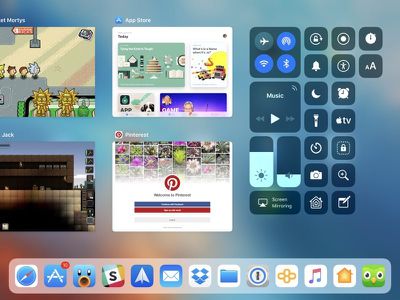
ios11ipadappswitcher
When you open two apps at once using multitasking functionality, the app arrangements are preserved in the App Switcher, so you can quickly switch between multiple multitasking windows with a simple swipe and tap.
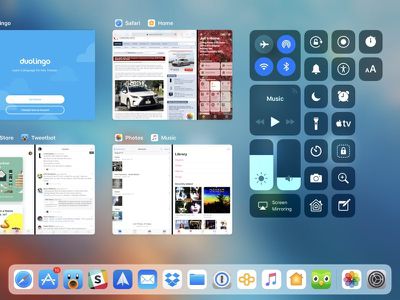
ios11appswitchermultitasking

Closing Apps

There's normally no need to close apps on iOS because Apple manages the device's power needs and keeps apps from using resources when not in use, but if you need to close an app, here's how:

  1. Bring up the App Switcher.
  2. Swipe upwards on any app to close it.

As mentioned earlier, the App Switcher is linked to the Control Center. You can change what's displayed in the Control Center portion of the App Switcher by going to Settings --> Control Center --> Customize Controls.


Related Forum: iOS 11

Popular Stories

iCloud iPhone 17 Pro

iPhone Users Who Pay for iCloud Storage Get Two New Perks on iOS 27

Thursday July 2, 2026 6:10 am PDT by
If you pay for certain iCloud+ storage plans beyond the 5GB that Apple offers for free, you will receive two more perks on iOS 27 at no additional cost. A summary of the two new iCloud+ perks on iOS 27:Increased daily usage limits for some new Apple Intelligence features, including image generation in the revamped Image Playground app. HomeKit Secure Video cameras receive generated video...
iPhone 4 on Black Feature

Apple Facing One of Its Worst Leaks Since the iPhone 4

Thursday July 2, 2026 9:53 am PDT by
Apple supplier Tata Electronics recently suffered a cyberattack that resulted in thousands of confidential files being published on the dark web, and this reportedly included some photos and documents related to the upcoming iPhone 18 Pro. We have elected not to share any of the leaked photos in this story due to the illegal nature in which they were obtained, but they can easily be found...
American Express Gold Apple Pay Feature

American Express Announces New Apple Pay Feature

Tuesday June 30, 2026 10:27 am PDT by
American Express today announced that you can now redeem Membership Rewards points when checking out with Apple Pay on the web and in apps on the iPhone and iPad. When checking out with Apple Pay on iOS 18 or iPadOS 18 or later, tap on your eligible American Express card (Platinum, Gold, Green, and others) and select the Membership Rewards points option. You can use points to cover all or...













