iPhone 13 Pro: How to Shoot Macro Photography - MacRumorsOpen MenuShow RoundupsShow Forums menuVisit ForumsOpen Sidebar
Skip to Content

iPhone 13 Pro: How to Shoot Macro Photography

by

With the launch of the iPhone 13 Pro and Pro Max, Apple introduced Macro mode, a new camera feature that's exclusive to the Pro models and brings the immensely detailed world of close-up macro photography to iPhones for the first time. Keep reading to learn how it works.

iphone 13 macro
With Macro mode enabled, you can take pictures or video of subjects that are as close as 2cm to your iPhone's camera lens, which means you can now take shots of flowers, textures, insects, or pretty much anything small or at close distance, with accurate focus, rich detail, and no blurring.

Here's how to use the Macro mode feature on iPhone 13 Pro and iPhone 13 Pro Max. Bear in mind that Macro mode is exclusive to these models and isn't supported on iPhone 13 mini or iPhone 13.

  1. Launch the Camera app on your iPhone 13 Pro.
  2. Make sure Photo mode is highlighted in the camera mode menu. If you're shooting video, swipe to Video mode instead.
  3. Line up your close-up subject in the viewfinder and allow the camera to switch to the wide-angle lens. Move in closer – the subject can be as close as 2cm away from the lens (you can use the zoom if necessary).
    camera

  4. Hold the phone steady. Once the lens has focused on the subject, tap the shutter to take the shot or begin capturing video. If you're shooting video, tap the shutter button again to finish.
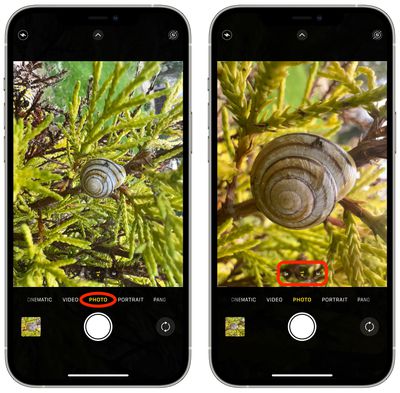
When you're experimenting with Macro mode, you'll likely notice that your iPhone 13 Pro switches automatically to the new mode as soon as it detects an object that's within 14cm away from the lens. This can cause the viewfinder to jitter as it switches between the wide-angle lens to ultra-wide angle, which can be quite jarring and distracting.

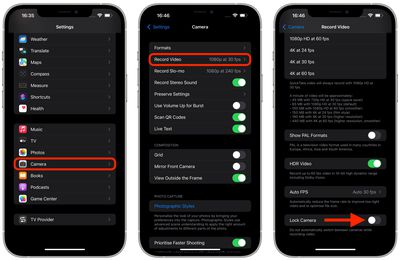
As of writing, there's no way to prevent this behavior when taking macro photos. If you're shooting macro video, however, you can prevent it by enabling the Lock Camera option under Settings -> Camera -> Record Video.
settings
Apple says that a forthcoming update, due in the fall, will allow users to specifically turn off automatic camera switching when shooting macro photography at close distances.

Have you taken a cool macro shot on your iPhone 13 Pro? Show it off in the comments below!

Related Forums: iOS 15, iPhone

Top Rated Comments

67 months ago
Only took 20 or so photos so far and I feel like every macro shot is rewarding…

Attachment Image

Attachment Image

Attachment Image
Score: 24 Votes (Like | Disagree)
LiE_ Avatar
67 months ago
Here’s one I took earlier.


Attachment Image
Score: 21 Votes (Like | Disagree)
Denzo Avatar
67 months ago
Ever wanted to look down the barrel of a straw on your ice latte? Me neither. 😂

Attachment Image
Score: 17 Votes (Like | Disagree)
67 months ago

Yeah, but what use is it in the real world ('https://www.macrumors.com/2021/09/24/iphone-13-pro-first-impressions/')?
Well, let's do a more extensive quote from that article

There are new camera capabilities, including a Macro mode. It's fun to play around with, but will have limited use in the real world.
Clearly, the author of that article has an easy time reading the serial number off the bottom of a Mac or back of an iPad, or from the strap slot of a Watch, or the IMEI from the SIM card holder of an iPhone.

I guess you can call that limited use. How often do most of us need to give those numbers to Apple tech support so we can arrange a repair? But I guarantee you that there are Etsy jewelry designers and eBay antiques dealers who are delighted to have this new tool.

But let's face it, a lot of "real world use" has nothing to do with practicality. What practical use is a football or tennis racquet, jewelry or a Halloween costume, a painting by Renoir or a Chopin etude?

As someone who purchased his first macro lens more than 50 years ago, the real world use is that it gives photographers another way to view the world around us. One of my favorite statements to make with a macro lens is "You can find beauty in the ugliest of places if you look closely enough." There has to be some real world value to that.
Score: 16 Votes (Like | Disagree)
67 months ago


Attachment Image
Score: 10 Votes (Like | Disagree)
Moakesy Avatar
67 months ago

Here’s one I took earlier.


And this is why the posts about phones not being the same as DSLR’s / you can’t beat the laws of physics etc annoy me so much.

This is shot with a phone you stick in your pocket. And look at it. It’s beautiful. Sure, if you pixel peep and are hyper critical, it won’t match pro level gear, but this tool we now can carry around with us all the time is simply incredible.

Great shot and well done.
Score: 10 Votes (Like | Disagree)

Popular Stories

duo aquarium

More Fun iPhone Duo Apps: 30 New Picks to Try

Friday November 6, 2026 3:27 pm PST by
When the iPhone Duo launched, we shared a list of some of the fun apps developers created for the new form factor. Two weeks out, developers are continuing to come up with fresh ideas, so we thought we'd share some of our favorites. Games Marbles Unhinged ($2.99) - Marbles Unhinged is a marble maze designed for the Duo. When you fold it, the floor turns into a ramp. If you stand the top...
apple pro tell logo

Apple Launching Five New Products Today

Thursday November 5, 2026 12:59 am PST by
Apple is launching five new products on Friday, November 6, following pre-orders that opened last week, including its first touchscreen MacBook Pro models. The following new products will be available from today: iPad mini with OLED display and A20 Pro chip iMac with M6 chip 14-inch MacBook Pro with M6 chip 14-inch MacBook Pro with OLED touchscreen 16-inch MacBook Pro with OLED...
silver iphone 18 pro

Apple Rumored to Drop the iPhone's Action Button Next Year

Friday November 6, 2026 6:07 am PST by
Apple plans to merge the iPhone's Action button with the Camera Control starting next year, according to the leaker known as "Instant Digital." In a new post on Weibo, the leaker claimed that a single press of the combined button would open the camera, while a long press would trigger the function assigned to the Action button. They explicitly clarified that the dedicated Action button would ...
Latest Stories
Siri AI Rumored to Become 'More Like an Agent' as Early as Next Year
10 hours ago
Apple Taking New Approach to Developing iOS 28 and macOS 28
11 hours ago
Early Apple Black Friday Deals on Apple Watch, MacBook Air, and More
1 day ago
'Backglow' Lets You Customize New MacBook Pro's Glowing Apple Logo
1 day ago
Top Stories: Apple Product Launches, iOS 27.3 Beta, and More
2 days ago
More Fun iPhone Duo Apps: 30 New Picks to Try
2 days ago
Hands-On With Apple's New OLED Touchscreen MacBook Pro
2 days ago
Apple Store With All-New Design Opening Soon in Southern California
2 days ago
Control the Glowing Apple Logo on Your New MacBook Pro
2 days ago
Apple Shares New 'Apple Card: Apply and Use in Minutes' Ad
2 days ago
Apple Says More Than 100,000 Apps Optimized for iPhone Duo, Here's What's Still Missing
2 days ago
Early Black Friday Deals Kickoff With Steep Discounts on Apple Watch Ultras and More
2 days ago
The MacRumors Show: iOS 27.3 Looks Like a Huge Update
2 days ago
Best Buy's Black Friday Event Begins With Sitewide Savings on Apple, TVs, More
2 days ago
Apple Releasing Yet Another Two New Products Next Week
3 days ago
MacBook Air Drops to Lowest Price in Months With Amazon's $250 Discount
3 days ago
Apple Rumored to Drop the iPhone's Action Button Next Year
3 days ago
Apple's Extended Return Policy Now in Effect for 2026 Holiday Season
3 days ago
Apple Music Classical Updated With New Icon and Refreshed Design
3 days ago
OLED iPad Mini, M6 iMac, and New MacBook Pros Available From Today
3 days ago
Apple Surveys iPhone Duo Buyers About Crease and Camera
3 days ago
Apple's First Touchscreen Mac is Now Arriving to Customers
3 days ago
Claude Gets Personal Finance Feature With Bank Account Linking
3 days ago
Apple Arcade Adds Crossy Road Rush and NBA 2K27
3 days ago
Apple's New HomeView Smart Home Hub: Here's How Much RAM It Has
3 days ago
iPad Mini vs. iPad Air Buyer's Guide: Now Just $50 Apart
3 days ago
First iOS 27.3 and macOS Golden Gate 27.3 Public Betas Now Available
3 days ago
Apple Announces a New Mac Sales Record
3 days ago
Paid $200 for Logic Pro? Apple Says You Won't Get This New Feature
3 days ago
Instagram's Edits Video Editor is Now Available on Mac
3 days ago











































