

iPhone 14: How Crash Detection Works and How to Turn It Off - MacRumorsOpen MenuShow RoundupsShow Forums menuVisit ForumsOpen Sidebar
Skip to Content

iPhone 14: How Crash Detection Works and How to Turn It Off

by

With the launch of iPhone 14 and new Apple Watch models, Apple introduced a new safety feature called Crash Detection. Keep reading to learn what it is, how it works, and how to turn it on and off.
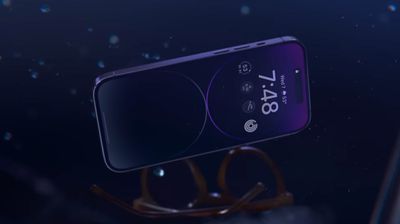
crash detection 1

What Is Crash Detection?

Crash Detection is designed to detect severe car crashes in passenger cars. If you're in a severe crash and unresponsive, your Apple device can automatically call emergency services on your behalf.

How Does Crash Detection Work?

While you're driving or you're a passenger in a motor vehicle, the motion sensor with a high dynamic range gyroscope and high-g accelerometer, GPS, barometer, microphone, and advanced motion algorithms work together in your iPhone or Apple Watch to accurately detect a crash.

When a severe crash is detected, an alert displays on your Apple Watch or iPhone display for 10 seconds. If you're still responsive, you can swipe the screen to call emergency services immediately or dismiss the alert if you don't need to contact them. If after 10 seconds you haven't interacted with your Apple device, a 10-second countdown will start. When it ends, emergency services are contacted.
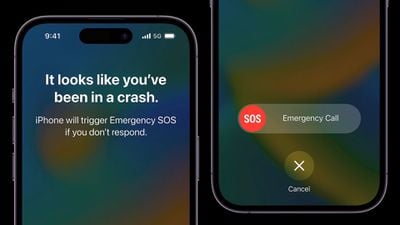
iphone 14 pro car crash detection
When emergency services pick up, the following audio message from Siri begins playing on a loop with five seconds of silence between each replay: "The owner of this iPhone was in a severe car crash and is not responding to their phone." ‌Siri‌ will then relay your estimated location with latitude and longitude and search radius both to emergency services and through your device's speaker.

The message is loudest the first time it is played, after which other replays have a reduced volume in case you are able to speak to emergency services. The message continues to repeat until you tap the Stop Recorded Message button or the call ends.

If you have emergency contacts set up, they will also be notified of the crash after another 10-second countdown, and if you have configured Medical ID information, a slider will appear on the Lock Screen for quick access.
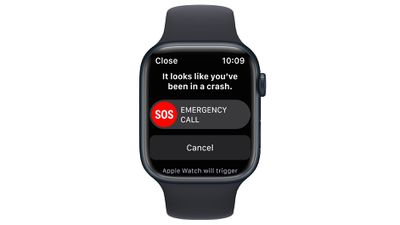
apple watch series 8 crash detection

What Kinds of Crashes Can It Detect?

According to Apple, Crash Detection can detect front impacts, side impacts, rear-end collisions, and rollovers.

Which Apple Devices Support Crash Detection?

Crash Detection is supported on the following iPhone and Apple Watch models.

  • iPhone 14
  • iPhone 14 Plus
  • iPhone 14 Pro
  • iPhone 14 Pro Max
  • Apple Watch SE (2nd Generation)
  • Apple Watch Series 8
  • Apple Watch Ultra

How to Enable Crash Detection

No setup is required. Crash Detection is enabled by default on the above supported devices, so you don't need to do a thing. If you're concerned that the feature could mistakenly register a crash and call emergency services, you can disable it by following the steps below.

How to Disable Crash Detection

  1. Launch the Settings app on your iPhone.
  2. Scroll down and tap through to Emergency SOS.
  3. Under "Crash Detection," toggle off the switch next to Call After Severe Crash.
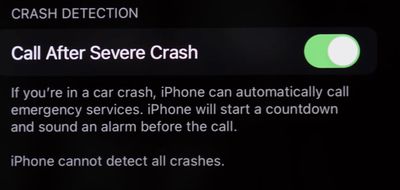
settings
If ever you want to enable the feature, simply toggle on the switch again in Settings.

Related Forums: Apple Watch, iPhone

Top Rated Comments

ProfessionalFan Avatar
50 months ago
When did people become so skeptical and negative of every single thing?

This sounds like a great and useful feature that hopefully nobody here ever needs.

I see no valid reason to disable it.
Score: 14 Votes (Like | Disagree)
50 months ago

Yep. Turning this off.

I really cannot conceive of a point in my city life where a crash that is severe enough that I would need this, and no one else would've called already, if I weren't conscious. I've had too many automated things "butt-dial"... last thing I need is for this to crash detect that I threw groceries on the counter and get the cops to my home.
What absolute nonsense. If you're literally launching your groceries from a trebuchet or something, this'll be one feature that will be very hard to get a false positive on. The feature relies on gyroscopic, microphone, accelerometer, GPS and barometric inputs to trigger it - you won't get all five by slamming your groceries down or putting it in your pocket.
Score: 14 Votes (Like | Disagree)
50 months ago

I really cannot conceive of a point in my city life where a crash that is severe enough that I would need this, and no one else would've called already
Single car crash, no witnesses–maybe at night or in a sparsely populated area. Groceries will not trigger it.
Score: 11 Votes (Like | Disagree)
The Game 161 Avatar
50 months ago
lol zero reason to turn it off
Score: 6 Votes (Like | Disagree)
50 months ago
It’s literally no reason to turn this off. The same people that would turn this off probably don’t wear seatbelts and disable the airbags in their car. Can’t fix stupid.
Score: 5 Votes (Like | Disagree)
PsykX Avatar
50 months ago
Maybe if you don't care about your life, you can turn it off.
Even if it consumes a bit of battery, I'll keep it on :)
Score: 5 Votes (Like | Disagree)

Popular Stories

apple watch series 11 pink

Apple Starts Selling Refurbished Apple Watch Series 11, Ultra 3, and SE 3

Friday June 5, 2026 2:14 pm PDT by
Apple is now selling refurbished versions of the Apple Watch Series 11, Apple Watch Ultra 3, and Apple Watch SE 3 at discounted prices. This is the first time the Series 11, Ultra 3, and SE 3 have been available through Apple's online refurbished store since the devices launched last September. Refurbished pricing on the 46mm GPS Apple Watch Series 11 starts at $369, down from $429, while ...
Apple Watch Series 9 Pink Aluminum Feature

watchOS 27 Drops Support for Apple Watch Series 8, Ultra 1, SE 2, and Older

Monday June 8, 2026 11:37 am PDT by
Apple today confirmed that watchOS 27 will not support the Apple Watch Series 8, Apple Watch Ultra (first generation), or Apple Watch SE (second generation), effectively drawing a line at devices equipped with the S9 or S10 chip. The only Apple Watch models compatible with watchOS 27 are the Apple Watch Series 9, Series 10, Series 11, Ultra 2, Ultra 3, and SE 3. The cuts are the biggest...
Apple Watch Series 9

Apple Watch Series 9 Mistakenly Left Off watchOS 27 Compatibility List

Monday June 8, 2026 4:17 pm PDT by
Apple today confirmed that the Apple Watch Series 9 is compatible with watchOS 27, after the device was mistakenly omitted from the software's official compatibility page. Apple updated its website immediately following its WWDC 2026 keynote, and the watchOS 27 page listed a shorter compatibility list than many users expected: the Apple Watch SE 3, Series 10, Series 11, Ultra 2, and Ultra 3. ...
















