iPhone 14 Pro: How to Turn Off Dynamic Island Content - MacRumorsOpen MenuShow RoundupsShow Forums menuVisit ForumsOpen Sidebar
Skip to Content

iPhone 14 Pro: How to Turn Off Dynamic Island Content

by

When Apple unveiled its latest iPhone 14 Pro models, many people were surprised by its innovative integration of software functions with the pill-shaped cutout at the top of the screen, which Apple calls the "Dynamic Island."

Dynamic Island Thumb Alt
Display pixels around the ‌Dynamic Island‌ merge it into one pill-shaped area that changes size and shape to accommodate various types of alerts, notifications, and interactions, turning it into a kind of front-and-center information hub.

But what if you find content that appears in ‌Dynamic Island‌ distracting, especially when you're trying to focus on something else on your iPhone's screen?

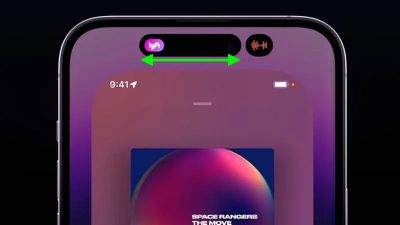
Unfortunately, there's currently no way to outright disable ‌Dynamic Island‌ content, as its behavior is baked into iOS 16. However, if you're distracted by its animations you can dismiss them by swiping left or right across the Dynamic Island, without affecting any related background activity.

For example, if an album in Apple Music is playing and you dismiss the audio waveform and artwork in the ‌Dynamic Island‌, the music will continue to play in the background. The same goes for when you dismiss a timer – it will still count down in the background even though it is no longer visible on the screen.
dynamic island dismiss content
If the ‌Dynamic Island‌ is split into two background activities and you want to get rid of one or both, use the same swipe gesture on the larger segment to make it disappear. Then, in the same way, swipe across the remaining activity that extends across the pill.

If you dismiss all activity in ‌Dynamic Island‌, it will return the pill-shape to its previous inert status, leaving you to focus entirely on what else is on the screen.
Related Forum: iPhone

Top Rated Comments

54 months ago
the amount of praise for this nonsense is unreal.

Score: 23 Votes (Like | Disagree)
maktaba Avatar
54 months ago
Dynamic Island is a good example of “putting lipstick on a pig”.
Score: 21 Votes (Like | Disagree)
54 months ago
Am i the only person who gives absolutely no f***s about dynamic island?
Score: 20 Votes (Like | Disagree)
deuxani Avatar
54 months ago
I think the content of this article perfectly describes the current state of Apple’s OS’s. It’s getting so complex with no logical cues, manuals or explanations for users, that we have to read articles online to figure out basic functionality like this.

The amount of time it takes to explain some (older) people that left swipe from the top brings the Notification Center and right swipe brings Control Center or TouchID is not pressing the button but laying your finger on it…
Score: 16 Votes (Like | Disagree)
scrm Avatar
54 months ago
Phase 1: “A seamless fusion of hardware and software, birthing an iconic new interaction method that’s fun as well as functional? Take my money!”

Phase 2: “Looks cool and my friends think so too but… is there a way to disable it?”

Phase 3: “The results are in: this was a design mistake. It wasn’t broken before, what was Apple thinking? At least the next version won’t have it!”

Case in point: MBP Touch Bar.

Dynamic island is now approaching phase 2.

IPadOS Stage Manager: about to land in phase 1. 😉
Score: 14 Votes (Like | Disagree)
Royksöpp Avatar
54 months ago
Why would you turn it off? Isn't that the whole point of buying this phone?
Score: 11 Votes (Like | Disagree)

Popular Stories

Apple MacBook Pro with PROLED XDR Display Dynamic Island Apple Music

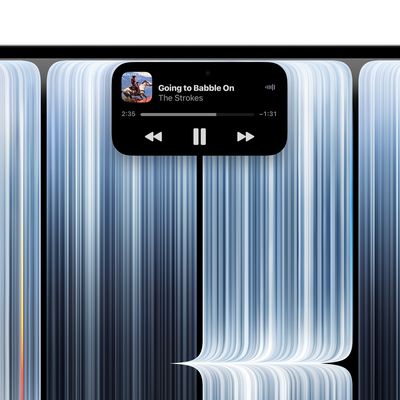
Apple Brings Dynamic Island to Mac for the First Time

Wednesday October 28, 2026 10:28 am PDT by
Apple today introduced the Dynamic Island to the Mac for the first time with its new 14-inch and 16-inch MacBook Pro models, bringing Live Activities, Spotlight, and Siri AI together in an interactive area of the display. The Dynamic Island first launched on the iPhone 14 Pro and iPhone 14 Pro Max in September 2022. It replaced the notch with a smaller TrueDepth camera cutout surrounded by...
macOS 27 3 Live Activities Timer

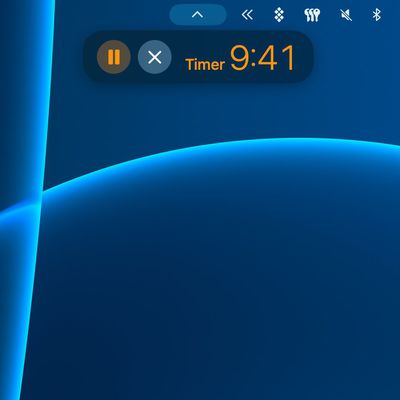
macOS 27.3 Brings Live Activities to Macs Without Dynamic Island

Wednesday November 4, 2026 9:40 am PST by
The new MacBook Pro models with touch-enabled OLED displays feature the Dynamic Island instead of a notch, and it includes support for Live Activities. Fortunately, other Apple silicon Macs will not entirely miss out, as the macOS 27.3 update enables Live Activities for apps like Apple Music, Clock, and Voice Memos in the macOS menu bar. The first macOS 27.3 developer beta released this week ...
dynamic island views macos 27%402x

macOS 27 Assets Hint at Dynamic Island for MacBook Pro

Wednesday October 28, 2026 4:28 am PDT by
Ahead of Apple's expected debut of new touchscreen MacBook Pro models, five system assets have been discovered in macOS 27 that bear a strong resemblance to information displayed in the iPhone's pill-shaped Dynamic Island. The new MacBook Pros are expected to feature a Dynamic Island-like cutout for the FaceTime camera, finally doing away with the notch that has been part of the machine's...
Latest Stories
Siri AI Rumored to Become 'More Like an Agent' as Early as Next Year
6 hours ago
Apple Taking New Approach to Developing iOS 28 and macOS 28
8 hours ago
Early Apple Black Friday Deals on Apple Watch, MacBook Air, and More
1 day ago
'Backglow' Lets You Customize New MacBook Pro's Glowing Apple Logo
1 day ago
Top Stories: Apple Product Launches, iOS 27.3 Beta, and More
1 day ago
More Fun iPhone Duo Apps: 30 New Picks to Try
2 days ago
Hands-On With Apple's New OLED Touchscreen MacBook Pro
2 days ago
Apple Store With All-New Design Opening Soon in Southern California
2 days ago
Control the Glowing Apple Logo on Your New MacBook Pro
2 days ago
Apple Shares New 'Apple Card: Apply and Use in Minutes' Ad
2 days ago
Apple Says More Than 100,000 Apps Optimized for iPhone Duo, Here's What's Still Missing
2 days ago
Early Black Friday Deals Kickoff With Steep Discounts on Apple Watch Ultras and More
2 days ago
The MacRumors Show: iOS 27.3 Looks Like a Huge Update
2 days ago
Best Buy's Black Friday Event Begins With Sitewide Savings on Apple, TVs, More
2 days ago
Apple Releasing Yet Another Two New Products Next Week
2 days ago
MacBook Air Drops to Lowest Price in Months With Amazon's $250 Discount
2 days ago
Apple Rumored to Drop the iPhone's Action Button Next Year
2 days ago
Apple's Extended Return Policy Now in Effect for 2026 Holiday Season
2 days ago
Apple Music Classical Updated With New Icon and Refreshed Design
2 days ago
OLED iPad Mini, M6 iMac, and New MacBook Pros Available From Today
3 days ago
Apple Surveys iPhone Duo Buyers About Crease and Camera
3 days ago
Apple's First Touchscreen Mac is Now Arriving to Customers
3 days ago
Claude Gets Personal Finance Feature With Bank Account Linking
3 days ago
Apple Arcade Adds Crossy Road Rush and NBA 2K27
3 days ago
Apple's New HomeView Smart Home Hub: Here's How Much RAM It Has
3 days ago
iPad Mini vs. iPad Air Buyer's Guide: Now Just $50 Apart
3 days ago
First iOS 27.3 and macOS Golden Gate 27.3 Public Betas Now Available
3 days ago
Apple Announces a New Mac Sales Record
3 days ago
Paid $200 for Logic Pro? Apple Says You Won't Get This New Feature
3 days ago
Instagram's Edits Video Editor is Now Available on Mac
3 days ago